
Not only can I no longer find the directory where I stored it, but I’ve even forgotten the command I used to run it (Not only can I no longer find the directory where I stored it, but I’ve even forgotten the command I used to run it. I eventually found the solution in my ChatGPT history, but the experience made me reflect on the nature and fragility of memory. I remember doing it. I even wrote a blog post about it: https://www.yin.roma.it/2026/08/a-hybrid-playwright-and-google-analytics-4-api-pipeline-for-weekly-analytics-reporting/. I still have a strong impression of the whole process, yet I had completely forgotten the final command needed to execute it. It feels a little like being in an oral exam. The professor asks you a question, and suddenly you’re completely clueless (so it seems you have a very high probability of failing the exam). You retain a general impression of the subject, but the details themselves are simply gone. That feeling is… a little bad… I had even forgotten that the project was run with npm run rather than Python, and I had also forgotten the npm run retry command. Perhaps I’ll write something more about this relationship between memory, familiarity, and forgetting in the future).
Author: YIN Renlong
Refreshing the Webpage as an Act of (Artistic) Composition and Encounter
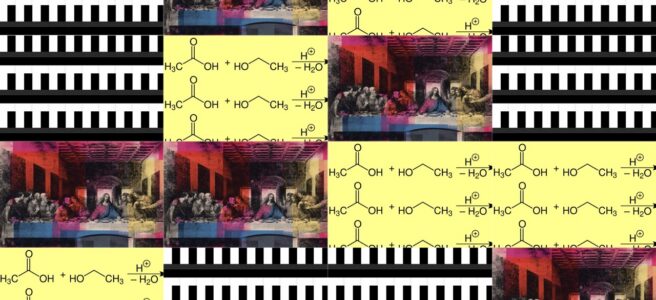
My Background Studio began as a practical website feature, but it gradually became a form of browser-native art. Technical writing, photography, animated animals, religious imagery, mathematical structures and Internet vernacular now coexist in compositions generated by twelve algorithms. The central page and its moving margins are complementary: each gives the other a context, rhythm and character that it could not produce alone.
A background that completes the foreground
It would be misleading to divide the website into “important content” and an unimportant decorative background. My articles and photographs supply intellectual, documentary and autobiographical depth. The animated field supplies movement, humour, visual tension, surprise and a less formal register of my personality. These two layers perform different functions, but neither is merely disposable.
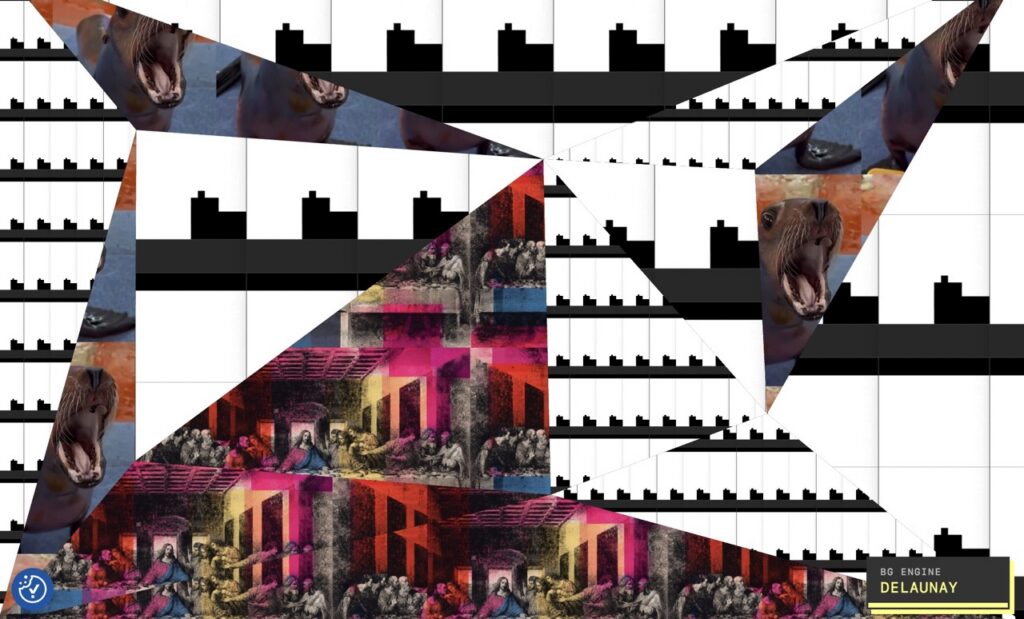
Without the central content, the animations would lose the specific context that turns them into encounters. A sea lion beside a technical article does not mean the same thing as a sea lion circulating alone on a social platform. Bertrand Russell changes when he appears beside writing about artificial intelligence or computational theology. An animated chemical equation gains autobiographical resonance because the footer explains its connection to my childhood near my uncle’s chemical factory.
The reverse is also true. Without the moving margins, the website would still communicate information, but it would become more conventional and much less personal. The background interrupts the expectation that a technically serious site must also look completely solemn. It reveals something playful, cute, unconventional and occasionally absurd within the same person who writes about infrastructure, theology, artificial intelligence and digital humanities.
The relationship is therefore complementary and contrapuntal. The foreground gives the background semantic gravity; the background gives the foreground affective weather. A different generated composition can make the same article feel comic, devotional, strange, contemplative or slightly unruly. The article, meanwhile, stops those images from becoming an undifferentiated stream of Internet distraction.
Rudolf Arnheim’s account of visual composition is useful here because he treated frames, centres, visual weights and eccentric forces as active relationships. In The Power of the Center, the centre does not simply defeat the periphery. Compositional energy emerges from their interaction. My website similarly establishes a relatively stable reading field while allowing animated forces to exert pressure from its edges.
The broad coloured surround is also part of that relationship. It may be blue, green, lime, brown or another colour inherited from the selected records. It frames the page architecturally while joining the central document to the generated imagery. The colour is neither wholly foreground nor wholly background. It is the hinge between them.
The moment the background stopped behaving like a conventional background
I have already documented the engineering history of the earlier system in Incremental Development of a WordPress GIF Mosaic Background Engine. That article explains how a single repeating background developed into mosaic and collage modes. The present discussion begins after a further transformation: the system became capable of selecting media, choosing a mathematical grammar, constructing a composition and reporting its actual algorithm on the public page.
At that point, “background” became an inadequate description. The work is closer to a procedural digital collage whose exhibition space happens to be a functioning WordPress website. It does not sit in a separate gallery page. It accompanies navigation, reading, photography and ordinary site use.
This distinction matters. A gallery work can demand exclusive attention. A website background must negotiate with menus, titles, paragraphs, links, photographs, footnotes and the visitor’s practical purpose. The generated layer succeeds when it remains visually alive while allowing the page to remain readable. Complementarity depends on restraint as much as spectacle.
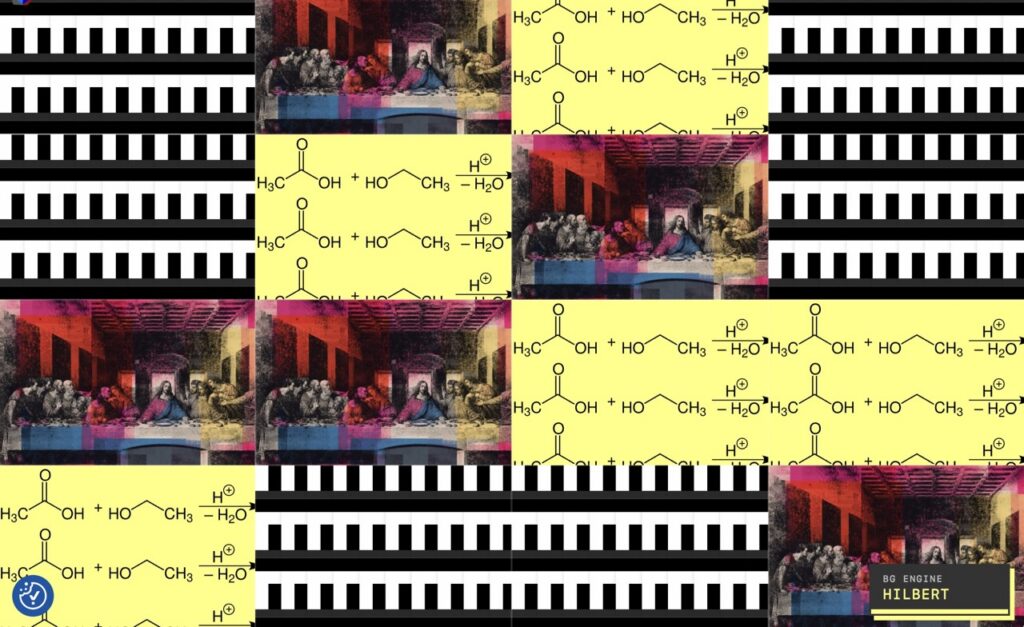
The screenshots reveal this negotiation clearly. Sometimes only narrow vertical or horizontal bands remain visible. Elsewhere, broad areas open below the footer or around the main container. A fox may be almost completely visible in one region while another image is reduced to an eye, a hand, a basketball or a fragment of chemical notation. Cropping does not merely conceal the source; it produces new images from it.
The page is consequently both document and moving frame. Its empty-looking margins are not empty. They are an active visual field whose composition changes every time the visitor enters another page or refreshes the current one.
A deliberately heterogeneous visual vocabulary
The current vocabulary contains animals, philosophy, chemistry, mathematics, religious painting, gesture, digital folklore and my own transformed media. Their differences are not defects that require stylistic homogenization. The tensions between them are one of the principal materials of the work.
Bertrand Russell as an animated fragment
The Bertrand Russell WebP was created by me from screenshots of moving-image material. Russell’s head, eyes and mouth move through a short, compressed loop. Detached from the original video and repeated across a generated region, the philosopher becomes both an identifiable historical person and a rhythmic visual gesture.
Repetition changes his cultural position. A single image of Russell may suggest philosophical authority or documentary evidence. A row of moving Russells becomes serial, comic and slightly uncanny. His face starts behaving like a visual pattern while continuing to carry the accumulated associations of logic, scepticism and public intellectual life.
Placed beside a sea lion, Russell can appear to be observing it, doubting it or participating in an extremely unconventional philosophical panel. Russell did not request this panel discussion, but the algorithm has appointed him anyway.
The two sea lions
The sea-lion animations contribute an unusually direct bodily energy. In one, the animal shakes its head vigorously. The motion is excessive, delighted and almost impossible to interpret without anthropomorphism. In the other, a sea lion faces the camera and opens its mouth widely. The gesture can resemble laughter, astonishment, hunger, protest or an operatic note that no browser can actually play.
Repetition intensifies their physicality. A row of violently shaking bodies turns delight into vibration. A wall of open mouths becomes both comic and vaguely alarming. The loop removes the conventional beginning and end of an action, so the animal never completes its expression. It remains permanently on the threshold of saying something.
These images are cute, but their role is not exhausted by cuteness. They introduce vulnerability, corporeality and uncontrolled affect into a site containing highly structured prose and engineered systems. The contrast lets each side reveal something in the other: the technical page becomes less impersonal, while the animal animation acquires a strange conceptual frame.
The fox entering the snow
The fox animation has another temporal structure. It approaches a patch of snow, leaps and disappears head-first. The movement contains preparation, commitment and disappearance, but the loop immediately restores the animal and begins again.
This produces a miniature mythology of persistence. The fox repeatedly enters a surface that appears empty. When placed next to the growing Hilbert visualization, both images can seem to concern exploration: one animal searches through physical snow while one mathematical path searches through abstract space.
Beside Russell, the fox can suggest instinct meeting reason. Beside the chemical equation, it introduces wild bodily behaviour into a field of symbolic transformation. None of these relationships was embedded in the original animation. They are produced provisionally by adjacency.
Otter, ball and miniature sport
The otter holding a ball beneath a basketball hoop introduces another network of circular forms. The ball connects visually with the basketball spun by Jesus, while the animal connects with the sea lions through water, play and bodily performance.
The scene also contains a wonderfully small mismatch between ambition and environment: the hoop belongs to human sport, but the player is an otter. In a generated collage, that mismatch becomes a method. The system repeatedly places culturally incompatible materials close enough that the visitor begins looking for a relation.
Hands as a recurring motif
The two Italian-hand-gesture works connect an ornate historical-looking frame, a photographed hand and a bright green three-dimensional animated hand. One feels ceremonial or museological; the other resembles a playful digital object or product demonstration.
Hands recur elsewhere. Jesus raises a finger to spin a basketball. Figures in the Last Supper gesture around the table. Russell’s bodily movement accompanies speech. Even the chemical equation contains arrows that behave like abstract directional gestures.
This creates a motif network that was not planned as a single iconographic programme. Fingers point, bless, argue, balance, rotate and communicate. The mathematical engine discovers and redistributes these relations without understanding them.
The Hilbert curve as authored computational motion
The Hilbert animation is one of my WebGL works, recorded and converted into animated WebP. It depicts a space-filling construction developing through time. The source is therefore already algorithmic before the Background Studio places it inside another algorithm.
This produces a nested structure: an algorithmic animation becomes an image record interpreted by a larger generative composition engine. The Hilbert curve may be cropped, repeated or assigned to regions produced by BSP, Voronoi, Truchet or another layout. An algorithm is being composed by an algorithm.
The live library deliberately contains two Hilbert records that share the same media URL but use different configured dimensions. They are treated as separate visual instruments because the dimensions produce different crops, scales and perceptual effects. In this system, identity belongs to the complete record configuration, not only to the underlying file.
This decision has an artistic consequence. A digital asset is not a fixed picture waiting to be placed. Scale, repetition, crop, position and attachment are part of what the picture becomes. The same WebP can have more than one compositional identity.
Chemistry as memory
The ethyl-acetate equation differs from the animal and religious animations because it is diagrammatic and autobiographical. It refers to the synthesis of ethyl acetate and to my childhood living near my uncle’s chemical factory.
When the equation is repeated, cropped or intersected by generated regions, scientific notation becomes visual rhythm. Arrows, molecular groups and bonds move between legibility and pattern. Yet the equation never becomes entirely abstract because its personal history remains attached to it.
This is an important counterweight to the easily circulated Internet images. The library is not merely a folder of amusing media. It contains different kinds of memory: cultural, technical, autobiographical, religious and computational.
Reworking sacred images
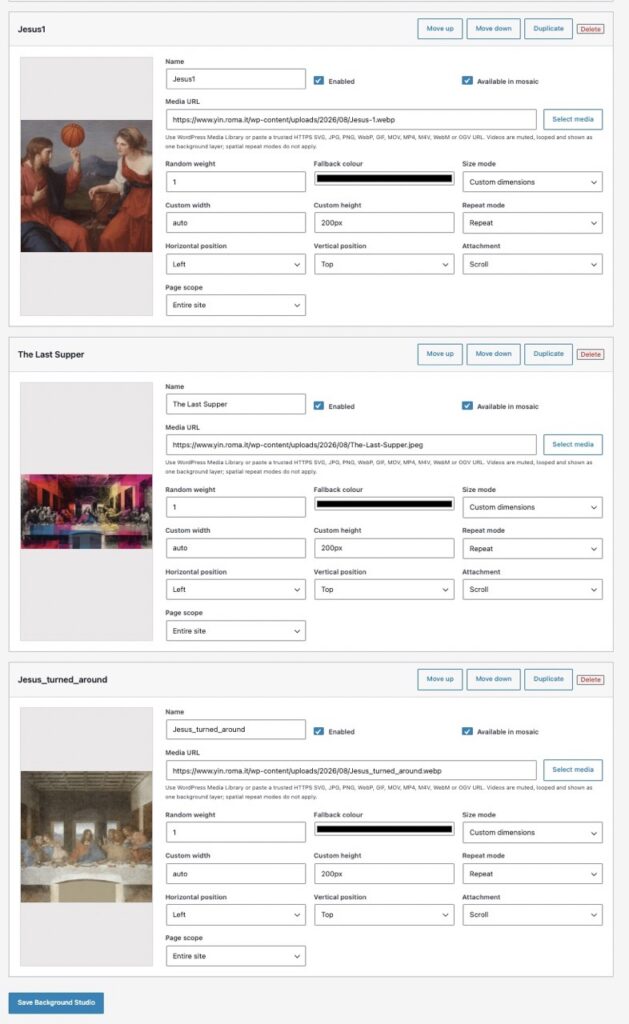
The animations of Jesus spinning a basketball and turning within the Last Supper were designed by me. They are not untouched images retrieved from the Internet. They are transformations in which a canonical religious figure acquires improbable movement.
In the basketball work, the motion joins blessing, pointing, sporting skill and visual comedy. The raised finger already carries religious and rhetorical associations; the ball changes its function without erasing them. The result can feel affectionate, irreverent, playful or theologically provocative, depending on the viewer.
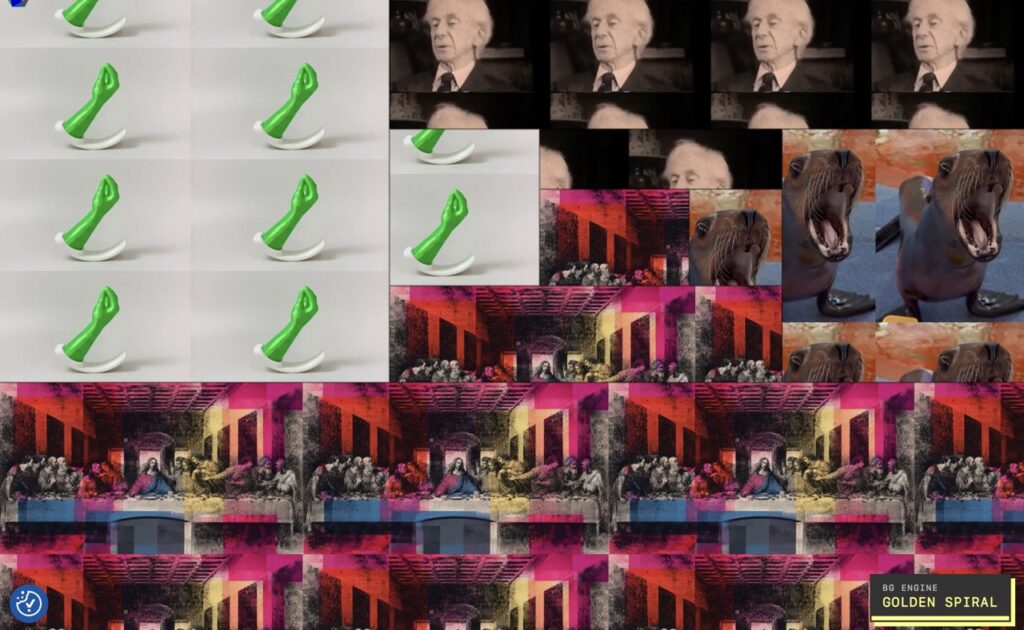
The animated Last Supper creates a different disturbance. A famous composition normally encountered as a stable art-historical image begins moving. The motion is small, yet precisely because the source is so familiar, the deviation becomes conspicuous. A supposedly settled icon refuses to remain settled.
The glitch-coloured Last Supper variants add another historical layer. Magenta, cyan, red, yellow and black fragments evoke print misregistration, photocopy culture, corrupted transmission and Pop appropriation. The Renaissance image passes through digital noise and becomes a contemporary surface.
Religious imagery has always been reproduced, relocated and interpreted. Digital circulation accelerates that process, but it does not make the ethical questions disappear. A comic transformation may renew attention or flatten a sacred image into a meme. The work remains productively ambiguous only if that tension is acknowledged.
Computational theology is relevant here, although it should not be used as an automatic defence. The meeting of sacred and ordinary material can evoke the theological importance of embodiment and everyday life. It can also simply be funny. Sometimes a basketball is a theological provocation, and sometimes it is a basketball. The work does not need to force a single answer.
Internet vernacular becomes artistic material
Several source images belong to forms of visual culture that circulate widely online and would not normally enter the category of fine art. They resemble reaction GIFs, memes, found clips, animal videos or minor digital curiosities. Their apparent lack of artistic status is precisely part of their value here.
Olia Lialina and Dragan Espenschied’s Digital Folklore treats amateur web production as a significant vernacular culture rather than as material that should be discarded once design fashions change. GIFs, repeating backgrounds and unruly personal pages preserve ways people learned to express themselves through networked media.
Research on GIF culture supports this reading. Kate Miltner and Tim Highfield describe the GIF as a form whose loop and contextual adaptability enable multiple meanings in Never Gonna GIF You Up. Ödül Gürsimsek examines GIFs as vernacular graphic design, while Camelia Gradinaru discusses their capacity to operate as floating signifiers. Their meaning remains mobile because the same loop can enter many different conversations.
My system makes that contextual mobility spatial and architectural. The media no longer appear one after another in a message thread. They become walls, strips, triangles, rectangles, wedges and cells around a functioning website.
Nicolas Bourriaud’s concept of postproduction is helpful here. Artists can work by selecting, reprogramming and reconnecting existing cultural products. Artistic authorship then resides partly in the relations, transformations and systems imposed on prior material.
That does not mean that putting any Internet image into an algorithm automatically turns it into art. Selection, transformation, provenance, timing, composition and critical intention still matter. The Background Studio gives vernacular media a new condition of appearance, but it does not magically abolish questions of attribution or copyright.
Repetition after Warhol
The comparison with Andy Warhol is persuasive because the work depends heavily on serial repetition. Warhol’s repeated soup cans, portraits and media images demonstrated how repetition can shift attention from a depicted object to its circulation, reproduction and status as a commodity. The Museum of Modern Art’s account of Campbell’s Soup Cans emphasizes the importance of serial presentation, while works such as Double Elvis use overlap to suggest movement and unstable duplication.
My repeated GIFs and WebPs share something with that serial logic. One sea lion is an animal. Twelve sea lions become a field. One Russell is a portrait; a tiled Russell becomes an event of reproduction. Repetition can flatten individual identity into pattern, but it can also intensify a gesture until it becomes impossible to ignore.
The difference is equally important. Warhol’s printed serial works are materially fixed once produced. My composition continues operating. Its images animate at different speeds, the layout can change at every navigation, and the mathematical structure can change from Voronoi to BSP, Hilbert, Phyllotaxis or another generator.
The browser also crops the composition according to the viewport, while the central content hides part of the generated layer. Each visitor therefore sees only a temporary manifestation. This is seriality transformed by software: repetition is no longer only represented by the artwork; it is executed by the artwork.
Juxtaposition creates relationships that did not exist before
The most interesting unit of the work may not be any individual image. It may be the interval between two images.
Suppose Jesus spinning a basketball appears beside the sea lion opening its mouth. No original narrative connects them. Yet the moment they share a composition, the viewer begins producing one. The sea lion may appear astonished by the miracle, delighted by the trick, ready to catch the ball or engaged in a call-and-response performance. Jesus may become coach, magician, saint, meme or street performer.
These are not claims about the source images. They are temporary interpretive possibilities generated by adjacency. A new refresh may dissolve the relation before it stabilizes.
The classical Kuleshov effect provides a useful comparison. Research has shown that the emotional interpretation of an image can be influenced by the shot placed beside it, although later studies have also qualified strong versions of the claim. A 2006 neuropsychological study found contextual effects consistent with Kuleshov-like montage, while a later replication and analysis demonstrated that the phenomenon is more nuanced than its popular legend suggests.
The principle remains valuable here: juxtaposition does not mechanically dictate one meaning, but it changes the field within which meaning is inferred. The viewer supplies causal, emotional or symbolic relations even when the system merely placed two files next to each other.
Other combinations create different provisional narratives:
- Russell beside the Hilbert curve can suggest philosophy watching mathematics draw itself.
- The fox beside the chemical equation can connect wild matter with symbolic transformation.
- The green Italian hand beside Jesus’s raised finger can turn gesture into an intercultural visual grammar.
- The otter with a ball beside basketball-spinning Jesus creates an accidental league of impossible athletes.
- The shaking sea lion beside a serious infrastructure article can read as celebration, refusal or the embodied emotional state of a server administrator after receiving exit code zero.
- The Last Supper beside repeating animal GIFs can appear devotional, comic, irreverent or unexpectedly tender.
- The Hilbert animation beside an Ulam Spiral layout places one mathematical ordering system inside another.
Because no caption confirms one interpretation, these relations remain open. Umberto Eco’s idea of the “open work” is relevant: the work establishes conditions and limits while leaving meaningful completion to the interpreter. Here, openness is not only philosophical. It is implemented through selection, layout, cropping, timing and refresh.
Temporal collage and asynchronous rhythm
A still screenshot records only one visual state. The actual work contains several layers of time.
First, each GIF or WebP has its own internal loop. The fox, Russell, Jesus, the otter and the sea lions do not necessarily have identical frame counts or delays. They repeatedly leave and regain synchronization.
Second, several animations may play simultaneously. This creates a kind of temporal heterophony: related but independent gestures coexist without a central clock. A sea lion opens its mouth while Russell turns his head, a fox disappears into snow and Jesus continues spinning a ball.
Third, the composition has a page lifetime. It begins when a page loads and ends when the visitor leaves, refreshes or opens another page.
Fourth, there is the sequence of visits. A visitor may encounter Voronoi now, Quadtree on the next article and Ulam Spiral later. Memory links these otherwise separate compositions.
The loop is therefore not a simple repetition of the same total event. Individual files repeat, but the larger system continually creates differences among repetitions. Ana Duarte’s discussion of circular narratives in animated GIFs is useful because looping can intensify meaning rather than merely restart it.
The Museum of the Moving Image has similarly treated the GIF as a medium defined by brevity, silence, shareability and repetition in exhibitions such as The GIF Elevator. Its exhibition on the reaction GIF as gesture is especially relevant to my library of mouths, hands, faces, turning bodies and repeated actions.
The algorithm is an editor, not an invisible utility
Generative art is often discussed too abstractly, as if “the algorithm” were a mysterious agent adding novelty. Here the mathematical rules are concrete. They determine the size, adjacency, balance, rhythm and directional force of the regions in which the media appear.
Margaret Boden and Ernest Edmonds’s essay What Is Generative Art? distinguishes generative procedures according to how systems contribute to producing an artwork. Philip Galanter similarly describes generative practice as one in which the artist gives a rule system some degree of operational autonomy in Generative Art Theory.
My system fits that broad account, but its authorship is distributed carefully. I choose and transform the vocabulary, decide which algorithms are permitted, configure dimensions and weights, and establish the relationship with the site. The engine selects and arranges a particular manifestation. The browser crops and animates it. The visitor chooses when to arrive, navigate or refresh.
The algorithm is culturally illiterate. It does not know that Russell is a philosopher, that Jesus is a religious figure or that a sea lion looks delighted. Yet its spatial decisions affect which cultural interpretations become likely. In that sense, it edits without understanding.
Selection, identity and reproducible randomness
The engine currently treats each Background Studio record as an instrument. A record’s identity includes its identifier, URL, dimensions, size mode, repetition, position, attachment, fallback colour, weight and eligibility. Two records may use the same URL and remain distinct because their configurations generate different appearances.
Selection occurs without replacement, so the chosen palette contains distinct records. Weighted mode changes how likely each record is to be selected, but a record with positive weight remains part of the possible vocabulary. The selected records are then shuffled and assigned cyclically to the generated regions.
A simplified description of that process is:
var selectionRandom = createRandom(seed + ':selection');
var geometryRandom  = createRandom(seed + ':geometry');
var paletteRandom   = createRandom(seed + ':palette');

var selected = chooseWithoutReplacement(
    availableRecords,
    selectedCount,
    selectionRandom
);

var palette = shuffle(selected, paletteRandom);

regions.forEach(function (region, index) {
    var record = palette[index % palette.length];
    renderRegion(region, record);
});
The separate random streams are aesthetically important. Selection, geometry and palette order do not have to consume one undifferentiated sequence of random numbers. They can vary as related but separable compositional decisions.
The engine hashes the seed into a 32-bit value and uses a compact deterministic pseudorandom generator. A fresh seed can be produced for every page load, while session, daily and fixed-seed persistence remain possible. Randomness therefore does not have to mean irreproducibility. A particular composition can, in principle, be replayed if its version, configuration, viewport and seed are preserved.
When the administrator chooses automatic algorithm selection, the public badge never says “AUTOMATIC.” It reports the algorithm actually used: for example, BG ENGINE / VORONOI or BG ENGINE / ULAM SPIRAL. The debug label seems to have wandered into the gallery and decided to stay, but this is useful. It teaches the visitor that the visible form has a procedural cause.
Complexity can also be randomized across five internal levels. It affects region counts or structural depth, but it is deliberately omitted from the badge. The public label names the compositional grammar without turning the page into a diagnostic dashboard.
The twelve mathematical grammars
The engine currently provides twelve algorithms. They should not be treated as interchangeable visual effects. Each algorithm organizes attention differently.
The exact parameters described below for BSP, Quadtree and Hilbert are confirmed by the audited engine source. For the later modules, I discuss the established mathematical principles represented by their names and their visible compositional functions; I do not assign undocumented numerical parameters to implementations I have not audited line by line.
1. Recursive BSP
Binary Space Partitioning begins with the complete rectangular viewport. The implementation repeatedly selects the largest remaining region and divides it into two children.
If a rectangle is wider than an aspect ratio of 1.25, the split is forced vertically. If it is narrower than 0.8, the split is horizontal. Otherwise, the direction is chosen pseudorandomly. The split occurs between 35 and 65 percent of the selected dimension.
BSP produces nested rectangular differences. Some media become long strips; others occupy large blocks. Its visual ancestry can recall modernist grids or Mondrian, but the moving pictures prevent the rectangles from settling into pure abstraction. The spatial hierarchy is orderly, while the cultural material inside it remains unruly.
2. Adaptive Quadtree
The Quadtree begins with one full cell and repeatedly divides a selected cell into four. The current implementation scores cells largely by area with a small random variation, so large areas are more likely to be subdivided.
Horizontal and vertical split ratios each vary between 42 and 58 percent. Because one cell becomes four, the region count increases by three on each subdivision and may pass the nominal target.
Quadtree creates local clusters of detail within larger structures. One part of the page may become a dense field of small sea-lion fragments while another preserves a broad Last Supper or chemical equation. It visualizes unequal attention: some areas are inspected closely while others remain spacious.
3. Hilbert ordering
The Hilbert generator uses a space-filling curve to order equal square cells. At order n, the grid side is 2n and the number of cells is 4n. The current complexity mapping produces 4, 16 or 64 cells.
A Hilbert curve preserves locality unusually well: points adjacent along the curve tend to remain spatially close. In the background, this creates a sequenced field rather than an arbitrary grid. Media records recur in a traversal that folds through space.
When the Hilbert WebP appears inside the Hilbert layout, the work becomes reflexive. The image displays a space-filling process while its containing regions are ordered by another space-filling process.
4. Golden Spiral
A golden spiral expands as its angle turns, with radial growth related to the golden ratio. In visual composition, it produces an eccentric centre and an outward sweep rather than a uniform grid.
Media near the focal area can feel concentrated, while later regions unfold around them. The layout gives the composition a direction of growth, making a refresh resemble the release of stored energy from a point.
5. Voronoi
Given a set of sites, a Voronoi diagram assigns every point in the plane to its nearest site. The result is a tessellation of irregular territories. The project uses the locally hosted d3-delaunay 6.0.4 library for Voronoi and Delaunay geometry.
Voronoi cells turn media into competing zones of influence. A sea lion, equation or religious image seems to possess a territory whose boundary is negotiated with neighbouring records. The irregular polygons introduce geological and biological associations that rectangular web layouts rarely permit.
6. Delaunay triangulation
Delaunay triangulation connects sites so that no site lies inside the circumcircle of any triangle. It is the geometric dual of the Voronoi diagram.
Where Voronoi emphasizes territory, Delaunay emphasizes connection. Its triangular facets fragment images into directional planes. Eyes, hands and basketballs can appear at sharp angles, making the page feel crystalline, folded or cut.
7. Lloyd Voronoi
Lloyd relaxation repeatedly moves sites toward the centroids of their Voronoi cells. The process tends to regularize an initially uneven distribution without converting it into a rigid square grid.
Artistically, this creates controlled balance. The cells retain organic variation while becoming less chaotic. It occupies a useful middle ground between the accidental and the designed, showing that randomness can be cultivated instead of simply accepted.
8. Phyllotaxis
Phyllotaxis models arrangements found in leaves, seeds and flower heads. A familiar construction places successive points at approximately the golden angle, 137.5078 degrees, while the radius grows roughly with the square root of the point index.
The result distributes elements efficiently without obvious radial rows. In the website it can make digital fragments resemble botanical growth. Otters, foxes, hands and Hilbert cells become an artificial ecology produced by number.
9. Radial Fan
A radial fan organizes wedges around a centre. Unlike BSP’s nested rectangles or Voronoi’s territories, its primary force is angular and centrifugal.
The centre becomes a stage from which images radiate. A basketball or open mouth can acquire unusual emphasis if it lies near the convergence point. The layout can feel celebratory, heraldic or explosive, depending on its media.
10. Squarified Treemap
A treemap divides a rectangle into area-bearing subrectangles. The squarified method tries to keep their aspect ratios close to squares, avoiding excessively thin strips where possible.
Treemaps traditionally represent hierarchy or quantities. Here the form is detached from data visualization and used as a compositional grammar. The suggestion of measured importance remains, even though the media are selected through a generative process. A ridiculous sea-lion gesture may receive the visual authority of a major statistical category.
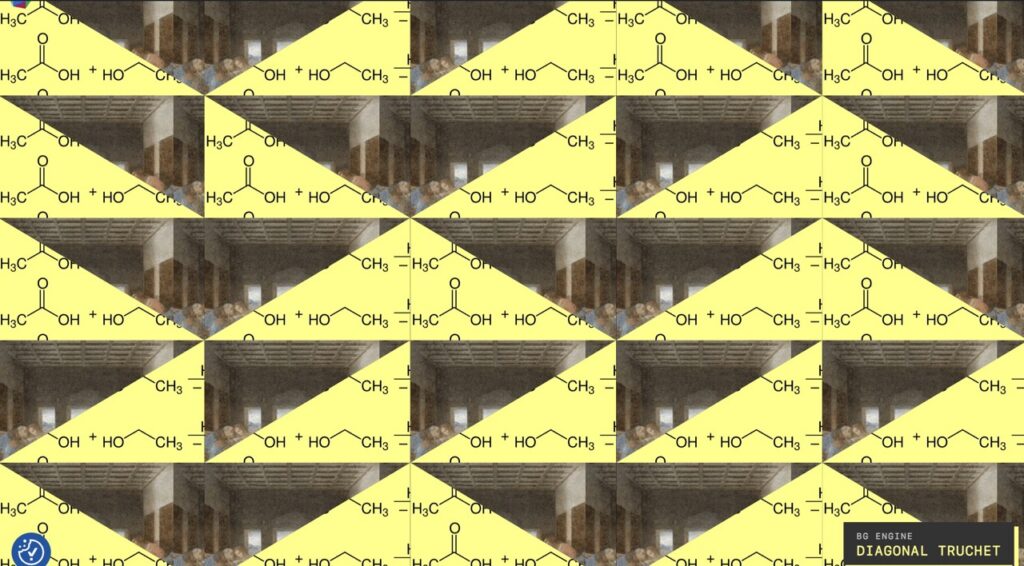
11. Diagonal Truchet
Truchet systems use repeated tiles with a small number of orientations. Simple local choices can form surprising global paths. In the diagonal version, binary diagonal decisions cut and reconnect the field.
This algorithm sits especially close to the logic of GIF culture. A limited vocabulary, repeated with small variations, creates an emergent pattern greater than any single unit. Its diagonals also resist the horizontal and vertical discipline of conventional web design.
12. Ulam Spiral
The classical Ulam spiral places integers along a square spiral and is famous for revealing diagonal structures among prime numbers. A visual generator inspired by it inherits the square spiral’s ordered expansion even when its artistic purpose is not a literal plot of primes.
Ulam Spiral compositions feel archival and accumulative. Images appear as if they were being indexed around a centre. When mathematical animation, sacred painting and Internet animals occupy this structure, number becomes a cabinet for culturally incompatible specimens.
Mathematics changes the meaning of repetition
The algorithms do more than change region outlines. They alter the social relationships among images.
BSP establishes hierarchy through recursive subdivision. Quadtree creates neighbourhoods of density. Hilbert creates sequence and locality. Voronoi turns images into territories. Delaunay makes them connected facets. Lloyd relaxation moderates conflict. Phyllotaxis turns repetition into growth. Radial Fan creates spectacle. Treemap implies quantified importance. Truchet produces continuity from local choices. Ulam Spiral suggests accumulation and hidden numerical order.
The choice of algorithm therefore resembles a curatorial decision. Displaying Jesus and a sea lion in BSP is not equivalent to displaying them in Voronoi. In BSP they may occupy unequal rooms. In Voronoi they become neighbouring territories. In Delaunay they are cut into connected triangular planes. In Phyllotaxis they participate in a shared growth pattern.
Casey Reas’s work provides an important precedent for treating software instructions as artistic structures. The Whitney Museum’s Software Structures connected generative software with Sol LeWitt’s instruction-based art. The relationship between rule and manifestation is central in both cases: the code establishes a field of potential works, and each execution realizes one state.
Golan Levin and Tega Brain’s Code as Creative Medium argues for code as an expressive artistic material. That formulation is particularly relevant here. The algorithm is not simply backstage engineering. It determines the composition’s visual rhetoric.
How many compositions are possible?
The phrase “almost infinite” is intuitively appropriate but mathematically imprecise. At any fixed moment, with a finite library and deterministic program, the formal state space is finite. It is nevertheless very large, and it expands whenever a record, algorithm, parameter, viewport or temporal state is added.
The current tested library contains N = 13 distinct configured records. Automatic selection may choose between m = 2 and m = 5 records without replacement. Because the selected palette is shuffled and its order affects region assignment, the appropriate count for a fixed palette size is the number of permutations:
P(N,m) = N! / (N-m)!
For thirteen records:
| Selected records | Ordered palettes |
|---|---|
m = 2 |
P(13,2) = 156 |
m = 3 |
P(13,3) = 1,716 |
m = 4 |
P(13,4) = 17,160 |
m = 5 |
P(13,5) = 154,440 |
The total across palette sizes two through five is:
156 + 1,716 + 17,160 + 154,440 = 173,472
Across twelve algorithms, this produces:
173,472 × 12 = 2,081,664
If the five complexity levels are also counted as distinct configuration states:
173,472 × 12 × 5 = 10,408,320
This figure still excludes seed-dependent geometry within an algorithm, fallback colours, record weights, viewport dimensions, cropping, page height, browser behaviour and animation frames. It is therefore a conservative count of nominal algorithm, complexity and ordered-palette states, not a count of every perceptually distinct appearance.
Adding only one new record demonstrates how quickly the vocabulary grows. With fourteen records:
∑m=25 P(14,m) = 266,630
That one record adds 93,158 ordered palettes. Across twelve algorithms and five complexity levels, it creates another 5,589,480 nominal states before geometry and time are considered. A single GIF is therefore not merely one more picture; it is a multiplier of relationships.
Why Nk is not the exact current formula
If every one of k labelled regions independently selected any of N records, the number of assignments would be:
Nk
For example, thirteen records independently assigned to twenty regions would permit:
1320 = 19,004,963,774,880,107,199,726,973,201
That is a useful formula for a possible future assignment mode, but it is not the exact behaviour of the present engine. The current renderer chooses a smaller distinct palette and cycles it through the regions. Repetition is structured, not independently sampled for every tile.
A future mode that selects exactly m distinct records and requires every selected record to appear at least once in k labelled regions would have:
P(N,m) × S(k,m)
where S(k,m) is a Stirling number of the second kind. This separates the choice and ordering of the media vocabulary from the distribution of regions among those media.
Animation multiplies the temporal states
If selected animation i has fi distinguishable frames, an upper bound for simultaneous formal frame combinations is:
T = ∏i=1m fi
For a nine-frame Jesus animation and an eighteen-frame open-mouth sea lion, the formal upper bound is:
9 × 18 = 162
The number of states actually visited depends on frame delays, cycle lengths, browser scheduling and when the page begins rendering. When several loops have incommensurate durations, the combined rhythm may take a long time to repeat exactly.
The work is therefore finite at a frozen technical version but practically inexhaustible during ordinary viewing. More importantly, the library is open-ended. If new GIFs, WebPs, SVGs, videos or webpages are added in the future, no final upper bound has been predetermined.
Refreshing the page becomes an act of composition
A refresh normally means requesting the same resource again. In this system, it can also mean asking the artwork to compose another answer.
The visitor does not directly choose where Russell, Jesus or a fox should appear. The visitor performs a small action and receives a new arrangement. Refresh becomes a gesture somewhere between operating a camera shutter, dealing a deck of cards and asking a curator to reinstall a room in less than a second. The curator never asks for a lunch break.
This action is not empty interactivity. It changes the visitor’s relation to the page. One can read the article while accepting the current composition, or refresh repeatedly in search of an intriguing conjunction. The visitor becomes a performer of selection without acquiring complete authorship.
The refresh also makes absence meaningful. A beloved image may fail to appear during a visit. Its later return can feel surprising because memory has begun tracking the system’s vocabulary.
Lev Manovich’s The Language of New Media describes variability as a defining condition of new media: a digital work can exist in multiple versions instead of possessing only one fixed arrangement. The Background Studio makes that variability visible during ordinary navigation.
The moving logo as a continuous signature
Across these changing compositions, the YIN Renlong logo moves slowly from left to right in an endless conveyor. It is another loop, but it performs a different role from the animal and religious animations.
The logo supplies continuity. Media records enter and disappear, algorithms change and colours shift, yet the signature persists. It behaves like a metronome crossing a composition whose other instruments follow independent tempos.
Its repetition also complicates conventional branding. A logo usually occupies one stable location and reassures the visitor through immobility. Here it becomes a procession. Identity is repeated rather than pinned down.
The conveyor responds to interaction: pointer behaviour can pause or accelerate it, keyboard focus pauses it predictably, and reduced-motion preferences remove the animation. Thus the signature is both persistent and negotiable.
The logo does not sit outside the artwork as a corporate stamp. It participates in the same logic of looping, seriality and browser time. The site signs itself continuously.
Brutalism, demoscene and the visible machine
The interface uses hard rectangular frames, heavy borders, bright signal colours, large typography and an algorithm badge in the lower-right corner. These features support a cyber-brutalist reading. They resist the frictionless neutrality associated with many contemporary templates.
The badge resembles a machine plate, gallery label and diagnostic console at the same time. Its dark field and yellow line match the site’s buttons, navigation and identity panel. Because it names the actual algorithm, the visual mechanism becomes part of the public presentation.
There is also a genuine affinity with the demoscene. Demoscene work often celebrates computational technique, real-time generation, mathematical pattern, audiovisual excess and the pleasure of making hardware perform unexpectedly. Finland’s heritage authorities have even included the demoscene in the national inventory of living heritage, recognizing it as a cultural practice rather than merely a technical hobby.
My website is not a classical demo. It is not a tiny standalone executable synchronized to music, and it does not exist principally to demonstrate optimization tricks. The resemblance lies in its confidence that code, mathematics and runtime behaviour can be aesthetic materials worthy of being seen.
The work also belongs to browser culture. It depends on CSS stacking, JavaScript execution, image decoding, viewport dimensions, user navigation and the timing behaviour of multiple animations. The browser is not a neutral display case. It is the instrument performing the work.
Precedents and related artists
This form is distinctive, but it did not appear without historical relatives. Its originality lies in a particular synthesis, not in claiming that algorithmic art, GIF collage or browser art has never existed before.
Vera Molnár
Vera Molnár is a foundational comparison because she used algorithms, combinatorial procedures and controlled randomness to explore variation. MoMA’s collection includes her plotter work Molndrian, whose title already connects computation with the modernist grid.
Her practice demonstrates that a rule-based system can be personal and visually sensitive. Programming does not remove artistic judgment; it relocates some judgment into the design of a space of possibilities.
Casey Reas
Casey Reas makes software structures visible as evolving visual systems. His importance here lies in treating instructions, processes and relations as artistic form. My twelve generators similarly operate as grammars whose outputs vary at runtime.
Mark Napier
Mark Napier’s browser-based works are especially close conceptually. The Whitney describes Riot as a browser that combines material from several webpages into one visual field. His works Shredder and Digital Landfill likewise transform network material through software.
Napier provides an important precedent for my possible future use of visitor-submitted webpages. A webpage can become artistic material when a system recomposes its structure, but the transformation also exposes questions of ownership, security and context.
Lorna Mills
Lorna Mills’s animated collages mine vernacular Internet culture and preserve its rough, jarring energy. The Museum of the Moving Image has presented her work as part of discussions of GIF culture and online collage. Her practice helps establish that crude, funny or widely circulated images can support sophisticated compositional work without being polished into institutional blandness.
Evan Roth
Evan Roth’s A Tribute to Heather repeatedly loads the same GIF hundreds of times. Because network loading affects synchronization, each viewing develops differently. This is directly relevant to my interest in repeated animations whose collective timing exceeds the identity of one source file.
Dina Kelberman and the expanding GIF archive
Dina Kelberman’s Smoke & Fire is an ever-growing grid of hundreds of GIFs. It demonstrates how accumulation itself can become a compositional and archival practice. My library is much smaller at present, but its potential expansion raises a related question: when does a collection of loops become an environment?
What is distinctive in my synthesis
The comparable practices clarify the specific character of my project. It combines:
- a functioning personal website rather than a separate gallery microsite;
- technical writing and photography in a complementary relationship with animated margins;
- authored animations, transformed video, mathematical work, autobiographical diagrams and Internet vernacular;
- twelve individually selectable generative grammars;
- automatic selection that publicly reports the actual algorithm;
- configuration-based media identity, including multiple treatments of one URL;
- page-refresh recomposition;
- a continuously moving personal logo;
- and the possibility of future visitor contributions.
Not every artist needs to be a programmer, just as not every artist needs to manufacture paint or build a camera. Yet programming changes what an artist can decide. A programmer-artist can create the rules governing when, where and how images meet, instead of composing only one final arrangement.
Christiane Paul’s Digital Art distinguishes art that uses digital tools to produce conventional objects from art in which computation, networks and software are themselves the medium. The Background Studio belongs primarily to the second category. Its variability and runtime behaviour are intrinsic to the work.
Magic without mystification
The compositions can feel magical, especially when culturally remote images suddenly appear to respond to one another. Yet the mechanism is not supernatural or technically unknowable. It consists of records, seeds, weights, geometries, loops, crops and browser timing.
The feeling of magic arises from a gap between causal simplicity and interpretive richness. The system may perform a straightforward modulo assignment, while the viewer sees Russell debating a sea lion or Jesus demonstrating basketball to an otter.
Understanding the implementation does not destroy the enchantment. It can deepen it. The visitor can know that Voronoi geometry produced two neighbouring cells and still experience their contents as a surprising encounter.
Margaret Boden’s account of computational creativity distinguishes combinational, exploratory and transformational processes. The present work is strongly combinational because it brings existing materials into new relations, and exploratory because it searches a structured space defined by the algorithms. Future algorithms that alter the rules of representation more radically might approach transformational creativity.
The work as a computational self-portrait
Although the engine operates automatically, its vocabulary is personal. Philosophy, computational art, theology, animals, humour, chemistry, photography and Internet culture are not random themes imported from an anonymous dataset. They reflect different parts of my life and interests.
The foreground and background consequently resemble two modes of self-presentation. The articles articulate ideas through sustained language. The generated field presents associations, impulses, memories and jokes through juxtaposition and motion.
One side may appear disciplined and discursive; the other appears playful and associative. Treating either as the “real” person would be reductive. Their coexistence is closer to an honest portrait.
This also explains why removing the Background Studio would make the website feel boring even if all written content remained intact. The loss would not merely be decorative. One entire register of self-expression would disappear.
Opening the vocabulary to visitors
A future version might allow visitors to submit GIFs, WebPs or webpages they value. This could transform the Background Studio from a personal generative archive into a partially participatory cultural field.
The artistic potential is substantial. A visitor could contribute an image that I would never have selected. The engine could place it beside Russell, a chemical equation or a sacred animation, creating relations that cross personal and social vocabularies. The background would begin recording a community’s visual interests.
Participation would also change authorship. The visitor would no longer merely activate compositions through navigation. Visitors would help construct the available language from which future compositions are made.
Nina Simon’s The Participatory Museum argues that contributions can diversify institutional voices, but successful participation requires clear framing, terms and curation. Claire Bishop’s Artificial Hells also warns against assuming that participation is automatically democratic, emancipatory or artistically successful.
An open submission system would therefore need more than an upload button. The Internet has rarely interpreted “open submissions” as an invitation to restraint.
A responsible model could include:
- moderation before publication;
- clear provenance and credit fields;
- confirmation that the contributor has permission to submit the media;
- file-type, file-size, frame-rate and dimension limits;
- malware and content-security checks;
- conversion of remote webpages into controlled snapshots or approved captures;
- separate artist-curated and visitor-contributed pools;
- opt-in modes such as “core archive,” “guest constellation” and “combined vocabulary”;
- content warnings or exclusions where necessary;
- and a process for removal or correction.
Allowing arbitrary live webpages to run inside the background would create serious security, privacy, performance and preservation problems. A safer artistic method would usually capture or transform approved material into a controlled local asset. The contribution can remain culturally networked without allowing unknown remote code to become part of the site.
Keeping a distinct guest collection would also protect the autobiographical coherence of the original work. The project could become porous without pretending that every contribution represents me personally.
Accessibility and the ethics of attention
Complementarity does not require both layers to compete at maximum intensity. If the animations make the text unreadable or cause discomfort, the relationship collapses. Likewise, if the central container covers everything and leaves no meaningful visual field, the generative work becomes nominal.
The current implementation places the generated layer behind the document, removes pointer interaction, marks it as decorative for assistive technologies and avoids layout shift by using fixed positioning. Reduced-motion preferences prevent the animated generative layer from rendering.
The World Wide Web Consortium recommends that users be able to pause, stop or hide moving content in its accessibility guidance for animation. Future development could add a visible pause control, a still-image mode and perhaps an intensity control without abandoning the artwork’s character.
Performance is also an aesthetic and ethical issue. Multiple GIFs and WebPs consume decoding time, memory, energy and battery power. A beautiful composition that causes low-powered devices to struggle is communicating through heat as well as colour. That may be an interesting media-theoretical observation, but it is not always a good user experience.
Practical improvements could include limiting concurrent animated records, preferring efficient WebP or AVIF where compatible, lazy activation outside visible regions, respecting data-saving preferences and measuring real client-side decoding costs.
Provenance, transformation and cultural responsibility
The library combines my own creations, transformations and found vernacular material. Those categories should remain distinguishable.
The Jesus animations, Hilbert work and Russell conversion involve different forms of authorship and source dependence. The chemical equation carries autobiographical meaning. Other GIFs may derive from widely circulated media whose original creator is difficult to identify.
Widespread circulation is not the same as public-domain status. Future cataloguing should record, where known, the source URL, original creator, date acquired, transformation history, licence, credit requirements and any uncertainty.
This information need not visually dominate every page, but it should exist in the archive. A public “media vocabulary” page could explain the records and acknowledge their histories.
Religious images also require contextual sensitivity. Playful transformation can invite fresh attention, but viewers may experience it as devotional, affectionate, trivializing or offensive. The work should preserve interpretive openness while remaining willing to explain its intentions and sources.
Preserving a work that changes
A screenshot cannot fully preserve this project. It records one viewport, seed, crop and instant in several animation cycles.
A meaningful archive would need several layers:
- the theme and engine source code;
- the exact media files;
- the record configurations and dimensions;
- algorithm versions and locally stored dependencies;
- saved seeds for representative compositions;
- viewport and browser information;
- screenshots showing spatial states;
- screen recordings showing asynchronous motion;
- the WordPress settings schema;
- and documentation of how user interaction affects the result.
Christiane Paul identifies collection and preservation as central problems of digital art because the work often depends on changing technical environments. Browser-native art adds particular fragility: APIs change, file formats lose support, layout engines evolve and external resources disappear.
The engine’s deterministic seeds and versioned algorithms provide a useful foundation. They make it possible to preserve selected specimens without pretending that one specimen is the whole work.
The best archival description may distinguish the system, the state and the performance. The system is the code and vocabulary. A state is one configuration and seed. A performance is what a browser and visitor produce through time.
An artwork that remains a website
One of the project’s most productive tensions is that it never stops being practical infrastructure. Visitors still need to navigate, read, inspect photographs and reach the footer. The artwork has to coexist with these ordinary tasks.
This prevents the generative system from becoming a closed spectacle. It must repeatedly negotiate attention with material that was not created merely to demonstrate it. The technical article alters the sea lion, and the sea lion alters the technical article.
The central page offers duration, argument and focused observation. The background offers recurrence, interruption and associative movement. The moving logo supplies continuity. The algorithm badge reveals the current rule. Refresh rearranges the relations.
These components form one environment. Their complementarity is not peaceful in every moment; sometimes it depends on friction. A sober article may become funnier than intended beside a row of open mouths. A comic animation may appear unexpectedly solemn beside religious or autobiographical material. The tensions are part of the composition rather than errors to be completely eliminated.
Conclusion: a living generative collage
I would describe the Background Studio as a browser-native generative Pop collage with a brutalist interface, a demoscene sensibility and an expanding autobiographical vocabulary.
Its Pop dimension comes from repetition, appropriation and the transformation of circulating images. Its generative dimension comes from rule-based selection, geometry, complexity and seeded variation. Its demoscene affinity lies in taking pleasure in visible computation. Its brutalism appears in the hard frames, bright colours and unapologetic algorithm badge. Its personal character comes from the particular combination of philosophy, animals, theology, mathematics, chemistry, humour and memory.
The background and foreground complete one another. The writing and photography give the animated field a place, history and interpretive pressure. The generated field gives the written and photographic site motion, unpredictability, humour and a more intimate personality. Removing either side would produce a different and substantially poorer work.
The algorithms do not discover a single hidden meaning among the images. They create conditions in which temporary meanings can emerge. Jesus may meet a sea lion. Russell may watch a fox disappear. An otter may join a theological basketball match. A Hilbert curve may be reorganized by an Ulam spiral. On the next refresh, the whole constellation may vanish.
That disappearance is not a failure of permanence. It is the work’s temporal form. Every page load offers one composition from a large but structured space of possibilities, and every new media record expands that space dramatically.
This is only the beginning. The library can grow, the mathematical grammars can multiply and carefully designed participation could introduce other people’s visual memories. The artistic challenge will be to preserve coherence, provenance, accessibility and personal meaning while allowing the system to remain genuinely surprising.
The refresh button has become a compositional instrument. The browser has become a small theatre. The website continues to publish articles and photographs, but around them it also dreams in loops.
Selected references and related works
- Rudolf Arnheim, The Power of the Center.
- Rudolf Arnheim, Art and Visual Perception.
- Margaret A. Boden and Ernest A. Edmonds, “What Is Generative Art?”
- Philip Galanter, “Generative Art Theory.”
- Margaret A. Boden, “Computer Models of Creativity.”
- Lev Manovich, The Language of New Media.
- Christiane Paul, Digital Art.
- Golan Levin and Tega Brain, Code as Creative Medium.
- Nicolas Bourriaud, Postproduction.
- Claire Bishop, Artificial Hells.
- Olia Lialina and Dragan Espenschied, Digital Folklore.
- Kate Miltner and Tim Highfield, “Never Gonna GIF You Up.”
- Ödül Gürsimsek, research on animated GIFs as vernacular graphic design.
- Camelia Gradinaru, research on GIFs as floating signifiers.
- Ana Assunção Duarte, “Animated GIFs and Circular Narratives.”
- MoMA, Andy Warhol’s Campbell’s Soup Cans.
- MoMA, Vera Molnár.
- Whitney Museum of American Art, Software Structures.
- Whitney Museum of American Art, Mark Napier’s browser-based work.
- Museum of the Moving Image, Evan Roth’s A Tribute to Heather.
- Rhizome ArtBase, Dina Kelberman’s Smoke & Fire.
- Nina Simon, The Participatory Museum, Chapter 6.
- W3C Web Accessibility Initiative, guidance on animated content.
Turning a Theme-Bound Generative Art System into a Maintainable WordPress Plugin
I began this migration for a practical reason: a background feature that had started as a theme customization had grown into a modular browser-based geometry engine. It still worked, but the theme now owned administration, persistence, mosaics, twelve generators, rendering, and a public badge. I wanted a cleaner boundary without losing the behaviour already proven on the live site.
The result was a site-specific standalone WordPress plugin, a deliberately minimal theme fallback, and a workflow in which the current VPS remains the primary technical authority. The migration preserved thirteen configured visual records, the complete Generative Engine, the existing WordPress option, the distinction between visually different records sharing one media URL, and every runtime mode already in use.
This was not a generic plugin product and I did not intend to distribute it. It only needed to integrate correctly with one website and its current theme. That narrower scope gave me useful freedom: I could design around the real site instead of constructing an abstraction for hypothetical installations. At the same time, working on a production VPS demanded more discipline than an ordinary local refactor.
When a theme customization becomes an application
The original Background Studio had begun as a relatively small extension inside a classic WordPress theme. Over several iterations it acquired saved media records, random and static selection, weighted probabilities, page, session and daily persistence, reduced-motion behaviour, image and video rendering, mosaics, scattered repeats, colour controls and a browser-based Generative Engine.
By August 2026 the engine exposed twelve algorithms:
- binary-space partition;
- quadtree;
- Hilbert ordering;
- golden spiral partitioning;
- Voronoi cells;
- Delaunay triangulation;
- Lloyd-relaxed Voronoi cells;
- phyllotaxis;
- radial fan sectors;
- squarified treemap;
- diagonal Truchet tessellation;
- Ulam spiral ordering.
The mathematical generators registered with a common JavaScript engine. A rendering layer requested normalized regions from the selected generator and assigned saved Background Studio records to those regions. D3 Delaunay 6.0.4 was served locally for the geometry that required it; there was no runtime CDN dependency.
Automatic permutation could choose among all twelve algorithms. Manual selection remained available, and an optional automatic-complexity setting generated levels from one through five deterministically from the composition seed. The public badge displayed the actual selected algorithm, never the word AUTOMATIC, while complexity remained available in the runtime state without being printed publicly.
In other words, the theme had quietly acquired a second job as an application framework. It was doing the job surprisingly well, but that did not make the boundary sensible.
The earlier verified environment was an x86_64 Debian 13 VPS. The historical handoff recorded PHP 8.4.24, WordPress 7.0.4, Node.js 20.19.2 and a 6.12-series Debian cloud kernel. Those facts described a confirmed checkpoint; they were never treated as eternal properties of the server. Every later change began by inspecting the environment again.
The objectives that defined the migration
The primary objective was maintainability. Future work on the Generative Engine should not require extending an increasingly long chain of loaders inside the theme. A theme replacement or update should not silently remove the engine. Conversely, deactivating the plugin should expose an ordinary theme state that was easy to understand and test.
I wanted the inactive state to be visually unambiguous. When the Background Studio had not added its active class, the outer page canvas would be solid black with no inherited background image. Foreground containers, articles, navigation and typography would remain untouched. When the active class was present, all managed image, Mosaic, collage, scattered-panel and Generative rendering had to continue exactly as before.
I was willing to let the public site display that simple black canvas briefly during the cutover. Preserving uninterrupted generative rendering was less important than making the migration sequence easy to reason about. Honestly, a controlled black background is a very respectable maintenance mode; it does not spin, flash or submit a support ticket.
The following constraints remained authoritative:
- preserve the serialized Background Studio option;
- preserve all thirteen records and their ordered identifiers;
- preserve the two deliberate Hilbert variants that shared one WebP URL but used different configured dimensions;
- preserve all twelve algorithms and reduced-motion behaviour;
- do not modify posts, uploads, media, credentials, database configuration or
wp-config.php; - do not introduce JavaScript merely to create the black fallback;
- do not edit both theme and plugin unless current source evidence required both;
- build and validate candidates outside the live directories;
- retain a timestamped rollback checkpoint for every material step.
The Hilbert variants deserve emphasis. A media URL was not the identity of a visual instrument. The record identifier, URL and visual configuration—including dimensions—formed its effective identity. Deduplicating solely by URL would have destroyed an intentional distinction and changed the resulting compositions.
Establishing what was actually live
Before designing the cutover, I performed a complete source audit. Historical documentation was useful, but it could not answer whether a file had subsequently changed, whether a loader still existed, or whether a plugin had already been introduced during an earlier attempt.
My authority order became simple: current live source and WordPress state first; parser, checksum, runtime and command output second; the written handoff third; earlier explanations last.
The audit covered the active theme’s functions.php and style.css, every inc/background*.php file, every non-minified js/background*.js file, every css/background*.css file, Additional CSS, relevant enqueue calls, the persistent option and the complete plugins directory.
A simplified version of the read-only inspection looked like this:
set -Eeuo pipefail

WP_ROOT="/var/www/example-site"
THEME_DIR="$WP_ROOT/wp-content/themes/example-theme"
PLUGIN_ROOT="$WP_ROOT/wp-content/plugins"

find "$THEME_DIR/inc" \
    -maxdepth 1 \
    -type f \
    -name 'background*.php' \
    -print

find "$THEME_DIR/js" \
    -maxdepth 2 \
    -type f \
    -name 'background*.js' \
    ! -name '*.min.js' \
    -print

find "$THEME_DIR/css" \
    -maxdepth 1 \
    -type f \
    -name 'background*.css' \
    -print

grep -RIn \
    --exclude='*.min.js' \
    'background-studio-active\|GenerativeState' \
    "$THEME_DIR" \
    "$PLUGIN_ROOT"

wp --allow-root \
    --path="$WP_ROOT" \
    plugin list

wp --allow-root \
    --path="$WP_ROOT" \
    eval '
        $value = get_option(
            "example_background_studio",
            array()
        );

        echo "Records: "
            . count($value["items"] ?? array())
            . "\n";

        echo "Mode: "
            . ($value["mode"] ?? "missing")
            . "\n";
    '
The audit established that no actual WordPress plugin contained Background Studio code. The complete system was theme-based. PHP syntax passed for the theme loader and all extension files, WordPress bootstrapped successfully, and the audit changed nothing.
This finding corrected an earlier broad assumption that both an existing plugin and the theme might need modification. There was no existing plugin implementation to protect or patch. The migration first needed to create one.
The audit also clarified the lifecycle of the active HTML class. The frontend selector added a class to the root html element after selecting a managed background. Theme CSS then applied custom properties to the root and made the body transparent so the selected background remained visible. Mosaic and Generative modes added their own layers and mode classes.
That meant the inactive fallback belonged in the theme’s public CSS. The plugin should own active rendering; the theme should define what the page looked like before or without that rendering. No database setting or JavaScript state was needed to express this boundary.
Drawing the new ownership boundary
The final architectural division was deliberately narrow. The standalone plugin owned the administration page, option handling, selection logic, Mosaic and collage rendering, separate panels, the Generative Engine, all twelve algorithms, the badge and the public assets. The theme retained only the inactive black canvas.
The fallback followed this conceptual form, with the deployed selector adapted to the site’s existing specificity and loading order:
html:not(.example-background-studio-active),
html:not(.example-background-studio-active) body {
    background-color: #000000 !important;
    background-image: none !important;
}

html.example-background-studio-active body {
    background-color: transparent !important;
    background-image: none !important;
}
The first rule applies only when the active class is absent. It changes the outer canvas, not #page, article elements, navigation or typography. It adds no layout space and therefore creates no cumulative layout shift.
The second half of the boundary existed in the new plugin bootstrap. The real bootstrap was built from the audited source structure, but its essential responsibility can be represented as follows:
<?php
/**
 * Plugin Name: Background Studio
 */

defined( 'ABSPATH' ) || exit;

define(
    'EXAMPLE_BACKGROUND_STUDIO_DIR',
    plugin_dir_path( __FILE__ )
);

define(
    'EXAMPLE_BACKGROUND_STUDIO_URL',
    plugin_dir_url( __FILE__ )
);

require_once
    EXAMPLE_BACKGROUND_STUDIO_DIR
    . 'inc/background-studio.php';

require_once
    EXAMPLE_BACKGROUND_STUDIO_DIR
    . 'inc/background-mosaic-extension.php';

require_once
    EXAMPLE_BACKGROUND_STUDIO_DIR
    . 'inc/background-generative-extension.php';

require_once
    EXAMPLE_BACKGROUND_STUDIO_DIR
    . 'inc/background-generative-badge-extension.php';
The important change was not simply moving files between directories. Theme-relative filesystem paths and asset URLs had to become plugin-relative paths and URLs. Loader order still mattered because algorithm modules registered with the common engine before the frontend renderer requested them. Administration dependencies also needed to preserve their existing enqueue sequence.
I did not attempt to make the plugin theme-agnostic. It was allowed to understand the current site’s foreground stacking, page container and black fallback contract. This avoided a large compatibility layer that would have brought no practical benefit.
Building and cutting over in reversible stages
The first plugin candidate was assembled under a timestamped /tmp directory. It contained 35 files. PHP syntax, JavaScript syntax and an explicit manifest passed before anything was copied into wp-content/plugins. A SHA-256 digest identified the candidate manifest, but the digest itself was evidence for that build, not a promise that future source would retain the same bytes.
The candidate-validation pattern was intentionally ordinary:
set -Eeuo pipefail

CANDIDATE="/tmp/background-plugin-candidate/background-studio"

php -l \
    "$CANDIDATE/background-studio.php"

find "$CANDIDATE/inc" \
    -type f \
    -name '*.php' \
    -print |
while IFS= read -r file; do
    php -l "$file"
done

find "$CANDIDATE/js" \
    -type f \
    -name '*.js' \
    ! -name '*.min.js' \
    -print |
while IFS= read -r file; do
    node --check "$file"
done

find "$CANDIDATE" \
    -type f \
    -print |
LC_ALL=C sort
The migration then proceeded through four bounded stages.
- Install the plugin inactive. The validated candidate was installed in the plugins directory without activating it. All plugin PHP was linted again from its installed path. WordPress still reported thirteen records and the same option checksum.
- Cut the theme back to its fallback responsibility. A timestamped theme checkpoint was created. The theme loader and active-renderer CSS were removed, and the black inactive fallback was installed. The plugin remained inactive, producing the deliberately simple black state.
- Activate and verify the plugin. WordPress activated the standalone plugin. Integration functions loaded, public assets responded, the configured mode remained
generative, and the option checksum remained unchanged. - Remove legacy theme ownership. Thirty-three old Background Studio files were moved out of the live theme into a separate timestamped checkpoint. Zero corresponding legacy files remained in the theme.
The state checksum was calculated from the serialized option rather than from a pretty-printed interpretation:
OPTION_HASH="$(
    wp --allow-root \
        --path="/var/www/example-site" \
        eval '
            $value = get_option(
                "example_background_studio",
                array()
            );

            echo hash(
                "sha256",
                serialize( $value )
            );
        '
)"

printf 'Option SHA-256: %s\n' "$OPTION_HASH"
This mattered because a record could remain visually plausible while a weight, identifier, dimension or persistence field had changed. Comparing only the number of items would have been a weak regression test.
Backups were created before every material stage. A backup is pessimism with a timestamp, and I mean that as praise. The rollback commands named exact files and exact directories; they did not depend on unresolved variables or broad recursive targets.
For multi-file source changes I used reviewed patches with an exact dry run:
patch \
    --dry-run \
    --fuzz=0 \
    -p1 \
    -d "$CANDIDATE_ROOT" \
    < "$PATCH_FILE"

patch \
    --fuzz=0 \
    -p1 \
    -d "$CANDIDATE_ROOT" \
    < "$PATCH_FILE"
When line-oriented patching was unsuitable, Python performed semantic or marker-based replacements with explicit count assertions:
from pathlib import Path

path = Path("/tmp/candidate/example.php")
text = path.read_text(encoding="utf-8")

start = "/* BEGIN MANAGED BLOCK */"
end = "/* END MANAGED BLOCK */"

if text.count(start) != 1:
    raise SystemExit(
        "Unexpected start-marker count"
    )

if text.count(end) != 1:
    raise SystemExit(
        "Unexpected end-marker count"
    )

old = text[text.index(start):text.index(end) + len(end)]
updated = text.replace(old, replacement, 1)

path.write_text(
    updated,
    encoding="utf-8",
)
This approach was idempotent and inspectable. A rerun replaced or recognized one managed block; it did not append duplicates. Blind sed replacement against production source was excluded because an unexpected match could quietly rewrite the wrong location.
The failures that improved the technical model
The final migration was clean because earlier iterations had already exposed several weak assumptions. Those failures were useful precisely because the installers stopped before deployment or restored their checkpoints afterward.
Exact source assumptions were too fragile
Several early installers searched for exact fragments that no longer matched the live source. Representative failures included:
Could not find Random method row.
Existing frontend enqueue call not found.
Expected one administration visibility function; found 0.
These were not random parser failures. They showed that the patchers had been designed around remembered source instead of inspected source. Later iterations used isolated extension files, verified loader anchors and marker counts. When a candidate could not prove its assumptions, it stopped.
An early diagnosis also found zero Mosaic markers even though previous terminal sessions had created checkpoints. The accurate conclusion was that the earlier attempts had backed up files but had not deployed the feature. Evidence replaced the more comforting story that “it probably installed.” Computers are unusually literal colleagues; they rarely infer our good intentions.
Client-side evidence changed a server-side decision
One subtle bug involved the classic three-background layout. JavaScript tests proved that classic_three had been selected, yet the page still rendered two regions. The browser was not lying: the original Mosaic renderer had received a server-localized count of two before the client made its later selection.
The correction moved classic-layout choice into PHP. The server temporarily altered the effective frontend option for that request without rewriting the saved database option. Classic one invoked the original random mode; classic two and three invoked the exact original Mosaic methods with counts two and three. A browser-side layout selector became a safe no-op.
This was an architectural correction driven by runtime evidence. Adding another JavaScript override would have treated the symptom while preserving the inconsistent state boundary.
Tool validation can fail even when source is valid
Node.js rejected a temporary JavaScript candidate because the temporary filename lacked a .js extension:
TypeError [ERR_UNKNOWN_FILE_EXTENSION]
The code was syntactically valid. The validator invocation was wrong. Later candidates used mktemp --suffix=.js before node --check.
Another post-deployment test used an unsupported WP-CLI format:
wp option get home --format=plaintext
The installed WP-CLI rejected that format value. The corrected test asked WordPress directly:
wp --allow-root \
    --path="/var/www/example-site" \
    eval 'echo home_url("/");'
A failed public-page test triggered the planned automatic rollback. That distinction mattered: the feature source had not necessarily failed, but the complete deployment contract had.
The patching environment also had a history
The VPS initially lacked GNU patch. After it was installed, one early patch failed with:
patch: **** malformed patch at line 692
Another valid Phase 2 patch failed because its functions.php hunk expected an obsolete line location. The correction generated a candidate from the actual file and inserted the loader through a verified source anchor.
When npm was unavailable, installing an entire package-management stack for one browser library seemed unnecessary. The official D3 package archive was retrieved, its package and version were verified, and the minified dependency plus licence were served locally.
A top-level set -euo pipefail also caused an invoked terminal session to close immediately on failure. The shell had obeyed with impressive moral certainty and almost no social grace. Later installers ran their work inside a child Bash heredoc, printed an explicit child exit code and kept useful logs visible.
macOS required its own compatibility discipline
The documentation repository and context-export helper lived on macOS Monterey, whose system Bash was 3.2. A repository-management script stopped at:
mapfile: command not found
mapfile arrived in Bash 4, so as far as the system shell was concerned it was a command from the future. I did not replace /bin/bash and did not install Homebrew merely to run the workflow. The scripts were rewritten using Bash 3.2-compatible while read loops.
A later README update appeared to stop at a lone colon while printing a long Git diff. Nothing had failed: Git had opened the output in less and was waiting for q. Even the documentation demanded one final keystroke. Future review commands should use git --no-pager diff when an unattended continuation is expected.
Separating different kinds of validation
One of the most useful methodological changes was to stop treating every successful command as the same kind of proof. The workflow distinguished several layers:
| Validation layer | What it established | Representative mechanism |
|---|---|---|
| Syntax validation | The language parser accepted an individual source file | php -l and node --check |
| Structural validation | Expected files, markers, loaders and CSS structure existed exactly once | Manifest counts, marker assertions and brace checks |
| Semantic testing | The algorithm produced finite, bounded and meaningful geometry | Normalized-coordinate and coverage tests |
| Regression testing | Persistent state and deliberate record identities survived | Serialized option hash, count and ordered identifiers |
| Deployment verification | The installed plugin loaded through WordPress and served its assets | Plugin state, WordPress bootstrap and HTTP requests |
| Browser runtime testing | The real page selected and displayed the intended mode | Runtime state, root classes, badge and visual inspection |
The geometry modules had already passed focused semantic tests. Examples included seventeen treemap regions covering the normalized viewport, fifty triangular regions from a Truchet grid of five, and forty-nine unique Ulam cells from a grid of seven.
TREEMAP PASS: regions=17
TRUCHET PASS: regions=50
ULAM-SPIRAL PASS: regions=49
After the plugin migration, WordPress still reported thirteen saved records and Generative mode. The installed plugin loaded its PHP integration and public assets. Thirty-three legacy theme files had been removed, and no legacy asset references remained.
The decisive browser test reported:
{
    activeClass: true,
    modeVersion: "5.0.0",
    engineVersion: "1.0.0",
    actualAlgorithm: "radial-fan",
    actualComplexity: 5,
    automaticComplexity: true,
    availableAlgorithms: 12,
    badge: "BG ENGINE RADIAL FAN",
    pluginAssets: 15,
    legacyThemeAssets: 0
}
The public page also passed visual inspection. When the plugin was active, the Generative Engine behaved as before. When its active class was absent, the theme exposed the solid black canvas without recolouring or hiding the foreground page.
The value actualAlgorithm was a concrete algorithm, never random or AUTOMATIC. That small assertion tested a larger architectural promise: automatic selection remained observable after it had made its decision.
Moving the handoff into a project-specific repository
Once the code no longer belonged to the theme, leaving its permanent handoff inside a general VPS migration repository felt equally awkward. I created a separate private repository for the Background Studio project, moved the complete handoff into its README.md, and replaced the old handoff with a short relocation notice.
The first documentation update stopped because git diff --check detected trailing whitespace in a newly inserted metadata line. No commit or push occurred. The whitespace was removed before the repository migration continued. This was a tiny defect, but it demonstrated why a documentation workflow deserves validation too.
The new repository was initially empty. That may have been the calmest component in the entire project. The complete 1,809-line handoff became its root README, and a second commit added an executable macOS helper named Copy-Project-Context.command.
The actual plugin source was not duplicated permanently into this repository. The live VPS remained authoritative, while a separate private WordPress backup repository contained a GitHub mirror of the current plugin directory. Automatically copying that directory into a second repository would have created two apparent sources of truth and complicated future development.
Instead, the helper performs a temporary sparse clone whenever I need to begin a new technical conversation:
git clone \
    --depth 1 \
    --branch main \
    --single-branch \
    --filter=blob:none \
    --sparse \
    "https://github.com/example-owner/wordpress-backup.git" \
    "$TEMP_DIR/wordpress-backup"

git -C "$TEMP_DIR/wordpress-backup" \
    sparse-checkout set \
    --cone \
    "website/wp-content/plugins/background-studio"

git -C "$PROJECT_DIR" \
    show origin/main:README.md \
    > "$TEMP_DIR/README.md"

pbcopy < "$TEMP_DIR/PROJECT-CONTEXT.txt"
The helper reads the latest project README from the project repository, fetches only the plugin directory from the backup mirror, generates a manifest containing paths, byte sizes and SHA-256 digests, concatenates every readable first-party source file and places the result in the macOS clipboard.
Minified vendor code is listed in the manifest but omitted from the prompt body. The confirmed run discovered 35 plugin files, included 34 source bodies and omitted one minified dependency. The resulting context contained 397,858 bytes and 14,947 lines. Temporary files were removed when the command finished; no persistent plugin copy remained on the Mac.
A second test came from double-clicking the .command file in Finder. It repeated the sparse retrieval, included the complete README and current plugin source, copied the result to the clipboard and exited with code zero. This gave me something close to a project button without introducing a browser extension, a cross-repository token or a generated source bundle committed to Git.
Why I kept the VPS as the present source of truth
A conventional software project would usually place its canonical source in a dedicated repository, build releases in CI and deploy those releases to production. That remains a reasonable future direction. It was not the state of this project during the migration.
The current plugin had grown through careful iterations performed against one live WordPress installation. The WordPress backup repository mirrored that installation, while the project repository held the technical handoff and context helper. Treating the new repository as canonical before importing, comparing and validating the complete live source would have reversed the evidence hierarchy prematurely.
For the present workflow, every material change therefore begins with a fresh VPS inspection. The administrator runs plain, inspectable Bash in the authorized VPS terminal. Candidates are built under a unique /tmp directory on the VPS, tested there and installed only after validation.
The project guidance records the exact general procedure:
- inspect the current live plugin, relevant theme integration, option, records, loaders and runtime;
- record checksums before changing anything;
- create a timestamped backup and rollback command;
- build candidates outside the live plugin;
- use an exact patch dry run or a marker-counted Python replacement;
- validate PHP, JavaScript, CSS, WordPress bootstrap and feature semantics;
- install only the validated candidate;
- compare the option checksum, record count and ordered identifiers;
- test public assets, HTML classes, runtime state and the browser result;
- print the installed checksums, backup path, rollback command and final exit code.
At the time of the recorded output, the command adding this guidance to the README had reached its reviewed Git diff and opened the pager. The final commit and push were not yet evidenced in the captured terminal output, so I would not describe them as confirmed until the subsequent Git result appeared. That may sound pedantic, but the whole method depends on refusing to turn an expected result into a reported fact.
What the migration changed and what it did not
The plugin migration changed ownership, loading paths and maintainability. It did not redesign the artwork, alter probabilities, rewrite saved options or regenerate media. The Generative Engine remained a browser-side system using the existing record library as its visual vocabulary.
The final boundary was clear:
- the theme owned the inactive black fallback;
- the plugin owned active background selection and rendering;
- the persistent WordPress option retained its existing records and settings;
- the VPS remained the authority for current implementation decisions;
- the backup repository supplied a convenient mirror;
- the project repository preserved history, method and reusable context.
This also reduced the risk associated with future theme maintenance. Replacing or updating the theme could still affect foreground integration or the fallback, but it would no longer remove the complete art engine simply because its files happened to live under the theme directory.
Remaining limitations and future improvements
No active installation fault was known at the stopping point, but several practical limitations remained.
The backup mirror can lag behind the VPS. The clipboard helper is therefore excellent for conversation context but cannot replace a fresh live audit before patching. A future workflow could compare the backup commit with a live manifest and report whether the mirror is current.
The plugin is still designed for one theme and one site. This is intentional, although its theme contract should remain documented. If the theme changes, the stacking of #page, the inactive fallback and any foreground transparency assumptions will need regression testing.
Animated GIFs remain expensive. Browser caching may prevent repeated downloads of one URL, but every visible animated layer still has decoding and rendering cost. Dense Truchet, Ulam or scattered compositions can also produce more DOM regions or CSS layers than low-complexity layouts. Desktop syntax tests cannot measure mobile battery use, memory pressure or perceived smoothness.
Cache layers can obscure a correct deployment. Browser caches, page caches and a CDN may temporarily serve older HTML or assets. Runtime testing must distinguish a stale response from a source defect before another patch is invented to “fix” code the browser has not loaded yet.
The context export is large—almost 400 KB in the confirmed run. It is useful for a capable context window, but future tooling could offer two modes: a complete export and a focused export containing only files related to a proposed change.
Eventually I may import the verified plugin source into the project repository and make it canonical. That would support tagged releases, deterministic packaging, CI syntax checks and deployment from a reviewed commit. Such a transition should happen once, with a live-source comparison and explicit authority change change. Quietly allowing two repositories to compete would be easier to automate and harder to trust.
Automated browser assertions would also be valuable. A small test suite could verify that the root active class appears, the actual algorithm is never reported as random, the badge names that algorithm, the expected number of generators is registered and no legacy theme asset is loaded.
What I learned from the human–AI workflow
AI assistance was valuable throughout the project, but it did not replace evidence or judgment. The AI helped generate source candidates, patchers, validators, audit commands and documentation. Deterministic tools decided whether PHP parsed, JavaScript parsed, patches matched, geometry remained bounded, checksums changed or WordPress bootstrapped. The live browser showed what users actually received. I decided which trade-offs were acceptable and executed every production command.
This division of labour matters. A plausible explanation is not the same as a source inspection. A well-written patch is not a deployed feature. A successful syntax check is not a runtime test. A checkpoint directory is not proof that the attempted installation reached production.
The workflow became increasingly useful as it became increasingly inspectable. Plain Bash, explicit paths, candidate directories, marker counts, file manifests, rollback commands and exit codes gave me ways to understand and challenge the proposed actions. Human oversight worked because the process produced evidence I could read, not because a generic instruction said “keep a human in the loop.”
Reversibility also changed the quality of decision-making. Once each step had a bounded target, validated candidate and precise rollback, it became easier to make meaningful changes without pretending that uncertainty had disappeared. The goal was controlled uncertainty, not omniscience—which, to be fair, is already an ambitious feature request.
The migration ultimately succeeded because architecture and method reinforced each other. The plugin boundary reduced coupling. The black fallback provided a clear inactive state. The audit established what was real. Checksums protected persistent state. Runtime evidence corrected mistaken assumptions. The project repository preserved the reasoning, and the macOS helper made that reasoning reusable without creating another uncontrolled source copy.
What began as a background effect had become a serious little software system. Treating it accordingly did not require a large framework or an elaborate deployment platform. It required clear ownership, current evidence, small reversible steps and the patience to let a failed check change the plan.
Deploying a Modular Generative Geometry Generator (Browser-Based)
After completing the mosaic and scattered-collage stages of my WordPress Background Studio, I began asking a different question: could the system choose a mathematical composition method as well as choosing media? That question changed the project’s category. What began as background randomization became a modular browser-based generative-art engine with twelve algorithms, deterministic seeds, record-aware identity and a deployment process designed for a live, resource-constrained server.
I described the earlier evolution from a repeating background to mosaics and random collage in Incremental Development of a WordPress GIF Mosaic Background Engine. This article begins where that one stops. I will not repeat the complete history of Static, Random, Mosaic, Separate Panels, density controls and gap colours. Instead, I want to explain the architectural turn that made mathematical generators possible, the failures that corrected my assumptions, and the evidence that established the final production state.
The point at which a layout became an engine
The previous system could already choose eligible media records, apply equal or weighted probability, preserve a choice for a page, session or day, and render several records in fixed or scattered arrangements. Its random collage was advanced, but the geometry still belonged to particular renderers. A mosaic script knew how to make a mosaic; a scattered-panel script knew how to scatter panels. Adding another visual structure meant extending another specialized branch.
I wanted both automatic and deliberate control. In automatic mode, the system should select a specific algorithm and show its real name. In manual mode, I should be able to choose Hilbert, Voronoi, Phyllotaxis or another method directly. The word “Automatic” describes a setting, not what appears on screen, so printing it in the public badge would have been rather like a museum label saying “Painting selected by database.” Technically true, visually unhelpful.
The production environment remained intentionally modest: Debian 13 with Linux kernel 6.12.101, approximately one virtual CPU and 1 GB of memory, PHP 8.4.24 with OPcache, WordPress 7.0.4, and a heavily customized Penscratch 1.0.3 theme. Node.js 20.19.2 provided JavaScript syntax validation. By this stage, the live Background Studio contained 13 records.
This last number matters. The engine did not need twelve algorithms because it had twelve records, and it did not need to generate new images. It needed to produce different spatial relationships among the existing records. The media library would provide the vocabulary; the algorithms would provide the grammar.
Constraints that shaped the design
The first constraint was preservation. Static, Random, Mosaic, Random + Mosaic, video handling and earlier collage modes already worked. Generative mode had to join them without rewriting their saved settings or quietly changing the existing WordPress option. Every installation therefore treated the option data as protected state and compared its checksum before and after deployment.
The second constraint concerned identity. Two deliberate Hilbert records pointed to the same WebP URL but used different configured dimensions. Those dimensions produced visibly different patterns. A conventional deduplication routine might see one URL twice and remove a “duplicate”; in this project, that would destroy an intentional visual distinction.
A Background Studio record is a visual instrument. Its URL identifies an asset, but it does not completely identify the instrument.
The engine consequently uses the record ID as its preferred identity and includes dimensions and other visual settings in a configuration signature. URL fallback is allowed only when one record matches unambiguously. This decision came from concrete evidence in the live library, not from an abstract preference for elaborate identifiers.
Other constraints followed from the earlier system:
- The composition had to remain fixed behind the page and outside document flow.
- Decorative regions could not intercept pointer or keyboard interaction.
- The renderer had to preserve each record’s colour, size, repetition, position and attachment settings.
- Reduced-motion preferences had to prevent animated generative rendering.
- Fixed seeds had to reproduce a composition.
- Session and daily persistence had to remain available.
- Automatic complexity needed a bounded range of 1–5.
- The public badge could display the actual algorithm, but not internal complexity codes.
- New geometry libraries should be added only when they solved a real mathematical problem better than small local code.
- Every production modification needed a checkpoint and a validated candidate.
These constraints made the design less “free,” but that was useful. Generative systems often become more interesting when freedom operates within intelligible boundaries. Unconstrained randomness is easy; meaningful variation requires a structure that can say no occasionally.
A small generator interface
The central architectural move was to extract geometry behind a registry. A generator accepts a context and returns normalized regions. It does not select media, write WordPress options or know how the page is styled.
The core interface is deliberately small:
var generators = Object.create(null);

function registerGenerator(name, generator) {
    var key = String(name || '')
        .trim()
        .toLowerCase();

    if (
        !/^[a-z][a-z0-9_-]*$/.test(key) ||
        !generator ||
        typeof generator.generate !== 'function'
    ) {
        throw new TypeError(
            'Invalid generator registration'
        );
    }

    generators[key] = generator;
}

function generate(name, context) {
    var key = String(name || '')
        .trim()
        .toLowerCase();

    if (!generators[key]) {
        throw new Error(
            'Unknown generator: ' + key
        );
    }

    return generators[key].generate(context || {});
}
Every returned region uses the same normalized coordinate model:
{
    x: 12.5,
    y: 0,
    width: 25,
    height: 33.33333,
    clipPath: 'polygon(0 0,100% 0,0 100%)'
}
The optional clipPath allows triangles and arbitrary polygons to use the same renderer as rectangles. Coordinates are percentages from 0 to 100, which keeps the algorithms independent of the visitor’s physical viewport size.
The renderer performs the common work: it chooses eligible records, requests geometry, creates one decorative tile per region, applies a record’s media configuration and attaches identity metadata. A simplified section looks like this:
regions.forEach(function (region, index) {
    var item = palette[index % palette.length];
    var tile = document.createElement('div');

    tile.className =
        'yin-background-generative-tile';

    tile.style.left = region.x + '%';
    tile.style.top = region.y + '%';
    tile.style.width = region.width + '%';
    tile.style.height = region.height + '%';

    if (region.clipPath) {
        tile.style.clipPath = region.clipPath;
        tile.style.webkitClipPath = region.clipPath;
    }

    applyInstrument(tile, item);
    layer.appendChild(tile);
});
This separation produced an important practical benefit. Adding Ulam Spiral no longer required creating another complete background renderer. I only needed a function that produced valid regions, an administration option, an allowlisted identifier and a badge label.
Configuration identity beyond the URL
The configuration signature records the properties that can materially change the appearance of one instrument. A simplified version is:
function configurationSignature(item) {
    item = item || {};

    return JSON.stringify([
        'instrument-v1',
        String(item.id || ''),
        normalizeUrl(item.url),
        String(item.size_mode || 'auto'),
        String(item.width || 'auto'),
        String(item.height || 'auto'),
        String(item.repeat || 'repeat'),
        String(item.position_x || 'left'),
        String(item.position_y || 'top'),
        String(item.attachment || 'scroll'),
        String(item.color || '#000000').toLowerCase(),
        Math.max(0.01, Number(item.weight) || 1)
    ]);
}
Including width and height is what preserves the two intentional Hilbert variants. It also means that changing a dimension changes the composition signature and invalidates stale persistence. That behaviour is desirable: a saved composition based on an old visual configuration is no longer the same composition.
Reproducible randomness
The engine uses a deterministic pseudorandom number generator derived from a hashed seed. This is visual randomness, not cryptographic randomness. The distinction matters: the purpose is repeatability, not secrecy.
Separate derived seeds control record selection, geometry, palette order and automatic complexity. A change in one concern therefore does not necessarily scramble every other concern.
var complexity = config.complexityRandom
    ? 1 + Math.floor(
        engine.createRandom(
            seed + ':complexity'
        )() * 5
    )
    : configuredComplexity;

var selectionRandom = engine.createRandom(
    seed + ':selection'
);

var geometryRandom = engine.createRandom(
    seed + ':geometry'
);

var paletteRandom = engine.createRandom(
    seed + ':palette'
);
A fixed seed reproduces the result. Page persistence generates a new page seed; session persistence stores a compatible seed in sessionStorage; daily persistence derives a date-based value. Storage failures are caught so that the background can continue without persistence.
Which mathematics to write and which library to use
I did not want to reinvent a well-tested computational geometry library merely to claim that every line was original. Equally, importing a large framework for a short recurrence relation would have made the system heavier without making it clearer.
D3 Delaunay 6.0.4 became the one external mathematical dependency. It provides robust Delaunay triangulation and Voronoi construction, and it also supports the repeated Voronoi calculations required by Lloyd relaxation. The minified browser file and its license are stored locally in the theme, so production does not depend on a third-party CDN.
The other generators were compact enough to implement directly. Their core operations—recursive splitting, grid traversal, golden-angle placement and treemap row construction—are understandable, deterministic and easy to test in isolation.
| Algorithm | Main geometry | Implementation choice |
|---|---|---|
| BSP / Mondrian | Recursive binary partition of the largest rectangle | Small custom generator |
| Adaptive Quadtree | Four-way recursive subdivision | Small custom generator |
| Hilbert | Square cells ordered by a Hilbert curve | Custom index-to-coordinate routine |
| Golden Spiral | Golden-ratio recursive cuts with rotating direction | Small custom generator |
| Voronoi | Cells around seeded sites | D3 Delaunay |
| Delaunay | Triangles connecting seeded sites | D3 Delaunay |
| Lloyd Voronoi | Voronoi sites repeatedly moved toward cell centroids | D3 Delaunay plus custom iteration |
| Phyllotaxis | Golden-angle radial point distribution followed by cells | Custom placement plus D3 Voronoi |
| Radial Fan | Triangular sectors between a seeded centre and perimeter | Small custom generator |
| Squarified Treemap | Area-weighted rectangular rows with controlled aspect ratios | Custom squarify routine |
| Diagonal Truchet | Seeded diagonal subdivisions of a square grid | Small custom generator |
| Ulam Spiral | Square grid traversed from the centre in an outward spiral | Custom directional traversal |
The Ulam traversal, for example, needs only four directions and an increasing step length:
var directions = [
    [1, 0],
    [0, -1],
    [-1, 0],
    [0, 1]
];

var stepLength = 1;
var direction = 0;

while (regions.length < grid * grid) {
    for (var repeat = 0; repeat < 2; repeat += 1) {
        var vector = directions[direction % 4];

        for (var step = 0; step < stepLength; step += 1) {
            x += vector[0];
            y += vector[1];
            addRegion();
        }

        direction += 1;
    }

    stepLength += 1;
}
This code does not attempt to generate prime-number visualizations. It uses the square-spiral ordering as a spatial composition method. Calling it an Ulam-style spiral is therefore precise; claiming that it performs number-theoretical analysis would be an invention.
Five phases instead of one reconstruction
The Generative Engine was installed in five bounded phases. This was not the shortest possible route, but it kept every intermediate state understandable and recoverable. By the end, I had accumulated backup archives with something approaching liturgical regularity. In production administration, repetition can be a virtue.
Phase 1 established the reusable engine, deterministic PRNG, record identity, configuration signatures and the first BSP generator. The existing mosaic and collage scripts could begin consuming engine services without changing their public behaviour. This was where the shared-URL Hilbert evidence changed the identity model: deduplication had to operate on configured records, not assets alone.
Phase 2 added Generative as a real Background Studio display mode, created the common renderer, introduced Quadtree and Hilbert, and added administration controls for algorithm, complexity, instrument range and seed. The mode could select a generator automatically or use one selected manually.
A separate extension then introduced the bottom-right brutalist badge. Its public contract is deliberately narrow:
BG ENGINE
ACTUAL ALGORITHM NAME
The badge never shows AUTOMATIC. It also no longer shows C1, C2 or another complexity code. Complexity is useful diagnostic state, but it is not the visitor-facing identity of the composition.
Phase 3 added Golden Spiral, Voronoi and Delaunay. This phase introduced the local D3 Delaunay dependency. Automatic permutation expanded from three to six algorithms.
Phase 4 added Lloyd Voronoi, Phyllotaxis and Radial Fan, increasing the catalogue to nine. These algorithms were related to Phase 3 geometrically, but their visual behaviour was sufficiently different to deserve independent names and controls.
Phase 5 added Squarified Treemap, Diagonal Truchet and Ulam Spiral. These widened the vocabulary beyond point-based computational geometry: one organizes weighted areas, one creates combinatorial triangular tiling, and one uses an ordered square-grid traversal. Automatic permutation now selects from all twelve.
PHP remains authoritative for allowed generator identifiers. A malformed or unknown value returns the previously valid settings instead of quietly saving an unusable state.
<?php
$allowed_generators = array(
    'random',
    'bsp',
    'quadtree',
    'hilbert',
    'golden-spiral',
    'voronoi',
    'delaunay',
    'lloyd-voronoi',
    'phyllotaxis',
    'radial-fan',
    'treemap',
    'truchet',
    'ulam-spiral',
);

if (
    ! in_array(
        $generator,
        $allowed_generators,
        true
    )
) {
    add_settings_error(
        YIN_BACKGROUND_STUDIO_OPTION,
        'invalid_generative_generator',
        'Invalid Generative algorithm. Nothing was saved.',
        'error'
    );

    return $previous;
}
The front-end enqueue chain mirrors the phase dependency chain. D3 loads before Phase 3; Phase 3 loads before Phase 4; Phase 4 loads before Phase 5; the common renderer loads last. WordPress file modification times provide asset versions, which reduces stale browser caching after an update.
Deployment as a chain of evidence
I was applying these changes directly to a live customized theme, so “the code looks reasonable” was never an adequate deployment test. AI generated much of the candidate code and patch structure, but deterministic tools decided whether that code could move forward.
The procedure separated several kinds of validation that are easy to blur together:
- Syntax validation asked whether PHP and JavaScript could be parsed.
- Structural validation confirmed expected files, markers, loader relationships and exact patch targets.
- Candidate validation applied patches to an isolated copy and checked resulting hashes before production installation.
- Semantic geometry testing executed generators and checked region counts, bounds, coverage and determinism.
- Regression validation confirmed that saved Background Studio settings had not changed.
- Deployment validation checked the installed live files and bootstrapped WordPress.
- Runtime validation inspected the actual browser state and public badge.
A condensed version of the candidate process is:
set -euo pipefail

WP_ROOT="/var/www/example-site"
THEME="$WP_ROOT/wp-content/themes/penscratch"
CANDIDATE="$(mktemp -d /tmp/generative-candidate.XXXXXX)"
PATCH_FILE="$CANDIDATE/integration.patch"

mkdir -p \
    "$CANDIDATE/theme/inc" \
    "$CANDIDATE/theme/js" \
    "$CANDIDATE/theme/css"

cp "$THEME/inc/background-generative-extension.php" \
    "$CANDIDATE/theme/inc/"

cp "$THEME/js/background-generative-mode.js" \
    "$CANDIDATE/theme/js/"

patch \
    --dry-run \
    --fuzz=0 \
    -p1 \
    -d "$CANDIDATE/theme" \
    < "$PATCH_FILE"

patch \
    --fuzz=0 \
    -p1 \
    -d "$CANDIDATE/theme" \
    < "$PATCH_FILE"

php -l \
    "$CANDIDATE/theme/inc/background-generative-extension.php"

node --check \
    "$CANDIDATE/theme/js/background-generative-mode.js"

sha256sum \
    "$CANDIDATE/theme/inc/background-generative-extension.php" \
    "$CANDIDATE/theme/js/background-generative-mode.js"
The live settings checksum was captured separately:
SETTINGS_HASH="$(
    php -r '
        define("WP_USE_THEMES", false);
        require $argv[1] . "/wp-load.php";

        echo hash(
            "sha256",
            serialize(
                get_option(
                    "yin_background_studio",
                    array()
                )
            )
        );
    ' "$WP_ROOT"
)"
The same calculation ran after installation. A mismatch would stop the procedure because code deployment had no authority to alter the saved studio configuration.
Every material phase also created a timestamped archive before changing live files. An opaque compressed one-liner might have been shorter to transmit, but I rejected the initial Base64-and-gzip form. If I am about to run something as root, being able to read it is part of the interface, not an optional decoration.
Failures that changed the model
The most useful failures did more than identify a bad line. They changed how I understood the system or how the next installer was designed.
The server did not have patch
The first multi-file installer stopped with:
bash: line 941: patch: command not found
Nothing had been installed. I considered using Python replacement because earlier deployments had used it successfully, but a unified patch remained the better tool for a known multi-file change: it could perform a dry run, report every hunk and apply the same reviewed diff to an isolated candidate.
GNU patch 2.8 was installed. The small VPS had apparently interpreted “minimal server” as a package-selection philosophy.
A malformed patch was not a code failure
The next attempt parsed several files successfully and then stopped:
patch: **** malformed patch at line 692
The important evidence was the word malformed. JavaScript execution had not failed; the patch parser could not understand the diff structure. The corrected patch was regenerated and dry-run before use. Once fixed, all hunks applied, some with harmless one-line offsets caused by the exact live source.
This distinction prevented the wrong diagnosis. Rewriting a valid generator would not repair a malformed diff.
The Phase 2 loader missed its expected line
The first activation patch for functions.php reported:
Hunk #1 FAILED at 750.
1 out of 1 hunk FAILED
The four Phase 2 files had already passed PHP or JavaScript syntax checks, but the loader had not been installed. This time, exact line-oriented patching was less suitable. A corrected activation built a candidate from the real functions.php, found a verified source anchor, inserted the loader once, checked the replacement count, validated PHP, bootstrapped WordPress and then installed the candidate.
That experience settled the patch-versus-Python question for me. A unified patch is excellent when the surrounding source is known and several files must change together. A small Python transformation is safer when one insertion must be located semantically and its occurrence count can be asserted. Tools do not need loyalty; they need appropriate jobs.
Node.js judged the file by its extension
The badge administration script failed validation with:
TypeError [ERR_UNKNOWN_FILE_EXTENSION]:
Unknown file extension ".Scu75glQ2E"
The candidate was a JavaScript file stored under a generic mktemp name. Node.js 20.19.2 was being asked to check it as a module but could not infer the format. The fix was small:
TEMP="$(
    mktemp \
        --suffix=.js \
        /tmp/generative-admin.XXXXXX
)"
The source then passed unchanged. Node had, quite literally, judged the script by its cover.
npm was absent, but the application did not need npm
The first Phase 3 dependency installer stopped with:
STOP: npm is not installed.
Installing an entire package-management environment on the production VPS would have solved the installer’s assumption, but it was unnecessary for the application. The actual requirement was one known browser distribution file and its license.
The corrected procedure downloaded the official D3 Delaunay 6.0.4 package archive, verified it, extracted d3-delaunay.min.js and LICENSE, and stored them under js/vendor/. Installing npm for this would have resembled building a supermarket to obtain one apple.
A checksum disagreement did not prove broken geometry
The first Phase 4 source step stopped because the pasted file’s SHA-256 did not equal the expected textual checksum. Node syntax validation passed, and the difference could have been formatting. The earlier gate therefore answered the wrong question too rigidly: “Are these bytes identical?” when the new source first needed to establish “Does this generator behave correctly?”
The revised step retained syntax validation and added semantic tests. It generated Lloyd Voronoi, Phyllotaxis and Radial Fan regions, checked their counts and verified that coordinates were finite and bounded. All three passed. Checksums remained valuable for integrating known existing files; they were no longer treated as a substitute for behavioural evidence about newly pasted source.
Noisy terminal text versus authoritative results
Some long heredoc pastes produced visually garbled fragments around the final echo commands. The reliable evidence was elsewhere: patch output, parser results, WordPress bootstrap messages, settings hashes and the child exit code. This was a useful human–computer interaction lesson. A terminal can display an untidy transcript while still executing a well-delimited heredoc correctly; one should inspect the authoritative signals before inventing a new failure.
An installer that exits with status 1 before changing production is not wasted work. In this project, exit status 1 was occasionally the most honest collaborator in the room.
Automatic complexity and a badge that tells the truth
The administration interface initially offered a fixed complexity from 1 to 5. I later added an Automatic complexity (1–5) checkbox. When it is enabled, the selected level is derived from the same composition seed family, so a fixed seed still reproduces both geometry and complexity.
Complexity does not mean exactly the same thing for every generator. For Hilbert it maps to curve order. For Voronoi-related algorithms it affects site count and, for Lloyd Voronoi, relaxation iterations. For Truchet it determines grid size. Ulam uses odd grids, reaching 9 × 9 at maximum complexity. This is a shared artistic scale, not a claim that 25 Voronoi cells are mathematically equivalent to Hilbert order 3.
The badge originally experimented with output such as VORONOI / C4. I decided that this exposed implementation detail without helping the visual reading of the page. The final output uses the shorter system label BG ENGINE and the exact algorithm beneath it.
The badge waits for window.YinBackgroundGenerativeState, normalizes the generator identifier and mounts only after it can name a concrete result. Consequently, automatic selection still produces VORONOI, DIAGONAL TRUCHET or another exact name. “Automatic” never escapes from the administration setting into the homepage.
What the tests actually established
Geometry tests were deliberately specific. A function returning an array was insufficient; a plausible array can still contain negative widths, duplicated positions or incomplete coverage.
The verified generator results included:
GOLDEN-SPIRAL PASS: regions=9
VORONOI PASS: regions=18
DELAUNAY PASS: regions=24

LLOYD-VORONOI PASS: regions=20
PHYLLOTAXIS PASS: regions=24
RADIAL-FAN PASS: regions=20

TREEMAP PASS: regions=17
TRUCHET PASS: regions=50
ULAM-SPIRAL PASS: regions=49
Phase 5 testing also confirmed that every coordinate was finite, every bounding box remained within the normalized viewport, the 17-region treemap covered an area of approximately 10,000 normalized square units, a Truchet grid of 5 produced 50 triangles, and an Ulam grid of 7 produced 49 unique cells.
The final server validation reported:
WordPress bootstrap PASS
Display mode: generative
Configured generator: random
Phase 5 integration: ACTIVE

FINAL SERVER CHECK PASS
Mode version: 5.0.0
Algorithms: 12
A browser test then established the real operational state:
{
    modeVersion: '5.0.0',
    actualAlgorithm: 'ulam-spiral',
    availableAlgorithms: 12,
    actualComplexity: 1,
    automaticComplexity: true,
    badge: 'BG ENGINE ULAM SPIRAL'
}
This result matters more than a successful syntax check. It confirms that the dependency chain loaded, the common renderer registered Quadtree and Hilbert, automatic selection chose a specific generator, automatic complexity produced a bounded value, the runtime state was published and the badge read that state correctly.
The WordPress option checksum remained unchanged during installation. The 13 records were still available, and the two same-URL Hilbert configurations retained their distinct identities.
Performance, accessibility and remaining limits
Generative geometry runs in the browser. The small VPS serves JavaScript, CSS, settings and original media; it does not rasterize mosaics or generate composite image files. This keeps server memory usage modest, but it does not make client-side rendering free.
At maximum complexity, Ulam can create 81 square regions. Truchet can create 72 triangular elements from a 6 × 6 grid. Reusing one media URL normally benefits from browser caching, yet the browser must still composite every visible region. Several animated GIFs can therefore affect battery life and painting performance even when network transfer is efficient.
The common layer uses fixed positioning, pointer-events: none, user-select: none, aria-hidden="true" and containment. The foreground page remains in a higher stacking context. Regions do not participate in document flow, so the background does not create cumulative layout shift.
Generative rendering currently exits when prefers-reduced-motion: reduce is active. That is a conservative behaviour. A future version could offer a specifically verified static generative fallback, but it should not assume that every WebP, GIF or video is motion-safe.
The public design also depends on foreground opacity and contrast. A mathematically elegant background can still be a bad reading surface. Geometry is not absolution; the article content must remain legible.
Other limitations remain clear:
- Visual tests cannot be replaced entirely by geometry tests, especially on mobile viewports.
- Direct theme customizations may be overwritten if the customized theme is replaced without merging these files.
- Aggressive optimization or script-concatenation plugins could alter the tested dependency order.
- The daily persistence boundary continues to follow the implementation’s UTC-derived date.
- Video remains established in the earlier single-background mode, not as a fully validated multi-region generative medium.
- No Phase 6 algorithm family has been selected; adding more before observing the present twelve would create catalogue growth without evidence of a real visual need.
What AI assisted, what tools proved, and what remained my decision
This work developed through an unusually direct human–AI loop. AI helped propose the Generative Engine architecture, write candidate generators, compose patches, build validation scripts and compare mathematical approaches. It could generate a substantial amount of source quickly, but speed did not give that source authority over production.
I remained the person deciding what the system should mean. The clearest example was record identity. An initial technical observation described two records sharing a URL as a possible duplication wrinkle. I clarified that the duplication was deliberate because different dimensions produced different views. That factual correction changed the engine’s identity model, persistence signature and recovery logic.
The live environment supplied the next level of evidence. GNU patch reported whether hunks matched. Node parsed JavaScript. PHP parsed the extension. D3 generated actual geometry. WordPress loaded the theme and returned saved settings. Browser state established which algorithm visitors really received. When one of those results contradicted an earlier assumption, the assumption changed.
This division of responsibility is, I think, the most useful model for AI-assisted systems work:
- AI can generate and compare candidate solutions.
- The operator defines intent, acceptable risk and visual meaning.
- Deterministic tools verify syntax and structure.
- Executable tests verify behaviour.
- The production environment establishes operational fact.
- Backups preserve the ability to reconsider.
There is also an ethical dimension to inspectability. A compressed Base64 installer may be convenient for transport, yet it weakens a person’s ability to understand what a privileged command will do. Replacing it with plain Bash heredocs made the collaboration slower to scroll through and easier to govern. I consider that a good trade.
The generative system itself offers a smaller conceptual lesson. Randomness became useful only after identity, limits, persistence and responsibility were made explicit. The same is true of collaborative development: creativity expands the space of possibilities, while evidence and reversible procedure keep those possibilities inhabitable.
Practical lessons from the complete iteration
- Extract a stable interface before multiplying layouts. A generator that returns normalized regions is easier to extend and test than another complete renderer.
- Define identity from the domain. A URL was insufficient because record dimensions carried intentional visual meaning.
- Separate random streams by responsibility. Selection, geometry, palette and complexity can remain reproducible without being unnecessarily coupled.
- Use mature libraries for mature geometry. D3 Delaunay solved Voronoi and triangulation robustly; small recurrences remained clearer as local code.
- Do not install infrastructure merely to satisfy an installer assumption. The missing npm executable did not mean the application required npm in production.
- Choose patching tools according to source certainty. Unified diffs suit known multi-file changes; assertion-based Python transformations suit semantic anchor insertion.
- Test semantics as well as bytes. Checksums identify known candidates, while geometry tests establish bounds, coverage, counts and determinism.
- Protect settings independently from source files. A successful code deployment must not imply permission to rewrite saved configuration.
- Keep public labels conceptually honest. Automatic mode should reveal the actual algorithm it selected.
- Distinguish installation success from runtime success. The browser state and visible badge completed the evidence chain.
- Prefer a failed safe step to a successful partial deployment. Several exit-code-1 results preserved production exactly as designed.
- Stop when the system reaches a coherent state. Twelve working algorithms are a reason to observe, compare and learn before adding a thirteenth.
Conclusion
Yin’s Background Studio reached this stage through a change in abstraction. The media records remained the same kind of records, and the browser still rendered familiar images, GIFs, WebP and SVG assets. What changed was the relationship among them. Geometry became modular, randomness became reproducible, identity became configuration-aware, and automatic selection became observable.
The final production system contains twelve algorithms across five phases, a common generator registry, locally served D3 Delaunay geometry, manual and automatic complexity, deterministic seeds, protected WordPress settings and a brutalist badge that names the actual result. It runs on the same small VPS because the server distributes the vocabulary while the browser performs the composition.
Honestly, the most valuable result may be methodological. The system did not emerge from one perfect reconstruction. It developed through bounded changes, failed assumptions, corrected diagnostics and increasingly precise tests. Mathematics gave the background more possibilities; disciplined deployment allowed those possibilities to reach a real website without sacrificing the work that already functioned.
Rethinking Yin’s Background Studio with Agentic AI (When the Harness Joins the Project)
I built Yin’s Background Studio through a semi-automated conversation: AI proposed bounded changes, I ran them on a live WordPress server, and the resulting logs and screenshots determined the next move. The system eventually grew from one repeating background into classic mosaics, scattered collage, persistence, density and colour controls. Now I want to try the next workflow seriously: let an agent inspect, edit, run, see and verify the project itself.
The existing method is my evidence base, not the method I am trying to preserve. Much of my participation was valuable product judgment, but much of it was also mechanical transport—copying a command into the VPS, waiting, and carrying the output back into the conversation. A managed agent can absorb that loop, including browser-based visual checking. The real question is therefore how far the workflow can move into the harness, what improves when it does, and which remaining human decisions are genuinely meaningful instead of inherited habits.
The old workflow is a baseline, not a preferred endpoint
I do not begin with the conclusion that the semi-automated workflow should survive. If an agent can inspect the actual repository, reproduce the WordPress environment, revise its own candidate after a failed check, open the page, evaluate the visual result and prepare a recoverable deployment, then repeatedly transferring commands by hand has little engineering value. It may have been the available bridge during the original project, but availability is not a design principle.
At the same time, replacing the transport loop does not require discarding everything learned through it. Exact saved-record counts, parser-specific validation, candidate construction outside the live theme, timestamped checkpoints, public-page checks and explicit rollback instructions are useful because they constrain failure. In an agentic workflow they should become reusable harness policies and automated evaluations. Their value does not depend on my manually invoking them.
I therefore approach the comparison without assigning moral superiority to either level of automation. The managed workflow should be preferred wherever it is more complete, faster, safer or easier to verify. The semi-automated history remains useful because its real failures reveal what the managed system must observe and test. This is also practical: I am interested in trying such a workflow now, beginning with a controlled development environment and widening its authority when the evidence supports it.
The concrete project behind the comparison
Yin’s Background Studio is a custom module inside a modified WordPress theme. Its initial job was modest: choose one enabled background, apply its saved colour, dimensions, repetition and position, and keep the website content readable above it. The captured environment was Debian 13 with kernel 6.12.101, PHP 8.4.24, WordPress 7.0.4 and a customised Penscratch 1.0.3 theme on a small VPS. Node.js was absent at first; version 20.19.2 was installed later when JavaScript syntax checking became part of the deployment gate.
The live handoff contained six saved background records. I often described these conversationally as “six GIFs,” but the source evidence was more precise: one record used SVG, one used GIF, and four used WebP, with two records referring to different configurations of the same Hilbert asset. This distinction matters in a performance discussion. Six records do not necessarily mean six simultaneously decoded GIF animations, and repeating one cached image is not equivalent to downloading it twenty-one times.
The original module lived primarily in these theme paths:
/var/www/example-site/wp-content/themes/penscratch/inc/background-studio.php/var/www/example-site/wp-content/themes/penscratch/js/background-selector.js/var/www/example-site/wp-content/themes/penscratch/js/background-studio-admin.js/var/www/example-site/wp-content/themes/penscratch/css/background-studio-admin.css/var/www/example-site/wp-content/themes/penscratch/style.css/var/www/example-site/wp-content/themes/penscratch/functions.php, which loaded the module
The WordPress option was named yin_background_studio. In simplified and anonymised form, the saved structure looked like this:
{
  "enabled": true,
  "mode": "random",
  "random_method": "equal",
  "persistence": "page",
  "static_id": "chemical",
  "reduced_motion_id": "chemical",
  "items": [
    {
      "id": "background_example",
      "name": "Example background",
      "enabled": true,
      "attachment_id": 100,
      "url": "https://example.com/wp-content/uploads/background.webp",
      "weight": 1,
      "color": "#000000",
      "size_mode": "custom",
      "width": "auto",
      "height": "225px",
      "repeat": "repeat",
      "position_x": "right",
      "position_y": "top",
      "attachment": "scroll",
      "scope": "all"
    }
  ]
}
PHP remained the authority for saved settings. It sanitised IDs, URLs, colours, weights, dimensions and allowlisted values. A later authoritative dimension validator converted a unitless value such as 256 into 256px, accepted supported CSS units and auto, and rejected invalid input with an explicit error while preserving the previous valid value. The administration JavaScript improved the interaction by switching to Custom mode when dimensions were edited, but it did not become the data-integrity authority.
On the public side, PHP first removed disabled, empty or out-of-scope records and localised the resulting configuration to JavaScript. The selector used window.crypto.getRandomValues() when available, falling back to Math.random(). Equal selection chose uniformly; weighted selection traversed the positive weights. Page persistence selected on each load, session persistence stored an ID in sessionStorage, and daily persistence stored an ID plus the UTC date in localStorage.
The main source boundaries were already visible in the function names. yin_background_studio_sanitize() and the later authoritative dimension sanitizer protected saved data; yin_background_studio_frontend_assets() assembled the scoped public configuration; and the browser functions choosePersistentRandom(), applyImage() and applyVideo() selected and rendered one item. Composition therefore needed to extend both the server-side schema/configuration path and the browser-side choice/rendering path without allowing two selectors to compete for the same decision.
Reduced motion was evaluated before normal static or random selection. The configured reduced_motion_id was used when prefers-reduced-motion: reduce matched. The system did not automatically put an animated GIF into that fallback; choosing a suitable still asset remained an administration decision. Images, SVG, GIF and WebP were applied through CSS custom properties on the root element. Video was recognised from the URL extension and mounted as a muted, looping, inline, non-interactive fixed layer with aria-hidden="true", metadata preloading and a configured fallback colour. Video support remained available in the original single-background modes, although the later collage work deliberately concentrated on images.
The feature request was visual, but the architecture was not trivial
The next idea sounded simple: instead of repeating one selected background, show two, three or perhaps more distinct backgrounds together. The important word was “together.” Stacking several full-screen CSS backgrounds would technically load several media items, yet the top opaque layer could hide everything below it. That would satisfy the array length and fail the design.
Three architectures were considered. CSS multiple backgrounds were attractive because they required little DOM, worked naturally with images and could later be useful for scattered copies. They were a poor primary representation for the first mosaic, however, because full-screen layers overlap and become difficult to reason about when each item needs its own visible region, saved sizing and position.
A fixed DOM container using CSS Grid was the strongest starting point. Each selected item could occupy an explicit tile; two- and three-item arrangements could be seen simultaneously; the container could sit behind the page, stay out of document flow, use pointer-events: none, and carry aria-hidden="true". Because it was fixed from the moment it appeared, it did not need to move the content or create cumulative layout shift. The browser, after all, understands a rectangle very well. It has had years of practice.
Canvas was also considered and rejected for this case. It would have introduced a custom rendering loop, more difficult GIF and video behaviour, extra accessibility and resizing work, and a less inspectable relationship between each saved item and its visual result. Canvas becomes worthwhile when pixels must be composited, transformed or simulated in ways that CSS cannot express. A few independently placed backgrounds did not cross that threshold.
The result evolved into more than one rendering strategy. Classic Two and Three layouts used deliberate regions. Full Random Collage generated less regular geometry. An optional Separate random panels mode then used controlled CSS background layers to scatter repeated copies, inherit each record’s configured size and avoid intentionally joining identical images into one large block. This mixed architecture was reasonable because the modes represented different visual promises.
How the semi-automated development loop actually worked
The development process was conversational but strongly procedural. I described the next behaviour, often in visual language. The AI analysed the current handoff or the latest installer output and produced one complete Bash command. I ran it as an authorised administrator on the VPS, then returned the log or a screenshot. Each iteration was expected to inspect before changing, build away from the live theme, validate candidates, checkpoint the current state, deploy only after the checks passed and verify WordPress afterward.
A representative transaction had this shape:
set -euo pipefail

SITE_ROOT="/var/www/example-site"
THEME_DIR="$SITE_ROOT/wp-content/themes/penscratch"
STAMP="$(date -u +%Y%m%dT%H%M%SZ)"
CHECKPOINT="/var/backups/example/pre-background-change-$STAMP"

# 1. Verify exact live files and current PHP syntax.
# 2. Read and count the saved Background Studio records.
# 3. Copy affected files into the timestamped checkpoint.
# 4. Build candidates outside the live theme.
# 5. Validate PHP, JavaScript and CSS candidates.
# 6. Deploy only the validated paths.
# 7. Bootstrap WordPress and test the public page and assets.
# 8. Confirm the saved record count and print rollback instructions.
Python frequently performed exact, counted text transformations. The point was not that Python possesses morally superior string replacement. It made a brittle assumption visible and executable:
from pathlib import Path

source = Path("/tmp/candidates/background-extension.php")
text = source.read_text(encoding="utf-8")

old = "expected exact source anchor"
new = "validated replacement"

count = text.count(old)
if count != 1:
    raise SystemExit(
        f"Expected exactly one patch anchor; found {count}."
    )

source.write_text(
    text.replace(old, new),
    encoding="utf-8",
)
This method prevented a guessed patch from silently landing in the wrong place. It also exposed a recurring weakness: the patch program only knew the source version and anchor shape encoded into it. When that assumption was wrong, a safe installer stopped, but another conversational round was required to inspect the actual form and produce a correction.
The failures were part of the specification
The first mosaic installers did not deploy. One reported ERROR: Could not find Random method row.; another reported ERROR: Existing frontend enqueue call not found. The checks did their job: PHP remained valid, the six records remained present, and the live checksums were unchanged. The eventual solution stopped trying to force every addition into fragile positions inside the original module. It added an isolated extension loader and separate PHP, JavaScript and CSS files.
The principal PHP extensions became inc/background-mosaic-extension.php, inc/background-separate-panels-extension.php, inc/background-scatter-controls-extension.php and inc/background-collage-layout-mix-extension.php, with corresponding public and administration JavaScript and CSS assets. This incremental shape was easier to checkpoint and roll back than a large rewrite of the working base module, although it also created a later consolidation question.
That decision reduced overlap with working code. The first successful extension added Mosaic mode with two or three distinct eligible backgrounds, then Random + Mosaic with a 50/50 choice between the original single selection and a mosaic. Equal and weighted selection continued, with composition drawing without replacement so that different eligible records appeared together. Full Random Collage later allowed a maximum from two through six, with three as the conservative default. Per-record composition eligibility kept unsuitable items out of mosaics. The user-facing idea kept growing, but each addition remained optional so the original static, random and video behaviours were preserved.
Adding Separate random panels produced another informative sequence. The first installer stopped because Node.js was unavailable for JavaScript validation. A replacement used PHP structural checks, but a later guard still failed. Node 20.19.2 was then installed and the isolated candidates passed both Node syntax and structural checks. Node arrived late to the party and immediately became the bouncer.
Even a successfully validated candidate did not automatically survive deployment. One post-deployment public test called a WordPress CLI command with an invalid format value. The feature files were sound, but the test command was not. Because the transaction treated any final verification failure as grounds for restoration, it rolled the live theme back. The correction fixed the verifier and redeployed the same validated candidates. This episode is useful because “test failed” did not mean “feature was wrong.” Tests are software too, with all the usual opportunities for character development.
The first Separate panels behaviour then revealed a product misunderstanding. It placed each selected image once, independently. I had meant something else: selected images should repeat across the viewport, keep their configured dimensions, remain scattered, and avoid deliberately merging equal images into one giant repeated rectangle. A new renderer repeated every selected image several times, inherited saved dimensions, spread identical copies apart and limited the visible CSS copies to twenty-one.
That version was much closer, but screenshots showed large empty regions. Nothing had “broken”; pure random placement had clustered layers. Randomness has no contractual duty to look evenly random to a human eye. The next update distributed placements across viewport regions, added Light, Balanced and Dense settings, and provided an optional fixed or persistent random colour behind the scattered images. The colour filled gaps only in Separate panels and did not rewrite the colours of individual records or affect the other modes.
The most subtle bug concerned the relationship among Full Random Collage and the original layouts. I wanted Full Random Collage optionally to include Classic One, Classic Two, Classic Three and the scattered collage. A combined Two/Three checkbox was difficult to test visually, so it became two independent controls. Yet with Two unchecked and Three enabled, the browser still sometimes rendered Two. Saved PHP settings were correct. The remaining problem was overlapping client-side selection and persistence logic.
The final correction moved the layout decision to a server-authoritative selector, versioned its persistence state and disabled the obsolete browser selector. Exact test branches demonstrated that Three-only choices excluded Two and that the forced methods produced the corresponding counts. A final independent checkbox added the original One-background repeat. At the stopping point, Full Random Collage could choose among every explicitly enabled classic layout and the scattered layout, while the main display could still remain ordinary Mosaic instead of Random + Mosaic.
These rounds did more than repair code. They clarified what “random,” “separate,” “full collage” and “include the old modes” meant. A final specification could now express those ideas precisely. At the beginning, neither a human nor a model possessed that final specification in full.
What “managed agent” and “harness” mean here
The vocabulary is easy to blur. An agentic model can decide to call tools, examine their results and continue over multiple turns. An agent harness is the software around that model: the loop, tool definitions, workspace, state management, policies, hooks, retries, approvals, traces and evaluators. A managed agent usually means that a product or cloud service operates a substantial part of that harness and execution environment for the user.
The core loop is broadly shared:
objective
   ↓
observe repository and environment
   ↓
form or revise a plan
   ↓
call a tool and change candidate state
   ↓
run checks and inspect the result
   ↓
continue, recover, ask for approval, or stop
At this level, the major systems do share broadly similar principles: observe, reason, act, evaluate and continue. My initial intuition was therefore largely correct. Their operational differences remain significant. The model influences diagnosis, code quality, planning and visual judgment. The harness determines what evidence reaches the model, which actions exist, what persists across runs, when another evaluator appears and whether an incorrect decision can touch production.
| Layer | Responsibility | Background Studio consequence |
|---|---|---|
| Foundation model | Reasoning, source comprehension, implementation and tool choice | Understands the PHP/JavaScript boundary and proposes a coherent renderer |
| Harness | Repeated model–tool–observation loop | Keeps inspecting, patching and testing without another pasted command |
| Execution environment | Repository, shell, browser, packages and fixtures | Runs WordPress, Node, PHP and visual tests against candidates |
| Policy layer | Path, network, secret, budget and approval limits | Prevents arbitrary root writes or unapproved option changes |
| Evaluation layer | Parsers, tests, performance budgets and independent review | Detects record loss, persistence conflicts, sparse coverage and motion regressions |
| Persistent state | Plans, artifacts, traces, decisions and resumable work | Preserves which layout semantics and failures have already been established |
What the current managed-agent landscape changes
I researched this landscape on 14 August 2026 because product names and capabilities now change faster than a WordPress plugin menu. OpenAI’s current model guidance recommends GPT-5.6 Sol for complex reasoning and coding, with Terra and Luna variants for different cost and throughput needs. The same guidance describes programmatic tool calling for bounded tool-heavy work and a beta multi-agent capability. The OpenAI Agents SDK supplies agent loops, tools, handoffs, sandbox workspaces, sessions, human approvals, guardrails and tracing, while current Codex material emphasises durable objectives and long-running engineering work.
Google’s product uses the term most literally. Its Gemini API Managed Agents documentation describes reasoning, code execution, package installation, file management and web retrieval inside an isolated cloud sandbox. A July 2026 update added environment hooks that can block, lint or audit tool calls, token budgets that pause while preserving state, scheduled triggers and environment management. This is close to the imagined replacement for my repeated copy–run–paste cycle, although a cloud sandbox still needs an authorised connection before it can establish facts about a private VPS.
Anthropic’s March 2026 harness report is particularly relevant to a visual WordPress feature. It describes a planner, generator and evaluator arrangement; the evaluator used Playwright through MCP to navigate and screenshot the implementation before scoring it. The report is refreshingly candid about cost: an early full harness ran for six hours and cost more than twenty times its solo comparison, while a later simplified run remained nearly four hours. It also reports that self-evaluation was too generous until evaluator prompts and criteria were tuned. Managed does not mean free, instant or epistemically immaculate.
The model market reinforces the separation between model and harness. Moonshot’s official Kimi K3 release presents a native multimodal, long-horizon, one-million-token model, but its benchmark notes pair models with Kimi Code, Claude Code, Codex and other harnesses. Z.AI’s GLM-5.2 report similarly distinguishes a fixed evaluation harness from the “best reported harness.” DeepSeek’s official API change log exposes deepseek-v4-pro and deepseek-v4-flash through OpenAI-compatible and Anthropic-compatible interfaces, which makes the models portable into different orchestration systems; it does not by itself supply the same managed workspace, policy and evaluation layer.
This is why a leaderboard number is not a complete forecast for my project. A strong model inside a weak tool loop may repeatedly misunderstand the live source. A slightly less capable model inside a well-designed harness may inspect the right files, run the right browser cases and recover safely. Kimi K3’s published comparisons are unusually useful here because they make the harness pairing visible instead of treating the model as if it coded in a metaphysical vacuum.
How a managed agent would change the Background Studio process
The first improvement is direct inspection. The early installers failed because they searched for source shapes that did not exist. A managed coding agent with access to the actual repository could search the current PHP and JavaScript, map loader relationships, discover enqueued object names and inspect saved-option fixtures before designing the change. It would still be capable of misunderstanding them, but the misunderstanding would no longer begin with an incomplete transcript.
The second improvement is continuity. Instead of constructing a new temporary harness inside every Bash command, the workspace could retain the theme source, six-record fixture, tests, screenshots and previous evaluator findings. A failure such as “configuration object not recognised” could trigger another search and candidate revision in the same run. I would receive the corrected diff, trace and remaining uncertainties instead of another command whose main purpose was to obtain the missing line.
The third improvement is counterfactual testing. The live site showed only one saved configuration at a time. A managed sandbox could cheaply generate a matrix of states:
{
  "display_modes": [
    "static",
    "random",
    "mosaic",
    "random_mosaic"
  ],
  "collage_layouts": [
    "classic_one",
    "classic_two",
    "classic_three",
    "scattered"
  ],
  "persistence": [
    "page",
    "session",
    "day"
  ],
  "random_method": [
    "equal",
    "weighted"
  ],
  "reduced_motion": [false, true],
  "viewport": [
    "mobile",
    "tablet",
    "desktop",
    "wide"
  ]
}
The complete Cartesian product would be wasteful, so a test planner could select pairwise coverage plus high-risk exact cases. Three-only must never produce Classic Two. Session mode must persist the selected composition across navigation. Daily mode must roll over on the UTC date boundary. Reduced motion must choose the explicit fallback before mosaic construction. Weighted selection without replacement must never duplicate an item unless duplication is explicitly allowed. The six saved records must remain equivalent except for intentionally added schema fields.
A managed agent could also build regression fixtures when evidence exposes a new semantic boundary. Once the server/client conflict appeared, a test could assert that exactly one layer owns layout selection. Once the invalid WordPress CLI format option appeared, the verification command itself could become a tested script. Once Node absence caused a stop, JavaScript validation could run in the managed sandbox image instead of changing production merely to gain a parser.
The visual part can also become agentic
Background Studio is an unusually good example of why syntax and unit tests are insufficient. PHP lint could confirm that a renderer parsed. Node could confirm that JavaScript parsed. Neither could decide whether a sea-lion image and a Hilbert pattern had fused into a visually dominant block, whether three panels felt sufficiently separate, or whether the lower half of the viewport looked abandoned. That does not mean visual verification must remain manual. Current agentic systems can control a browser, inspect the DOM, take screenshots, compare viewports and use vision-capable models to evaluate what they see.
A managed browser evaluator could load deterministic seeds, capture the DOM and screenshots at several viewports, and calculate useful measurements: uncovered viewport area, overlap ratio, minimum spacing between equal-media copies, number of visible distinct items, content occlusion, and whether the background container changed layout metrics. A vision-capable evaluator could compare the screenshots with a written design rubric, send concrete criticism back to the implementation agent and repeat the cycle until the candidate passed. This is a genuine agentic loop, not merely a screenshot generator waiting for me to do all the interpretation.
{
  "criterion": "separate_random_panels",
  "requirements": {
    "distinct_selected_media_visible": 3,
    "intentional_full_grid": false,
    "same_media_large_joined_block": false,
    "configured_dimensions_inherited": true,
    "maximum_uncovered_ratio": 0.35,
    "content_layer_interactive": true,
    "background_pointer_events": "none"
  },
  "automatic_actions": [
    "reject failed geometry",
    "capture another random seed",
    "revise placement algorithm",
    "rerun viewport and performance checks"
  ],
  "escalate_when": [
    "the visual objective is still ambiguous",
    "evaluators disagree",
    "a new aesthetic direction is proposed"
  ]
}
The numeric threshold above is a proposed evaluation contract, not a confirmed property of the final plugin. It could initially be calibrated against screenshots I accept and reject, then operate automatically for later changes within the same design language. Anthropic’s harness report makes the same general point: subjective evaluation improves when taste is translated into concrete criteria, and an evaluator can use Playwright and screenshots to drive another implementation round. The evaluator itself still needs calibration and regression testing, just like any other component.
This could have shortened several conversational rounds. The agent might first generate strict non-overlap, balanced scatter and dense scatter variants, score them, discard candidates that violate objective constraints and continue refining the strongest one. If the written requirement still allowed several genuinely different aesthetics, it could present that smaller decision to me. After my choice entered the rubric, similar future changes could be evaluated without another mandatory human round. Human judgment supplies missing product meaning; it need not duplicate visual work the agent can already perform.
Performance could be measured instead of discussed abstractly
The original conservative recommendation was two or three simultaneous animated items. That remains sensible. Several GIFs can increase decoding, painting, memory, CPU and battery use even when HTTP caching prevents repeated downloads. Twenty-one CSS layers are a visual ceiling, not a recommendation to animate twenty-one independent GIFs. Static WebP and SVG copies are a different workload from animated media.
A managed browser environment could collect performance traces for representative fixtures and compare them with budgets. It could test mobile emulation, reduced-motion mode, background-tab behaviour and slow-network caching. The exact budget should be established empirically instead of invented in prose. Useful evidence would include transferred bytes, decoded image memory where observable, animation frame consistency, long tasks, style/paint time and the number of composited layers.
The agent could then recommend and enforce a policy based on media type: allow Dense scattering for lightweight stills, warn when several animated GIF records are selected, default Full Random Collage to three, and require deliberate confirmation before a higher animated-media ceiling. The best code path may also reuse one decoded URL across repeated CSS layers. Browser caching helps, but caching is not a sacrament that absolves every compositor cost.
How the real failures would look inside a managed run
| Observed iteration | Semi-automated response | Managed-agent response |
|---|---|---|
| Expected PHP administration row was absent | Installer stopped; I returned the log; another command used a different anchor | The agent searches the checked-out source, revises its patch and reruns candidate tests in the same task |
| Expected frontend enqueue call was absent | Second safe failure and another conversational round | A repository map identifies the actual enqueue function and loader relationship before implementation |
| Node.js unavailable | Installation stopped; alternative structural checks were attempted; Node 20.19.2 was later installed | An ephemeral test image supplies the parser; production gains no package unless it has an operational purpose |
| Invalid WP-CLI public-test parameter | Post-deployment verification failed and automatic restoration returned the site to safety | An evaluator tests the verifier in staging before promotion; rollback remains the final production guard |
| Separate panels rendered only one copy of each image | A screenshot and explanation changed the product interpretation | Visual variants and an acceptance contract expose the ambiguity before deployment |
| Random scatter left large empty areas | Further screenshots led to region balancing, density controls and a gap colour | Seeded screenshot tests measure coverage and drive automatic placement revisions |
| Three-only still produced Two | Settings were audited, client selection was disabled and authority moved server-side | State-machine tests enumerate owners, cookies and persistence keys, then reject multiple selectors for one decision |
The managed column is not a claim that the first generated solution would be perfect. It describes where the corrective loop would execute. In the original method I manually transported each failure back into reasoning. A managed agent could retain the candidate, interrogate more evidence and perform several repair cycles before returning. That is a genuine gain.
There is also a different risk: an autonomous agent could perform several wrong repairs before I saw the first one. Requiring a click after every rg search would not solve that well. Isolated candidate work, retained traces, protected tests, path and token budgets, and a separate production capability give the system room to iterate without giving each intermediate hypothesis production consequences.
The architecture I would choose now
I would use a managed development plane and a deterministic production plane. The managed side would contain a canonical private repository, anonymised option fixtures, a disposable WordPress environment, browser automation and test artifacts. The live server would expose a small deployment bridge instead of a general root shell.
Managed development plane
├── repository and architecture map
├── planner for the requested behaviour
├── implementation agent
├── deterministic PHP, JavaScript and CSS checks
├── WordPress option and bootstrap fixtures
├── browser and screenshot evaluator
├── performance test cases
├── preserved traces and candidate diffs
└── immutable deployment bundle
              │
              │ approved or policy-authorised request
              ▼
Restricted production bridge
├── inspect named theme files
├── read sanitised Background Studio settings
├── report saved-record IDs and count
├── create timestamped checkpoint
├── deploy allowlisted bundle paths
├── run named WordPress and HTTP checks
└── restore named checkpoint
              │
              ▼
Deterministic live WordPress site
├── PHP validation and option schema
├── ordinary JavaScript selection
├── CSS/DOM background rendering
├── page, session and daily persistence
└── reduced-motion fallback
This architecture avoids two unnecessary limitations. A repository-only agent can write and test the plugin safely, but it cannot establish that production uses the expected theme, option or asset URLs. A root-connected agent can inspect everything and change anything, which converts an implementation mistake into a server-administration event. The narrow bridge supplies the missing evidence and deployment actions without expanding authority to the whole VPS.
The deployment bundle should be immutable and reviewable:
{
  "change_id": "background-collage-layout-v4",
  "expected_record_count": 6,
  "expected_record_ids": [
    "chemical",
    "hilbert",
    "background_example_1",
    "background_example_2",
    "background_example_3",
    "background_example_4"
  ],
  "affected_paths": [
    "inc/background-collage-layout-mix-extension.php",
    "js/background-collage-layout-mix-admin.js"
  ],
  "validation": {
    "php_lint": "passed",
    "node_syntax": "passed",
    "option_round_trip": "passed",
    "layout_state_matrix": "passed",
    "browser_screenshots": "passed",
    "performance_budget": "passed",
    "wordpress_bootstrap": "pending-production"
  },
  "rollback": true,
  "requested_action": "deploy_allowlisted_bundle"
}
The identifiers above are anonymised examples, and the manifest is a proposed design instead of an artifact that existed during the original work. In production, the bridge would recompute hashes, compare the current live source with the bundle’s expected base, count the records before and after, create its own checkpoint, deploy only the declared paths, rerun local parsers and return structured evidence.
One agent, several agents, or a simpler loop?
I would not begin by assigning a committee of five frontier models to every CSS adjustment. Anthropic’s experiments show that planner/generator/evaluator structures can produce meaningful gains on difficult long-running builds, but they also show substantial time and cost. OpenAI’s current multi-agent capability likewise makes parallelism useful when work divides cleanly. More agents create more handoffs, duplicated context and opportunities for confident consensus around the same bad assumption.
For a bounded Background Studio correction, one strong coding agent plus deterministic tests and a separate visual evaluator may be enough. A planner becomes valuable for a multi-mode redesign or consolidation of the extension files. A specialist evaluator becomes valuable when the generator is operating near its reliable frontier: cross-browser persistence, visual placement and performance regression are good examples. A cheaper model can classify logs or summarise traces; a stronger model can investigate the server/client authority conflict. Model routing should follow measured task difficulty.
The open and proprietary model choices also create deployment options. GPT-5.6, current Claude models, Gemini, Kimi K3, GLM-5.2 and DeepSeek V4 Pro all participate in the broader agentic engineering landscape, but they do not arrive with identical environments or policies. Kimi, GLM and DeepSeek can be placed inside third-party coding harnesses; Google’s Managed Agents provides a hosted sandbox loop; OpenAI offers both Codex and an SDK for custom orchestration. The optimal choice depends on where the source may travel, which tools are required, latency and cost, vision quality, audit requirements and how much harness code I want to own.
I would therefore benchmark candidate systems on a small Background Studio evaluation suite instead of choosing by brand reputation. Give each system the same base repository and tasks: add an allowlisted field without losing six records; diagnose a stale client selector; render and visually inspect a three-item composition; preserve reduced motion; reject an invalid dimension; and produce a deployment bundle without touching unrelated files. The system that performs those tasks reliably under the required policy is more relevant than the system with the most impressive general benchmark.
What I would automate, and what I would gate
| Action | Recommended default | Reason |
|---|---|---|
| Read repository source and build an architecture map | Automatic | Low impact and essential to avoid invented anchors |
| Create fixtures, patches and screenshots in a sandbox | Automatic | Reversible, inspectable and isolated from visitors |
| Run PHP, Node, CSS, WordPress and browser checks | Automatic | These are executable acceptance conditions |
| Retry after a classified transient tool failure | Automatic within a budget | No new product decision is normally required |
| Generate, inspect and rank visual variants | Automatic when the rubric is established; escalate genuine ambiguity | Browser geometry and vision evaluation can resolve most repetitions of a known design goal |
| Deploy an allowlisted, tested bundle with rollback | Focused approval initially; automatic for proven change classes | Production impact is real but tightly bounded |
| Change the option schema or migrate saved records | Automatic candidate and migration tests; production gate until proven | The agent can do the engineering, while durable-data promotion receives stronger evidence |
| Install production packages or grant a new capability | Explicit approval | It changes the agent’s future authority and the server’s operational surface |
| Use an unrestricted root shell or modify unrelated WordPress data | Unavailable | The Background Studio task does not require that authority |
The approval boundary can evolve. After repeated successful deployments of the same class, an exact file update with a valid rollback and green test bundle might be promoted automatically. A new database migration, media deletion or privilege expansion should still stop. This is progressive autonomy based on evidence, not a ceremonial insistence that my finger touch every Enter key.
A WordPress “one-click AI deployment” plugin could also be built. It could display a signed candidate summary, request an administrator nonce, invoke the restricted controller, stream redacted status and expose rollback. It should not accept arbitrary generated PHP from the browser and execute it as root. The plugin would be an interface to the capability bridge, while the managed agent performed the actual development and evaluation in its workspace.
What should remain deterministic
The public background selector does not need a managed model. Equal and weighted sampling, selection without replacement, persistence keys, reduced-motion precedence and CSS rendering are ordinary application logic. They are cheaper, faster and more reproducible when expressed in PHP and JavaScript. An LLM deciding the visitor’s background on every request would add network dependency, privacy questions, latency and a new failure mode to a problem already solved by a few random numbers.
Server-side sanitisation should also remain deterministic. An allowlist can prove that a submitted mode is one of the accepted values. A dimension parser can prove that 256 becomes 256px and that unsupported text is rejected. A record-count assertion can prove that six records did not become five. The agent can write, improve and call those checks. It should not replace them with “the option array looks plausible.”
Persistence deserves the same treatment. The earlier Three-only bug existed partly because more than one layer attempted to own a choice. The final design moved authority server-side and versioned the client state. A managed agent can diagnose and test that architecture, but the production decision should remain an explicit state machine instead of an inference.
This distinction is important. Agentic development does not imply that AI must inhabit every layer of the finished application. The agent can autonomously design, test and improve deterministic software. In many cases that is the better result: a highly capable development process producing a simple and dependable runtime.
Human agency in a more autonomous workflow
In the semi-automated workflow, my participation was highly visible. I formulated the request, ran each script, observed whether the terminal remained open, pasted the log, looked at the page and answered “so?” when a technically elaborate result still did not match the visual goal. Some of that activity was substantive. Some was simply data transport.
Managed execution would remove much of the transport and could also reduce my day-to-day involvement in diagnosis, coding and visual checking. That can be an improvement. My most consequential contributions in the original project were identifying the desired relation among images, protecting all six records, rejecting a full-screen overlay that hid lower layers, accepting a mixed DOM/CSS architecture, deciding that occasional adjacency was fine but intentional giant blocks were not, recognising excessive empty space, requesting density and gap-colour controls, and insisting that Classic One, Two and Three remain independently selectable. Once these choices are encoded, the agent need not ask me to repeat them.
Those decisions shaped the object being built. An agent could have implemented the final specification faster if I had possessed it on day one. I did not. The specification emerged through seeing real outputs and revising my own language. An agentic workflow can support this discovery more efficiently by generating controlled variants, measuring them, explaining their trade-offs and updating its rubric from my response. It may also propose a better design than my first idea. The important test is whether its reasoning and evidence are inspectable enough for that change of direction to be understood.
Human disagreement is not the only evidence of agency. If an evaluator demonstrates that a grid gives better coverage, lower paint cost and clearer separation than my first idea, accepting that result after inspection is also a human decision. The goal is not to win arguments against the model. It is to retain meaningful influence over purposes, constraints and consequences while allowing technical evidence to change my mind.
Approval fatigue complicates the picture. Clicking “allow” for every file read can make participation visible while making judgment disappear. A well-designed harness should automate low-risk reads, sandbox writes, browser interactions and deterministic checks, then interrupt me for unresolved aesthetic ambiguity, new authority, irreversible operations or unfamiliar production consequences. Fewer approvals can create more agency when each approval corresponds to a real decision.
The educational value depends on inspectability
A managed agent could compress the entire Background Studio history into a clean pull request. That would be useful engineering. It might also remove the moments in which I learned why CSS multiple layers differ from visibly partitioned regions, why randomness clusters, why a verifier can be wrong, why server and browser persistence can conflict, and why a safe patch anchor should fail loudly.
The answer is not to preserve manual inconvenience for educational theatre. It is to retain an inspectable record: the initial objective, architecture map, proposed plan, capability policy, important tool calls, candidate diff, failed tests, screenshot comparisons, evaluator criticism, human decisions and final acceptance evidence. A student or maintainer should be able to explain why the system chose a fixed grid for classic mosaics, controlled layers for scatter, and no Canvas; why reduced motion precedes composition; and why production never needed a model in its page-load path.
An “agency ledger” for one visual iteration might look like this:
| Field | Example |
|---|---|
| Observed state | Three selected images formed a visually continuous block |
| Initial AI interpretation | Render each selected item once in an independent panel |
| Human clarification | Repeat the selected images across the viewport, inherit saved sizes and avoid deliberately adjoining equal copies |
| Candidate result | Scattered repetitions with a twenty-one-copy ceiling |
| New evidence | Screenshots showed excessive uncovered space under some random seeds |
| Revised design | Balanced regions, selectable density and an optional gap colour |
| Future agentic equivalent | Seeded browser runs measure coverage, the evaluator rejects sparse candidates, and the implementation agent iterates automatically |
| Final validation | PHP, JavaScript, CSS, WordPress bootstrap, public page and six-record preservation all pass |
This record shows collaboration without pretending that code authorship and accountability are identical. In the original process, the AI generated most implementation text, deterministic tools established syntax and runtime facts, the live browser supplied visual evidence, and I clarified what counted as an acceptable background. In a managed version, much of that evidence cycle could occur autonomously while remaining available for later inspection.
The agentic experiment I would run now
I would begin with a real managed run, not another conceptual comparison. The current working theme source and a sanitised six-record option fixture would enter a private canonical repository. A reproducible workspace would match the relevant versions—PHP 8.4, WordPress 7.0, Penscratch and Node 20—and include safe SVG, GIF and WebP test assets plus a static reduced-motion fallback. The agent’s first task would be to reconstruct the architecture and prove that its description matches the source.
Its second task would be to turn the development history into a regression suite. The suite would cover option round trips, invalid dimensions, equal and weighted distinct selection, page/session/day persistence, reduced motion, Classic One/Two/Three, scattered density, fixed and random gap colours, the disabled feature path and preservation of all six records. Browser automation would run seeded randomness at mobile, tablet, desktop and wide viewports, recording screenshots, geometry and performance evidence.
I would then give the agent one bounded improvement to complete end to end. A suitable experiment might be consolidating one pair of overlapping extension scripts without changing behaviour, or adding a warning when a selected composition exceeds an established animated-media budget. The agent would inspect, plan, patch, run deterministic checks, visually evaluate the result, revise failures and produce a final diff and evidence bundle. I would not carry intermediate shell output between turns.
The success condition would be stronger than “the agent wrote code.” It would need to demonstrate that the six records survived, every layout and persistence branch behaved correctly, reduced motion still took precedence, screenshots met the established rubric, the public page loaded without layout shift and rollback material existed. If the agent repaired its own failed tests or visual result during the same managed run, that would be direct evidence that the new workflow had replaced the old relay instead of merely wrapping it in a new interface.
After that sandbox run, a production bridge could initially expose read-only comparison: live hashes, WordPress version, theme state, option count and public assets. The next step would add exact checkpoint, deployment, verification and rollback actions for allowlisted theme paths. A bundle that matches the expected base and passes the established suite could receive one focused approval at first; after repeated successful changes of the same class, promotion could become automatic.
This sequence is not a concession to the semi-automated workflow. It is ordinary engineering separation between development and production. The agent remains autonomous across inspection, implementation, testing and visual evaluation. Production authority grows according to observed reliability, just as CI/CD systems earn broader deployment roles after their invariants are established.
Risks and unresolved questions
A managed workflow does not remove hallucination; it changes the feedback available after one. A model can misread a screenshot, overfit a coverage metric, edit tests to accommodate its own bug or accept an evaluator’s superficial approval. Independent deterministic checks, protected tests and sceptically tuned evaluation remain necessary.
Cloud execution also creates data-governance questions. Theme source may be harmless enough for a private hosted workspace, while production options, logs or unpublished media could require stricter handling. The capability bridge should redact secrets locally and send only the data required for the task. Open-weight models such as Kimi K3, GLM-5.2 and DeepSeek V4 broaden deployment choices, but self-hosting a very large model is not automatically simpler than using a managed service. Operations have a way of returning through the side door carrying a GPU invoice.
Visual tests can become brittle. Exact pixel diffs may fail after a browser update even when the design remains good, while loose vision evaluation may miss a real regression. The best suite will combine DOM assertions, geometric thresholds, selected reference screenshots and vision evaluation. Human review remains available for a genuinely new aesthetic direction, but it does not need to be the normal verifier for every iteration.
Performance remains device-dependent. A desktop trace cannot guarantee acceptable battery use on every phone. The twenty-one-copy ceiling and default maximum of three are conservative design controls, but further real-device measurement is still needed if several animated GIFs are enabled together. A future improvement could classify animation and warn about expensive combinations without automatically altering the saved choice.
Finally, the current extension architecture grew incrementally. That protected working code during a risky live development process, but several extension loaders and overlapping scripts are harder to maintain than one deliberately designed module. A managed agent with complete regression coverage could propose consolidation. It should first prove behavioural equivalence across every persistence and layout branch. Refactoring because the file tree looks untidy is not yet evidence that the resulting system is safer.
How my workflow would actually change
The largest change is that one request could contain several engineering rounds. The agent would inspect the whole codebase, maintain a durable plan, build fixtures, run PHP and Node checks, launch WordPress, capture screenshots, compare performance, receive criticism from a separate evaluator and revise before returning. My current pattern of command, log, correction, new command would contract into one observable managed task.
Checkpointing, candidate validation, record preservation, public testing and rollback would stop being regenerated inside every installer. They would become reusable harness capabilities, tested centrally and invoked automatically. The same applies to visual verification: seeded browser runs and evaluator criteria would become part of the normal definition of done instead of an informal inspection after deployment.
My interaction with the AI would move toward objectives, product semantics and exceptional decisions. I could still steer a running task when a screenshot revealed a new preference, but I would not need to approve each search, parser call or corrective patch. When the rubric already covered the situation, the agent could perform the visual iteration itself.
The live renderer would remain deterministic and server-side PHP would remain authoritative because those are sound application boundaries, not remnants of manual development. Invalid administration input must still be rejected, media records must not be silently rewritten, and the saved-record invariant must remain machine-enforced. Agentic engineering improves how the code is developed and verified; it does not require turning every runtime decision into an AI request.
In practical terms, the old workflow would become the source of tests for the new one. Its successful constraints would move into code, its failures would become fixtures, and its manual transport steps would disappear. That is the change I would now want to evaluate in a real managed run.
Conclusion
Yin’s Background Studio reached a satisfying result through an inspectable semi-automated process. The original single-background selector survived. Mosaic and Random + Mosaic became optional. Full Random Collage gained a conservative maximum, distinct eligible selection, scattered repetition, saved-size inheritance, balanced coverage, density and fixed or random gap colours. Classic One, Two and Three became independent choices. Reduced motion, equal and weighted selection, page/session/day persistence, images, SVG, GIF, WebP and the original single-video behaviour remained part of the system. Every successful deployment preserved six saved records and passed PHP, JavaScript, CSS, WordPress and public-asset checks.
A contemporary managed agent could improve this workflow substantially. It could read the actual source before patching, carry state across corrections, generate counterfactual fixtures, use a browser and vision model as evidence, separate implementation from evaluation, measure performance, and return a verified bundle instead of another monolithic installer. The strongest current models make that prospect more credible; the surrounding harness determines whether their capability becomes reliable engineering.
For this project, the better next workflow is a managed development agent with direct repository access, reusable deterministic evaluations, browser-based visual verification and a reversible production bridge. That arrangement can remove most of the command relay, diagnose several failures within one task, and test many more states than I could reasonably inspect by refreshing the live site.
My agency would become less visible at the level of individual terminal commands and more visible in objectives, product meaning, evaluator criteria and authority design. It would also be reasonable for the agent to change my initial technical preference when its evidence supported a better solution. The important question is no longer whether I or the AI “made” the feature. It is whether the managed process produced a background system that is correct, recoverable, understandable and responsive to the purpose I was trying to achieve.
Sources and further reading
- OpenAI: GPT-5.6 model guidance, including programmatic tool calling and multi-agent beta
- OpenAI Agents SDK: agent loops, sandbox agents, guardrails, sessions, human-in-the-loop and tracing
- OpenAI Agents SDK: tracing agent runs, tool calls, handoffs and guardrails
- Google: Antigravity managed agent in the Gemini API
- Google: managed-agent hooks, budgets, triggers and environment controls
- Anthropic: harness design for long-running application development
- Anthropic: evaluating AI agents
- Anthropic: official model system-card index
- Moonshot AI: official Kimi K3 repository and evaluation notes
- Z.AI: GLM-5.2 and long-horizon agentic engineering
- DeepSeek: official API change log for DeepSeek V4 Pro and Flash
From Patch-and-Verify to Managed Agents, and What I Would Automate Now
After building a multi-site WordPress backup system through a long patch-and-verify conversation, I wanted to revisit the entire process without assuming that its present form deserved to survive. Managed agents can now maintain state, operate tools inside sandboxes, enforce hooks, delegate evaluation and continue for hours. What would happen if that infrastructure were applied to the same project? Which manual loops would disappear, which controls would move into code, and where would human judgment change?
This is a comparison, not a defence of the old workflow. The project began with four independent WordPress installations on a small Debian VPS. Each site needed a complete filesystem and database backup in a separate private Git repository. The server had limited disk space, native IPv6 connectivity and no dependable native IPv4 route to GitHub. A temporary WARP tunnel supplied IPv4 during repository operations, while IPv6 and existing SSH sessions had to remain outside the tunnel. Maintenance mode could be enabled briefly during capture, but every exit path had to disable it again.
Over many iterations, the system developed into a central root-owned backup engine with four configuration files, isolated status and log directories, private repositories, restricted controllers, systemd service instances, a global lock, a central WordPress dashboard and a sequential daily timer. It eventually completed and remotely verified all four backups.
The development workflow itself was semi-automated. I described the objective and constraints in conversation. The AI examined pasted evidence, proposed an analysis and generated a complete Bash program. I ran the program on the VPS, returned its output and decided whether the next operation should proceed. Each program usually audited the server, constructed candidate files, validated them, created a rollback checkpoint, deployed the change and checked the final safety state.
That workflow worked, but the point of this article is not to preserve it ceremonially. I want to ask what a contemporary managed agent could do better. Perhaps much of my manual involvement was valuable judgment. Perhaps some of it was merely transport work—copying a command into a terminal and bringing the log back. Those two activities should not be confused simply because my fingers performed both.
What a managed agent actually adds
The central principles of current managed-agent systems are indeed broadly similar. The agent receives an objective, inspects available context, forms or revises a plan, calls tools, observes the results, evaluates progress and repeats the loop until it reaches an accepted stopping condition or requires escalation. Product interfaces differ, but this basic observe–act–evaluate cycle appears across managed coding agents, research agents and general-purpose agent platforms.
The important differences lie around the loop. One platform may provide an ephemeral Linux sandbox, while another operates directly in a local repository. Some preserve files between sessions; others reconstruct state from structured handoffs. Some expose pre- and post-tool hooks, network allowlists, budget limits, scheduled triggers, subagents or approval policies. The model determines much of the reasoning quality, but the harness determines what the model can observe, what it can change and how its claims are checked.
| Component | Function | Why it matters |
|---|---|---|
| Foundation model | Interprets the problem, reasons, writes code and chooses actions | Stronger models can retain more context, diagnose deeper causes and require fewer corrective rounds |
| Agent harness | Runs the repeated model–tool–observation loop | Turns a response generator into a system capable of sustained work |
| Execution environment | Supplies files, shell commands, packages, browsers and other tools | Determines whether the agent can test its ideas against reality |
| Policy layer | Limits paths, networks, credentials, budgets and destructive actions | Constrains the consequences of an incorrect decision |
| Evaluation layer | Runs tests, parsers, reviewers and acceptance criteria | Separates a plausible solution from an evidenced one |
| Persistent state | Preserves plans, artifacts, logs and progress across sessions | Allows long tasks to survive context resets and interruptions |
Google’s Gemini Managed Agents, for example, can provision an isolated Linux environment in which an agent reasons, manages files, installs packages, runs code and retrieves web material. Later updates added tool hooks, budget controls and scheduled triggers. OpenAI’s account of harness engineering describes agents using repository tools, worktrees, browser automation, logs, metrics and automated reviewers. Anthropic’s work on long-running harness design uses planner, generator and evaluator roles, plus structured handoffs between fresh contexts.
The exact product is less important here than the architectural change. In my earlier workflow, the conversation suggested actions while I manually connected it to the environment. In a managed workflow, the environment and its tools become part of the conversation’s execution loop. I was effectively acting as the network cable between the reasoning system and the server. It was a highly educated network cable, admittedly, but still a cable.
How my patch-and-verify loop worked
A typical iteration began with evidence copied from the VPS. This might include a systemd journal, a status document, an exact source block, repository metadata, service states and a mandatory safety report. The AI then constructed a single Bash program intended to perform one bounded correction.
The program generally followed this sequence:
- Acquire the global backup lock.
- Confirm that no backup service was active.
- Check WARP, website services, maintenance markers and SSH continuity.
- Inspect the exact installed source and expected anchor text.
- Construct candidates in a temporary directory.
- Apply deterministic transformations, often through Python.
- Validate Bash, PHP, JSON, systemd and sudoers artifacts with their real parsers.
- Create a timestamped rollback checkpoint.
- Deploy the approved files.
- Reload or reset only the affected services.
- Run a non-destructive preflight or status query.
- Verify the mandatory final safety state and print the result.
Python was frequently embedded in Bash to make exact, counted replacements. This avoided imprecise manual editing:
from pathlib import Path
import shutil

installed = Path("/usr/local/sbin/example-backup")
candidate = Path("/tmp/candidate/example-backup")
checkpoint = Path("/tmp/checkpoint/example-backup")

text = installed.read_text(encoding="utf-8")

old = 'EXPECTED_MODE="600"'
new = 'EXPECTED_MODE="640"'

count = text.count(old)

if count != 1:
    raise SystemExit(
        f"Expected exactly one patch anchor; found {count}"
    )

shutil.copy2(installed, checkpoint)
candidate.write_text(
    text.replace(old, new),
    encoding="utf-8",
)
After construction, the candidate was submitted to the relevant authorities:
bash -n /tmp/candidate/example-backup
php -l /tmp/candidate/example-plugin.php
systemd-analyze verify /tmp/candidate/[email protected]
visudo -cf /tmp/candidate/example-sudoers
python3 -m json.tool /tmp/candidate/status.json >/dev/null
This method created strong boundaries around individual changes. It also repeated a large amount of orchestration. Every new correction rebuilt another miniature framework for inspection, patching, validation, checkpointing, deployment and cleanup. In other words, I was repeatedly generating temporary harnesses because no persistent harness yet connected the agent to the system.
Translating the workflow into an agentic process
A managed implementation could absorb most of that orchestration. The human would provide the objective, environment policy and acceptance criteria. The agent would inspect the source and current state directly, reproduce the problem inside an isolated workspace, patch the candidate, run the validators, obtain independent evaluation and return a change bundle. If production deployment were authorised, a narrow controller could apply the verified bundle and report the result to the same agent.
Semi-automated workflow

Human objective
    ↓
Conversational analysis
    ↓
Generated Bash program
    ↓
Human copies program to VPS
    ↓
VPS executes audit, patch and validation
    ↓
Human copies result back
    ↓
New analysis and correction


Managed-agent workflow

Human objective and policy
    ↓
Planner
    ↓
Managed sandbox and environment tools
    ↓
Implementation agent
    ↓
Deterministic validators
    ↓
Independent evaluator
    ↓
Verified change bundle
    ↓
Production policy gate
    ↓
Restricted local deployment controller
    ↓
Telemetry returned to the agent
The new workflow would not simply make the old one run faster. It would change where decisions occur, how evidence moves and what the human sees. Instead of receiving a fresh monolithic script for every correction, I could inspect a persistent plan, live tool calls, candidate diffs, evaluator reports and a final deployment request.
Environment inspection could happen directly
During the original development, each diagnosis depended on the evidence I pasted. Sometimes the evidence was enough. Sometimes another audit was needed because the first report omitted the decisive line. This happened when the dashboard displayed an old successful backup log alongside a newer failed systemd result. The status file, unit state and log described different events, but the conversation initially saw only part of that timeline.
A managed agent connected to a read-only observability interface could query all three sources itself. It could correlate them using service invocation IDs and timestamps, then construct a structured event history:
{
  "site": "example-main",
  "latest_attempt": {
    "invocation_id": "example-invocation",
    "state": "failed",
    "stage": "local-validation",
    "started_at": "2026-08-13T21:11:11Z"
  },
  "latest_verified_backup": {
    "state": "completed",
    "commit": "example-verified-commit",
    "completed_at": "2026-08-13T10:40:37Z"
  }
}
That would remove many separate “please run this audit” rounds. The agent could ask the environment follow-up questions immediately, while the failed state was still fresh.
Planning could become an executable artifact
My earlier commands contained plans, but the plans were encoded inside hundreds of Bash lines. A managed agent could maintain a separate task graph showing dependencies and acceptance criteria. For a repository rename, the graph might include repository identity verification, history ancestry, availability of the new name, configuration discovery, boundary-aware replacement, parser validation, deployment and remote confirmation.
The human could review or alter that graph before execution. If a new fact invalidated one step, the agent could revise only the affected branch. This is more flexible than regenerating the entire transaction script.
The agent could construct its own tests
Stronger recent models materially change what is possible inside the loop. Anthropic’s official announcement for Claude Opus 5 describes improved root-cause analysis, self-verification and sustained iteration. One reported example involved the model building its own test harness when no live data source was available. Another described it correcting an underlying package-manager bug that a surface-level patch had missed.
These capabilities would have been highly relevant to my Unicode-path failure. A backup failed with exit code 141 during Git capture. The eventual diagnosis involved display-quoted Unicode filenames, newline-oriented parsing and an upstream process receiving SIGPIPE. A capable managed agent could preserve the failed candidate, create a small repository containing Chinese filenames, spaces, tabs and other edge cases, and test alternative validators before touching production.
mkdir -p fixture/site/uploads

touch "fixture/site/uploads/普通话文件.jpg"
touch "fixture/site/uploads/file with spaces.txt"
touch $'fixture/site/uploads/file\twith-tab.txt'

git -C fixture/site init -q
git -C fixture/site add -A

git -C fixture/site ls-files -z |
python3 validate_paths.py --input-separator=nul
A stronger model might generate this regression itself. The harness still matters because the test must run somewhere, observe real Git behaviour and reject a patch that fails. The server does not award points for an elegant explanation of SIGPIPE if the pipeline still exits with 141.
Evaluation could be separated from implementation
One weakness of both humans and models is attachment to their own solution. Anthropic’s harness research found that agents often evaluated their own output too generously. Its long-running architecture therefore separated planning, generation and evaluation. The evaluator received concrete criteria and returned criticism to the implementation agent.
That structure would improve my workflow. After an implementation agent modified the backup engine, a separate evaluator could inspect the diff, run regression fixtures and attempt to disprove the claimed fix. A security evaluator could examine privilege boundaries, while an operations evaluator checked cleanup and systemd state.
The evaluators would not all need to use the most expensive model. Deterministic parsers should handle syntax. A fast model could classify logs. A stronger reasoning model could investigate cross-layer failures involving shell behaviour, Git, networking and systemd. The model choice becomes part of the harness design instead of a single decision applied to every task.
Context handoff could become deliberate
The original conversation accumulated a long history containing successful decisions, obsolete assumptions, superseded commands and partial fixes. That history was valuable, but it also made context management difficult. A managed harness can periodically start a fresh agent with a structured handoff containing the current architecture, unresolved task, relevant evidence, prohibited actions and validated checkpoints.
This differs from merely summarising an ever-growing conversation. A clean handoff can exclude irrelevant attempts while preserving the facts necessary for the next agent. The handoff itself can be versioned and tested for required fields.
{
  "objective": "Correct Unicode-safe Git path validation",
  "confirmed_root_cause": [
    "display-quoted Git paths",
    "newline-oriented validation",
    "upstream SIGPIPE"
  ],
  "current_production_state": {
    "maintenance": "off",
    "backup_service": "inactive",
    "repository": "private-and-empty"
  },
  "prohibited_actions": [
    "start-backup",
    "push",
    "change-network-registration"
  ],
  "required_evidence": [
    "bash-syntax",
    "nul-path-regression",
    "unicode-path-regression",
    "cleanup-state"
  ]
}
How the original failures might change under managed execution
The repository commit mismatch
An early audit compared the last backup commit stored in the status file with the current remote main commit. They differed because a manually edited README had added two newer commits. Both values were correct, but they represented different concepts.
In the semi-automated process, I had to explain that the newer remote commit was expected and ask for a more nuanced audit. A managed agent with GitHub access and local state could independently inspect the commit graph, discover that the remote head descended from the last verified backup, examine the intervening changes and revise the acceptance rule from equality to ancestry.
This is a case where increased autonomy would probably improve the workflow. The agent would not need a human to transport every Git query. Human involvement would become important only if the intervening changes required a judgment the policy could not express—for example, deciding whether a manual documentation change was legitimate.
The generated README overwrote permanent documentation
The backup engine regenerated README.md for every snapshot. I had also used that file for a long manual technical history. The next backup replaced my documentation because two different forms of content shared one path.
A managed agent could trace all writers of README.md, compare generated output with repository history and identify the ownership conflict. It might then propose the same eventual architecture: a generated snapshot README plus a permanent document under docs/, backed by a root-owned authoritative copy.
This correction does not intrinsically require human execution. Once the desired preservation policy is explicit, an agent can implement and test it. The human contribution lies in defining that the historical document has permanent value and should remain part of every future backup.
The optional documentation directory
The first additional site failed because the engine expected an extra documentation directory that did not exist when documentation was disabled. The fix initially addressed that assumption, but another Unicode-related failure then appeared.
A managed agent could generate a configuration matrix and exercise both branches before deployment:
Case 1: documentation enabled and source exists
Case 2: documentation disabled
Case 3: documentation enabled but source missing
Case 4: empty documentation directory
Case 5: documentation contains Unicode paths
This is a straightforward improvement. The earlier workflow tested the state that happened to exist. A managed sandbox can cheaply create states that do not yet exist and discover branch-specific defects earlier.
The full-log problem
The first WordPress dashboard exposed only allowlisted log lines. That protected secrets but omitted details needed for diagnosis. I then had to run another root-only audit and paste its result. Later versions returned a much fuller operational log after deterministic redaction.
A managed agent could receive detailed protected logs through a narrow connector without displaying raw secrets to the browser or copying them through conversation. A redaction service could run locally before the data entered the agent environment. The dashboard could continue showing the complete protected operational log to administrators.
Here the managed workflow would reduce human labour without necessarily increasing access. The agent receives better evidence, but the credential boundary stays outside the model.
The GitHub Internal Server Error
The first Experimental-site backup completed its database export and Git commit, then GitHub rejected the push with an Internal Server Error. A later bounded retry succeeded with a newly generated snapshot.
A managed agent could classify the error, inspect the remote state, apply exponential backoff and retry according to policy. It could preserve the distinction among a locally created commit, an attempted push and a remotely verified backup. The dashboard would update only after the authoritative remote reference matched the expected commit.
This is another area where autonomous handling is beneficial. A transient service failure does not require a human decision each time. It requires a reliable retry budget and an escalation threshold. Even GitHub is occasionally entitled to a bad afternoon; the engineering task is to prevent its mood from becoming our data model.
The exact documentation mode
The main-site backup later failed because the protected history document had mode 0644. One correction changed it to 0600, which still failed because the engine required exactly root:root:0640. The problem was not a lack of effort. The correction implemented an assumed security rule instead of reading the predicate enforced by the installed engine.
A managed agent with direct source access could search for the actual check, inspect the relevant configuration and run the real preflight against a candidate. An independent evaluator could ask whether the patch changes the condition or the file metadata and whether that matches the system’s design.
The strongest improvement here is epistemic. The agent can move from discussing what the mode probably should be to interrogating what the running system actually requires. A more capable model such as Opus 5 may be less likely to stop at the surface symptom, but the harness gives it the source, shell and evaluator needed to prove the conclusion.
The scheduler installation failure
The first scheduler installation candidate failed systemd verification because its unit referenced a sequence runner that had not yet been installed. The validator correctly reported that the command did not exist, but the installation script treated this as an unexpected failure.
A managed environment could stage the complete candidate filesystem before running unit verification. The service file, runner, timer and configuration would exist together inside the simulated root. This would make the validation environment resemble the post-deployment state instead of the pre-deployment host.
That is a subtle but important shift. Managed sandboxes can test a proposed future state. My original scripts often validated individual files while the host still represented the old state.
The stale remote read after a successful push
A documentation commit was pushed successfully, but an immediate follow-up query returned the old remote head and the wrapper declared failure. The mutation had succeeded; the confirmation path observed stale state.
A managed agent could retain the push receipt, poll the authoritative reference within a bounded consistency window and classify the result as confirmed, pending or failed. It should not repeat the push merely because one immediate read was stale.
This kind of temporal reasoning is well suited to a long-running agent. The agent can wait, recheck and preserve context without requiring another human round trip.
What could be automated more aggressively now?
If I redesigned the development workflow today, I would allow the managed agent to perform substantially more of the engineering loop. Read-only discovery, source inspection, reproduction, candidate construction, syntax validation, regression testing, diff review, status correlation, retry handling and documentation generation could all run without a human manually relaying each result.
The agent could also deploy certain changes automatically if the capability were narrow, the mutation reversible and the acceptance criteria fully executable. For example, updating a canonical plugin inside a controlled staging WordPress installation could be automatic. A successful test bundle could then be promoted to production through a local controller whose permissions covered only the expected files.
More consequential actions would receive explicit gates. Repository deletion, force-pushes, changes to WARP registration, unrestricted root commands, destructive database operations and alterations to network policy should require a higher level of authority. Those boundaries are not eternal moral categories. They can move as the harness accumulates stronger evaluations, safer credentials and better recovery mechanisms.
| Action class | Possible default | Reason |
|---|---|---|
| Read-only inspection | Automatic | Low impact and necessary for complete diagnosis |
| Sandbox patching and testing | Automatic | Isolated and reversible |
| Documentation and candidate generation | Automatic with diff retention | Reviewable before promotion |
| Retry after classified transient failure | Automatic within a budget | No new design decision is normally required |
| Deployment through an exact scoped controller | Conditional automation | Can be safe when hashes, paths and rollback are verified |
| New privileged capability | Human approval | Changes the agent’s future blast radius |
| Destructive or difficult-to-reverse external action | Explicit human approval | Consequences extend beyond the candidate environment |
The system could gradually earn more autonomy. A new workflow might begin with mandatory approval for every production bundle. After repeated successful deployments, low-risk classes could become automatic while unusual changes continued to stop. This resembles progressive deployment in ordinary software engineering: trust is supported by observed performance and bounded consequences.
What should remain deterministic?
Managed agents can technically schedule and run recurring jobs. That does not mean every recurring job benefits from model reasoning. The production backups already have a known sequence, global lock, fixed cleanup procedure and exact success conditions. Systemd can perform that work locally, cheaply and without depending on an external agent service.
The managed agent could supervise the sequence, inspect anomalies and propose adaptations. It could notice that one site’s backup duration has doubled, that available disk is approaching the preflight threshold or that several pushes are failing in the same stage. The actual nightly command sequence can remain deterministic until there is a real reason for adaptive planning.
Using a frontier model merely to remember that four known services should run in order would be like appointing a theologian to ring the church bell. It may produce an interesting reflection on time, ritual and distributed consensus, but the bell was doing fine with a clock.
The same principle applies to maintenance cleanup, lock acquisition, status-file schema validation and remote commit verification. These are executable invariants. The agent should call them, interpret them and improve them when necessary. It should not replace a reliable predicate with a conversational impression.
A managed architecture for the same project
I would divide the new system into a managed development plane and a deterministic production plane. The two would communicate through a narrow capability bridge.
Managed development plane
├── Planner
├── Implementation agent
├── Operations evaluator
├── Security evaluator
├── Persistent task state
├── Synthetic WordPress and Git fixtures
├── Candidate files
├── Test reports
└── Immutable deployment bundle
             │
             │ scoped request
             ▼
Production capability bridge
├── Read service status
├── Read protected operational logs
├── Run non-pushing preflight
├── Verify candidate bundle hash
├── Apply approved paths
├── Reload named units
└── Execute rollback
             │
             ▼
Deterministic production plane
├── Root-owned backup engine
├── Per-site configuration
├── Global lock
├── systemd services and timer
├── WARP safety controller
├── Maintenance cleanup
├── Private Git repositories
└── WordPress status dashboard
The managed development plane
The managed environment would contain the canonical source, tests, synthetic fixtures and selected configuration metadata. It would not contain production database exports, private keys or unrestricted server credentials. The agent could freely inspect and modify its candidate workspace.
A planner would decompose the objective. The implementation agent would make the changes. Evaluators would attempt to falsify the proposed solution. Hooks would run parsers and policy checks after writes or before sensitive tool calls. The environment would preserve artifacts across model context resets.
The production capability bridge
The bridge would expose exact actions instead of a general shell:
status(site-id)
read-log(site-id, invocation-id)
preflight(site-id)
verify-bundle(bundle-sha256)
deploy-approved-bundle(approval-id)
rollback(change-id)
Each action would validate its arguments against an allowlist and execute a root-owned implementation. The model would never construct an arbitrary string for sudo bash -c. If the agent needed a new capability, adding it would itself become a reviewed engineering change.
The deployment bundle
A completed agent run would produce an immutable bundle containing the patch, file hashes, validation results, affected paths, rollback material and remaining uncertainties:
{
  "change_id": "unicode-validator-v2",
  "objective": "Support byte-safe Git path validation",
  "affected_paths": [
    "/usr/local/sbin/example-backup"
  ],
  "candidate_sha256": "example-candidate-hash",
  "validation": {
    "bash_syntax": "passed",
    "unicode_fixture": "passed",
    "nul_stream_fixture": "passed",
    "cleanup_fixture": "passed"
  },
  "rollback_available": true,
  "unresolved_risks": [],
  "requested_action": "deploy-scoped-candidate"
}
The production controller would recompute the hash, check the allowed paths, rerun local validators, create its own checkpoint and apply the bundle. The agent could then inspect the post-deployment state.
Where stronger models change the calculation
Harness design should not obscure the importance of model progress. A better harness cannot turn a weak model into a reliable systems engineer. It can provide useful structure, but the model still has to understand ambiguous evidence, maintain causal hypotheses, recognise incorrect assumptions and choose appropriate tests.
Claude Opus 5 is relevant because Anthropic reports improvements precisely in root-cause analysis, verification and long-running agentic work. Its announcement includes examples of the model building missing validation infrastructure, catching edge cases and pushing back on an engineer’s proposed design. GPT-5.6, Gemini and other current systems likewise place increasing emphasis on tool use, sustained tasks and agentic execution.
A stronger model could reduce the number of iterations in my project. It might have discovered the exact documentation-mode predicate before proposing 0600. It might have connected exit code 141 with a prematurely terminated pipeline earlier. It might have modelled Git ancestry correctly instead of comparing two commit identifiers for equality.
However, these improvements are probabilistic. Opus 5’s stronger self-verification does not make external evaluation obsolete. Anthropic’s own harness research separates generation from evaluation because models tend to favour their own work. The optimal design combines improved model judgment with independent tests and constrained execution.
The balance will continue to change. As models become steadier, some approval gates may add more delay than safety. As harnesses acquire stronger policy enforcement, agents can operate longer without supervision. Engineering should respond to measured capability instead of preserving a fixed amount of human intervention for symbolic reasons.
Comparing the two workflows objectively
| Dimension | Semi-automated patch-and-verify | Managed-agent workflow |
|---|---|---|
| Environment access | Human transports selected evidence and commands | Agent queries authorised tools directly |
| Continuity | Conversation history, pasted logs and checkpoints | Persistent workspace, structured state and resumable tasks |
| Planning | Embedded in explanations and generated scripts | Explicit task graph that can be revised during execution |
| Testing | Constructed separately for each corrective script | Reusable fixtures, hooks and evaluator agents |
| Human effort | Frequent execution, observation and evidence transfer | Concentrated on goals, policies, exceptions and acceptance |
| Auditability | Excellent when scripts and logs are preserved, but fragmented | Potentially comprehensive if tool calls, artifacts and decisions are retained |
| Safety boundary | Human decides whether to execute the complete program | Sandbox, capabilities, hooks, budgets and action-level approvals |
| Failure recovery | New conversational round and corrective program | Agent can inspect, revise, retry or escalate within the same task |
| Risk of hidden error | Long generated Bash may conceal an assumption | Long autonomous execution may conceal a chain of assumptions |
| Scalability | Limited by human attention and round-trip time | Supports concurrent investigation and long-running tasks |
The managed workflow is likely better for sustained inspection, reproduction, candidate development and repetitive validation. It reduces delays caused by moving evidence manually and can explore several hypotheses before returning. It can also improve safety if its permissions are narrower than the authority embedded in a copied root script.
The semi-automated workflow has one natural advantage: every major state transition is visible because a human must execute it. Managed agents need to reconstruct that visibility deliberately through plans, event streams, diffs, evaluation artifacts and approval gates. Otherwise, efficiency can make the process harder to understand.
This does not mean that manual execution is intrinsically safer. A human can approve a dangerous script without reading it, especially after twenty successful iterations. Conversely, a managed policy can mechanically block all writes outside two approved paths. Security depends on the quality of the boundary, not on whether a human’s hand touched the Enter key.
Human agency after the workflow becomes more autonomous
The academic question becomes more interesting once managed agents can perform a substantial part of the intermediate process. In my semi-automated workflow, human participation was continuously visible. I asked the next question, ran the next command, interpreted the result and redirected the project. A managed agent could collapse several of those cycles into one task.
That does not automatically remove human agency. It changes its location. Agency can move from individual command execution toward problem formulation, environment design, capability allocation, evaluation criteria, interpretation of exceptions and acceptance of consequences. In some cases, this may increase human agency because the person can pursue a more ambitious project and compare more alternatives.
There is also a real risk of losing agency. If the managed environment, tests, model routing and stopping criteria remain invisible, the person may receive a polished result without understanding how the problem was framed or which alternatives disappeared. The human then becomes an outcome consumer instead of a collaborator.
UNESCO’s discussion of AI operators and creators is useful here. It asks whether people merely operate systems designed elsewhere or acquire the understanding needed to shape those systems. In a managed-agent project, the student who designs the harness, validators and authority boundaries exercises a different and potentially higher-level form of technical agency than the student who only asks for a finished application.
The intermediate process is still educational evidence
Higher education should therefore avoid assessing only the final repository. A managed agent may produce a technically excellent artifact, but the final artifact alone does not show whether the student understood the system, designed the tests, recognised the risks or simply accepted the output.
Useful evidence could include the original objective, agent plan, capability policy, significant tool calls, rejected hypotheses, evaluator reports, diffs, regression fixtures, human interventions and the final acceptance argument. The student should be able to explain why the solution is correct, what evidence would falsify it and which remaining risks were consciously accepted.
An oral defence could select one unexpected event from the agent trace. The student might have to explain why 0640 passed while 0600 failed, why a remote commit needed ancestry rather than equality, or why a NUL-delimited path stream solved the Unicode failure. This evaluates situated understanding without requiring the student to pretend that AI was absent.
Human disagreement with the agent is not the only sign of agency
It would be another mistake to define human agency only as resisting the machine. A capable agent may present a better design than the human’s first proposal. Anthropic reports that Opus 5 can challenge an engineer’s approach and sustain a reasoned objection. Accepting that criticism after examining it can be an exercise of agency too.
The important issue is whether the person can understand and evaluate the alternative. Human authority should not mean that the human must always be right. It means that responsibility for the project’s purposes and consequences remains traceable, while technical reasoning can be genuinely collaborative.
Approval fatigue can imitate participation
A workflow can contain many human clicks while containing very little human judgment. Anthropic’s security research has reported high approval rates for repeated permission prompts, suggesting that users become less attentive as confirmations accumulate. A student who approves every action automatically is not exercising much more agency than a mechanical Enter key with a tuition invoice.
Managed systems should reserve human interruption for decisions that are meaningful. Routine reads, sandbox writes and deterministic tests can proceed automatically. New privileges, destructive operations, unresolved ambiguity and major production consequences deserve focused attention.
What I would automate now
I would automate the collection and correlation of read-only evidence. The agent could inspect source files, service state, protected logs, status documents, repository history, timers and disk capacity through restricted tools.
I would automate reproduction and candidate construction inside a managed sandbox. The agent could generate edge-case fixtures, patch the source, run validators, compare alternatives and preserve its workspace across iterations.
I would automate independent evaluation. One agent could implement, another could challenge the diagnosis, and deterministic tools would remain the final authority for syntax and executable invariants.
I would automate bounded retries, eventual-consistency polling, status reconciliation and documentation derived from verified state. These operations require patience and accurate bookkeeping more than human judgment.
I would allow scoped production deployment when a candidate bundle modifies known paths, passes established regressions, includes rollback material and can be applied through a narrow controller. The system could earn broader autonomy through repeated successful evaluation.
I would keep deterministic services for routine backups, locks, cleanup and schedules. Their behaviour is already expressible as code and does not benefit from fresh model reasoning every night.
I would retain explicit human involvement when the operation creates a new capability, changes the security boundary, affects external identity, risks data loss or contains a genuine policy ambiguity. That boundary can evolve. The goal is not to maximise either automation or human clicking; it is to assign each decision to the mechanism best equipped to make and verify it.
Conclusion
My patch-and-verify workflow was effective because it connected AI reasoning to deterministic evidence through carefully bounded command sequences. It also required repeated human transport, rebuilt temporary orchestration for each change and sometimes discovered incorrect assumptions only after another production-facing iteration.
Managed agents could substantially transform that process. They can inspect authorised environments directly, maintain long-running state, build their own tests, use separate evaluators, enforce hooks, control budgets, retry transient failures and return a verified change bundle instead of another monolithic script. Stronger models such as Claude Opus 5 make this transformation more significant because they improve root-cause analysis, sustained reasoning and self-correction.
The resulting workflow would probably be more autonomous than my original one. That is not a concession or a threat; it is an engineering opportunity. The important work is designing the environment in which autonomy operates: what the agent can see, what it can change, how it is evaluated, how it recovers and when it must escalate.
For higher education, the same shift changes the meaning of technical participation. Students may execute fewer individual commands while taking greater responsibility for system goals, evaluation design, delegation and governance. That possibility is valuable, but it depends on keeping the intermediate process inspectable. If managed AI hides the process, it can reduce learning to outcome consumption. If the harness exposes plans, evidence, failures and decisions, it can become a richer environment for human–computer collaboration.
The most useful question is therefore no longer whether a person or an agent “did the work.” A real engineering system distributes work among models, tools, tests, schedulers, policies and people. The better question is whether that distribution produced a correct, recoverable and intelligible result—and whether the people involved still understood enough to take responsibility for it.
Sources and further reading
- Anthropic: Introducing Claude Opus 5
- Anthropic: Harness design for long-running application development
- Anthropic: How we contain Claude across products
- OpenAI: Harness engineering in an agent-first environment
- OpenAI: Introducing the Codex app
- Google: Introducing Managed Agents in the Gemini API
- Google: Managed Agents, environment hooks, budgets and triggers
- UNESCO: AI operators or creators?
An Inspectable Human–AI Workflow: Agency, Evidence, and Judgment in an AI-Assisted Project
Over several days, I built a centralized WordPress backup system by working with AI one verified change at a time. The AI wrote a great deal of Bash, Python, PHP and JavaScript, but it never independently controlled the production server. I inspected the evidence, ran each bounded operation, questioned incorrect diagnoses and decided when a procedure was finally reliable enough to automate.
This was neither ordinary manual coding nor fully agentic development
When people discuss AI-assisted programming, they often imagine two extremes. At one end, AI behaves like an advanced autocomplete system: the developer remains responsible for almost every decision and accepts occasional suggestions. At the other end, an agent receives a broad goal, opens the repository, modifies files, runs commands, repairs failures and continues until it considers the task complete. My workflow sat somewhere between these models, although “half-automated” does not quite describe the division of labour. The AI sometimes generated almost the entire implementation of a feature, yet I still controlled the transitions between diagnosis, patching, deployment and acceptance.
The practical boundary was simple. The conversational AI did not have persistent shell access to my production VPS. It knew only what I described or pasted into the conversation. When it needed more evidence, it proposed a read-only audit. I ran that audit, inspected the result and returned the output. When it proposed a correction, I received a complete command that created a checkpoint, constructed a candidate, validated it and—when appropriate—installed it. The actual server then answered with its own evidence. Sometimes it agreed with our explanation; sometimes it replied with an exit code and no concern for our feelings. (The server, as usual, was not emotionally invested in my confidence.)
This created a recurring development rhythm. I would begin with a goal such as renaming a repository, centralizing four backup configurations, improving diagnostics in WordPress or scheduling daily backups. AI would translate that goal into code and technical hypotheses. The system would reveal details that neither of us had fully anticipated. Well, then we would adjust the design through another bounded iteration. The project grew through many small state transitions, each visible enough to inspect and discuss.
Current descriptions of agentic AI generally emphasize independent workflow management: an agent plans, selects tools, takes actions, observes results and adapts across multiple turns. My method used some of the same reasoning capabilities, but the control structure remained human-governed. The AI could plan beyond the immediate command, while I decided whether the next step should occur. This difference mattered because the intermediate process contained much of the engineering knowledge I was developing.
The project that made this method visible
The immediate task was a backup system for four independent WordPress installations on a small VPS. The server ran Debian 13 with a 6.12 cloud kernel, one virtual CPU and approximately 1 GiB of memory. Its root filesystem was only about 9 GiB, and free space during the later work hovered around 1.8 GiB. The software stack included WordPress 7.0.4, PHP 8.4, MariaDB 11.8, Nginx 1.26, WP-CLI 2.12, Git 2.47, GitHub CLI 2.97, Python 3.13 and Cloudflare WARP 2026.6.
The four websites were separate WordPress installations, not a WordPress Multisite network. Each needed its own private GitHub repository, database export, website snapshot, recovery metadata, status file and log directory. A single backup could temporarily consume hundreds of megabytes, so simultaneous jobs were unacceptable on a server with one CPU and limited disk space. GitHub connectivity introduced another constraint: the VPS had dependable native IPv6, while the required GitHub path still needed IPv4. WARP therefore supplied temporary IPv4 transport during remote operations, with native IPv6 deliberately excluded from the tunnel so that the existing SSH connection remained independent.
The completed structure looked approximately like this:
/usr/local/sbin/example-wordpress-backup
/usr/local/sbin/example-wordpress-backup-control
/usr/local/sbin/example-wordpress-backup-all
/usr/local/sbin/example-wordpress-backup-schedule-control

/etc/example-wordpress-backup/
├── schedule.json
├── docs/
│   └── BACKUP-SYSTEM-HISTORY.md
└── sites/
    ├── site-main.conf
    ├── site-a.conf
    ├── site-b.conf
    └── site-c.conf

/var/lib/example-wordpress-backup/
├── site-main/
│   ├── jobs/
│   └── status.json
├── site-a/
├── site-b/
└── site-c/

/var/log/example-wordpress-backup/
├── site-main/
├── site-a/
├── site-b/
└── site-c/
One generic root-owned engine loaded a protected site configuration and performed the same validated procedure for each installation. A restricted controller exposed only approved actions and site identifiers. A systemd service template created a separate service instance for each site. One WordPress plugin, active only on the main site, displayed the status of all four websites and allowed an administrator to launch a backup. Later, a systemd timer ran the four jobs sequentially each night.
A site configuration contained only the values that genuinely varied:
SITE_ID='site-main'
SITE_LABEL='Main WordPress Site'
WP='/var/www/example-site'
REPO='example-owner/example-site-wordpress-backup'
BRANCH='main'
STATE='/var/lib/example-wordpress-backup/site-main'
LOG_DIR='/var/log/example-wordpress-backup/site-main'
DOCUMENTATION_FILE='/etc/example-wordpress-backup/docs/BACKUP-SYSTEM-HISTORY.md'
This architecture provides useful context, but the more interesting subject is how it emerged. I did not begin with a complete four-site engine, dashboard, scheduler and network safety design. The project began with one manually tested backup. Once that worked, I added a WordPress interface. The repository was then renamed, the engine became multi-site, the dashboard became centralized, three additional repositories were initialized, Unicode failures were corrected, fuller operational logs were exposed and automatic scheduling was installed. Each stage reused the previous working system instead of replacing it with a fresh design.
That continuity became one of my strongest requirements. A new feature had to extend the system already running on the VPS. Creating a second repository or writing a parallel plugin might have looked cleaner in isolation, but it would also have created two sources of truth. In practical administration, two sources of truth usually become three surprisingly quickly, and then nobody remembers which one has the latest fix.
The workflow began with evidence, not with editing
Whenever something failed, the first useful task was to determine what had actually happened. This sounds obvious, but AI can generate a plausible correction very quickly, sometimes before the relevant state has been established. I found that the quality of the patch depended heavily on the quality of the preceding audit. If the installed file, current service result, saved status and latest log were not compared, the conversation could easily solve yesterday’s problem or patch a version that no longer existed.
A focused audit of an operational script might begin like this:
FILE="/usr/local/sbin/example-wordpress-backup"

test -f "$FILE"

file "$FILE"
stat -c '%n | %s bytes | %U:%G | %a | %y' "$FILE"
sha256sum "$FILE"
bash -n "$FILE"

grep -nF 'relevant source anchor' "$FILE" || true
For a failed service, I also needed systemd’s view of reality:
SERVICE="[email protected]"

systemctl show "$SERVICE" \
    --property=LoadState \
    --property=ActiveState \
    --property=SubState \
    --property=Result \
    --property=ExecMainCode \
    --property=ExecMainStatus

journalctl \
    -u "$SERVICE" \
    --no-pager \
    -n 80
The saved application status and the systemd result were intentionally treated as different sources. A previous successful backup might still be recorded in status.json even after a later preflight failed before creating a new snapshot. The dashboard originally combined these states badly: it displayed the old success message next to a red “failed” badge and removed the previous commit link. That was confusing because the service had indeed failed, but the last verified backup had not suddenly evaporated.
This was one of many moments when data modelling mattered more than visual styling. A field named commit could mean “the commit currently being constructed,” “the commit written locally,” “the commit most recently pushed,” or “the latest remotely verified successful backup.” Those meanings are not interchangeable. The final controller exposed a commit as successful only after remote verification, while transient local hashes remained part of the protected operational log.
The same discipline applied to negative requirements. A documentation correction might be authorized to change one Markdown file and push one documentation-only commit. That request did not implicitly authorize a database export, maintenance mode, new backup snapshot or unrelated service restart. Stating these exclusions at the beginning limited the blast radius and made later verification more precise. It also prevented an AI-generated script from surrounding a small edit with a grand tour of the entire server.
Define the blast radius before writing the patch
A good correction begins by saying what it is allowed to change. When I wanted to repair the mode of one documentation file, the operation did not need to export SQL, start WARP, enter WordPress maintenance mode or touch the other three sites. When I wanted to rename a repository, the operation needed remote access but explicitly prohibited a new backup or force-push. These restrictions became part of each command’s opening report so that I could see its authority before execution.
=== Correct protected documentation metadata ===
Only one protected documentation file may change.
No backup, SQL export, maintenance mode or repository push will run.
This practice exposed over-designed commands. During some iterations, a small patch inherited every safety check used anywhere in the project. The script would inspect all websites, all services, SSH continuity, IPv6, WARP, GitHub authentication, disk space and scheduler state before changing a single local file. The intention was admirable, but the result created new ways to fail. A documentation update once stopped because the SSH-session detector interpreted the wrong fields from ss. The documentation operation itself was harmless; its ceremonial security procession had tripped over its own robes. (This may be the closest system administration comes to ecclesiastical comedy.)
I gradually learned to separate comprehensive audits from task-local safeguards. A network change deserves route, IPv4, IPv6 and SSH checks. A repository operation deserves privacy, ancestry and remote-reference checks. A metadata correction needs source identity, content preservation, the exact expected owner and mode, and a real application preflight. Safety improves when each check has a clear causal relationship with the authorized action.
This also made the commands easier to understand. A monolithic script can contain many individually sensible operations while remaining difficult to review as a whole. If it fails near the end, the operator must determine which earlier mutations happened and which did not. A focused transaction tells a clearer story: this is the current state, this is the only permitted change, this is the checkpoint, this is the candidate, and these are the tests that determine acceptance.
Checkpoint first, patch second
Before changing an installed source, I created a timestamped checkpoint outside the temporary candidate directory. For a single file, shutil.copy2 preserved its content and metadata. Multi-file changes saved the controller, engine, service units, sudo policy, canonical plugin and deployed plugin together. The checkpoint often included a rollback script so that recovery would not depend on remembering the correct modes or destinations later.
from datetime import datetime, timezone
from pathlib import Path
import shutil

source = Path("/usr/local/sbin/example-wordpress-backup")

stamp = datetime.now(
    timezone.utc
).strftime("%Y%m%dT%H%M%SZ")

checkpoint = (
    Path("/root")
    / f"example-backup-checkpoint-{stamp}"
    / source.relative_to("/")
)

checkpoint.parent.mkdir(
    parents=True,
    exist_ok=True,
)

shutil.copy2(source, checkpoint)

print(f"Checkpoint created: {checkpoint}")
A checkpoint does more than guard against disaster. It makes experimentation intellectually manageable. I can authorize a narrow hypothesis knowing that the previous working artifact remains available. It also forces the patch to reveal its scope. If restoring the previous state would require reconstructing several undocumented relationships, the proposed change is probably broader than it first appeared. A rollback plan is a little like an umbrella: mildly inconvenient until the precise minute it becomes your closest friend.
For coordinated files, the rollback logic was explicit:
install \
    -o root \
    -g root \
    -m 0750 \
    "$CHECKPOINT/usr/local/sbin/example-controller" \
    "/usr/local/sbin/example-controller"

install \
    -o root \
    -g root \
    -m 0644 \
    "$CHECKPOINT/etc/systemd/system/[email protected]" \
    "/etc/systemd/system/[email protected]"

systemctl daemon-reload
I rarely needed to run these rollback scripts, but their existence changed the quality of the deployment decision. “This should work” is less reassuring than “this candidate passed the relevant tests, and here is the exact recovery path if the live integration still rejects it.” Honestly, the second sentence also helps one sleep better after editing a root-owned service late at night.
Why I often used Python for find-and-replace
A large part of the workflow involved modifying existing files without asking me to open an editor and manually hunt for the relevant block. Python’s pathlib, shutil and regular-expression support made these transformations deterministic. The script could copy the source, check the expected anchor, apply one replacement, write a candidate and refuse to continue when the installed version differed from the assumed source.
For a stable block that should occur exactly once, literal replacement was often the clearest option:
from pathlib import Path

candidate = Path(
    "/var/tmp/example-fix/example-controller"
)

text = candidate.read_text(encoding="utf-8")

old = """old exact block
with the original indentation
and enough surrounding context
"""

new = """corrected block
with the intended indentation
and enough surrounding context
"""

count = text.count(old)

if count != 1:
    raise SystemExit(
        f"Expected one source block; found {count}."
    )

candidate.write_text(
    text.replace(old, new, 1),
    encoding="utf-8",
)
The count assertion is one of the smallest yet most valuable safeguards in the method. If the result is zero, the patch was written for a different source. If it is greater than one, the anchor is ambiguous. Both cases stop before deployment. Without that assertion, a patch can run successfully while changing nothing, or it can modify several unrelated locations and still exit with status zero. Computers are extremely obedient in this respect: they will perform the wrong replacement with admirable punctuality.
Regular expressions helped when the content inside a block varied but its boundaries remained stable. I preferred markers or surrounding function signatures that described the semantic region, then used subn to retain the replacement count:
from pathlib import Path
import re

candidate = Path(
    "/var/tmp/example-fix/example-controller"
)

text = candidate.read_text(encoding="utf-8")

pattern = re.compile(
    r"(?ms)^# BEGIN STATUS LOGIC$"
    r".*?"
    r"^# END STATUS LOGIC$"
)

replacement = """# BEGIN STATUS LOGIC
corrected status implementation
# END STATUS LOGIC"""

updated, count = pattern.subn(
    replacement,
    text,
)

if count != 1:
    raise SystemExit(
        f"Expected one status block; found {count}."
    )

candidate.write_text(
    updated,
    encoding="utf-8",
)
The repository rename showed why more careful boundaries were necessary. The old slug appeared as a bare name, inside owner/repository, inside an HTTPS URL and inside generated status data. A naive replacement could add the new prefix twice or alter part of a longer identifier. The corrected transformation treated the slug as a token and then counted old, new and doubled references in every candidate. The operation was structurally valid only when all expected old references had disappeared and the known number of new references remained.
Text replacement was not the automatic answer to every file. JSON was parsed into an object, modified and serialized. Filesystem metadata was changed with install, chown or chmod. Complex source refactoring may call for an abstract syntax tree. What made find-and-replace appropriate in many of these corrections was the combination of a unique anchor, a small intended diff and a clear failure condition. Used this way, it becomes an auditable patching technique, not a blind search box with root privileges—which, uhh, is not a product I would be eager to beta-test.
Build and validate the candidate before touching production
The live source was copied into a private temporary directory and modified there. This candidate could fail syntax checks, structural checks or regression tests without affecting the installed system. I could inspect the diff between the installed file and the candidate before authorizing deployment. This separation became one of the clearest expressions of human control in the workflow: AI generated the transformation, deterministic tools tested it, and I decided whether the verified candidate should cross into production.
SOURCE="/usr/local/sbin/example-wordpress-backup"
WORK="$(mktemp -d /var/tmp/example-patch.XXXXXX)"
CANDIDATE="$WORK/example-wordpress-backup"

cp --preserve=all \
    "$SOURCE" \
    "$CANDIDATE"

# Python modifies $CANDIDATE here.

bash -n "$CANDIDATE"

diff -u \
    "$SOURCE" \
    "$CANDIDATE" \
    || true
The diff mattered because an AI explanation describes intention, while the diff displays effect. These are not always identical. A generated patch may insert the right block in the wrong function, remove adjacent comments or match a second region that looked similar in the conversational excerpt. A small diff lets me evaluate the actual intervention without rereading a thirty-thousand-byte script from the beginning.
After validation, deployment used explicit ownership and mode:
install \
    -o root \
    -g root \
    -m 0750 \
    "$CANDIDATE" \
    "$SOURCE"

test "$(
    sha256sum "$CANDIDATE" |
    awk '{print $1}'
)" = "$(
    sha256sum "$SOURCE" |
    awk '{print $1}'
)"
The checksum comparison confirmed that the installed file was exactly the candidate that had passed validation. This closes a subtle gap between “the candidate was good” and “the good candidate is what production received.” In a casual local project, I might consider that distinction unnecessary. On a small production VPS containing several websites and their databases, I preferred the checksum to optimism.
A validator can be wrong too
The repository-renaming work produced one of the most revealing early failures. The controller candidate was sent to Python’s compiler, and Python reported:
File ".../example-wordpress-backup-control", line 19
    start)
         ^
SyntaxError: unmatched ')'
The line was part of a Bash case statement. The controller was a valid shell script, but the validation process had treated it as Python. Because the error contained a filename, line number and familiar word such as SyntaxError, it initially looked authoritative. In reality, Python had successfully proved that Bash is not Python. Philosophically interesting, perhaps; operationally, less so.
The corrected validation selected a parser for each artifact:
bash -n candidate-backup
bash -n candidate-controller

php -l candidate-plugin.php

node --check extracted-plugin-script.js

systemd-analyze verify \
    [email protected]

visudo -cf candidate-sudoers

python3 -m json.tool \
    candidate-status.json \
    >/dev/null
This incident changed how I thought about verification. A check is not automatically useful because it is strict or produces detailed output. It must correspond to the artifact and the property being claimed. bash -n establishes shell syntax, but it cannot prove that a repository exists. systemd-analyze verify inspects unit structure, but it may complain that a referenced executable is absent if the candidate has not yet been installed. A GitHub API response establishes repository privacy, but it cannot prove that the WordPress database export is complete.
Validation therefore became a layered argument. Source checks established that the patch targeted the audited version. Syntax checks confirmed that the relevant parser accepted the candidate. Structural tests counted repository references, configuration keys or staged paths. Regression fixtures tested known edge cases. Deployment checks compared candidate and installed checksums. Runtime preflights demonstrated that the application accepted the new state. Final safety checks confirmed that maintenance mode, temporary files and network authorization had been removed.
From Chinese filenames to NUL-safe Git processing
The first backup of one additional site failed during “metadata and direct Git capture.” The SQL export had succeeded, maintenance mode was cleaned up and temporary material was removed, but the dashboard initially showed too little detail to locate the exact problem. After safer engine diagnostics were added, the next run reported line information and exit code 141. The site contained Chinese filenames, which became an important clue.
The original validator used newline-delimited output from git ls-files and passed it through awk to confirm that every staged path belonged to an expected top-level directory. Git may quote unusual names in human-readable output. More importantly, a downstream command that exits after finding the first unexpected line can close the pipe before Git finishes writing. Git then receives SIGPIPE, and the pipeline can fail with exit code 141 even though the repository data is valid.
The replacement used raw NUL-delimited paths and consumed the complete input before evaluating it:
git ls-files -z |
python3 -c '
import sys

paths = sys.stdin.buffer.read().split(b"\0")

allowed = {
    b"website",
    b"database",
    b"restore",
    b"docs",
    b"README.md",
    b".gitattributes",
}

for path in paths:
    if not path:
        continue

    top = path.split(b"/", 1)[0]

    if top not in allowed:
        raise SystemExit(
            "Unexpected top-level staged path."
        )
'
The regression test created a small real Git repository containing ordinary names, spaces and Unicode filenames, then verified both accepted and rejected top-level paths. The next production backup succeeded, capturing more than ten thousand entries and pushing the initial branch to its private repository.
What I like about this correction is that it did not create a special “Chinese mode.” The revised code addressed the actual abstraction: Unix filenames are byte sequences that must not be assumed to use newline as a safe separator. The filename had been innocent all along; the newline assumption was the actual criminal. The result supports Chinese, spaces, quotation-sensitive names and other Unicode scripts without needing to know which languages future filenames may contain.
Direct Git capture on a small server
The VPS did not have enough free space for a comfortable full copy of every website plus an SQL dump and a second Git working tree. The backup engine therefore created a temporary bare Git object store and used alternate indexes. Website files were hashed directly from the live WordPress root into Git objects, while generated recovery files were staged from a separate temporary directory.
The website index was populated with environment variables that separated the Git database, work tree and index:
GIT_DIR="$GITDIR" \
GIT_WORK_TREE="$WP" \
GIT_INDEX_FILE="$SITE_INDEX" \
    git add -f -A -- .
The resulting site tree could then be inserted under the website/ prefix of the main backup tree:
GIT_DIR="$GITDIR" \
GIT_INDEX_FILE="$MAIN_INDEX" \
    git read-tree --empty

GIT_DIR="$GITDIR" \
GIT_INDEX_FILE="$MAIN_INDEX" \
    git read-tree \
        --prefix=website/ \
        "$SITE_TREE"
The generated area contained the SQL export, restoration scripts, checksums, permissions, ownership, directory and symlink manifests, server-version records, plugin and theme inventories and the recovery README. These paths were added through the second index before the final tree was written.
EXTRA_GIT_PATHS=(
    .gitattributes
    README.md
    database
    restore
)

if [[ -n "$DOCUMENTATION_FILE" ]]; then
    EXTRA_GIT_PATHS+=(docs)
fi

GIT_DIR="$GITDIR" \
GIT_WORK_TREE="$EXTRA" \
GIT_INDEX_FILE="$MAIN_INDEX" \
    git add -f -- \
        "${EXTRA_GIT_PATHS[@]}"
This design reduced temporary disk duplication while preserving a self-contained repository layout. It also introduced more validation work: the engine compared the number of Git-tracked website entries with the observed number of regular files and symlinks, checked the staged SQL checksum, enforced known top-level paths and rejected generated files above GitHub’s practical per-file limit. The complexity was justified by the server’s resource constraints, but it needed careful instrumentation because a failure inside this stage could otherwise be difficult to distinguish from an ordinary git add problem.
Recording what Git cannot preserve
Git stores file content, executable bits, paths and symlink targets, but it does not preserve every Unix ownership and permission detail or represent empty directories naturally. The backup therefore generated restoration manifests. A Python walk used lstat() so that symlinks were inspected without following them, percent-encoded arbitrary path bytes and wrote separate tab-separated records for permissions, ownership, directories, symlinks and regular files.
information = path.lstat()

if stat.S_ISDIR(information.st_mode):
    kind = "directory"
elif stat.S_ISREG(information.st_mode):
    kind = "file"
elif stat.S_ISLNK(information.st_mode):
    kind = "symlink"
else:
    raise RuntimeError(
        f"Unsupported object: {relative}"
    )

mode = stat.S_IMODE(
    information.st_mode
)

record = (
    encoded_relative,
    kind,
    f"{mode:04o}",
    information.st_uid,
    information.st_gid,
)
A restoration helper later recreated empty directories, applied ownership with os.chown() and restored non-symlink modes with os.chmod(). Website and recovery checksums made content verification independent of Git history. The repository therefore contained both the snapshot and a description of the filesystem properties needed to reconstruct it.
This part of the project illustrates why AI-generated code still required architectural judgment. It would have been easy to say “Git backs up the website” and stop there. A restorable system needed a clearer definition of what “website” included. SQL contents, WordPress files, symlink targets, empty directories, ownership, permissions, software versions and restoration order all belonged to the recovery problem, even though Git represented only some of them directly.
Temporary IPv4 without sacrificing native IPv6
The network design also became part of the iterative method. The VPS used native IPv6 for normal operation and SSH, but GitHub access required IPv4. WARP ran only during the GitHub portion of a preflight or backup. A volatile authorization marker allowed the daemon to start through a systemd gate; a rescue watchdog could stop it if the main process stalled; and ::/0 remained excluded so that IPv6 traffic did not enter the tunnel.
The engine verified the resulting split with separate address families:
IPV4_TRACE="$(
    curl -4fsS \
        https://www.cloudflare.com/cdn-cgi/trace
)"

IPV6_TRACE="$(
    curl -6fsS \
        https://www.cloudflare.com/cdn-cgi/trace
)"

grep -qx 'warp=on' \
    <<<"$IPV4_TRACE"

grep -qx 'warp=off' \
    <<<"$IPV6_TRACE"
Earlier audits failed for reasons that had little to do with actual connectivity. One check searched only a limited IPv6 routing view and reported that the default route was absent, even though functional IPv6 HTTPS worked. Another WARP check misinterpreted command readiness. The corrected audits examined the complete routing-table set, performed an actual IPv6 route lookup and made a functional HTTPS request. I think this is generally a better principle: when a high-level state can be tested safely through real behaviour, configuration inspection should support that test instead of becoming its substitute.
Every operation ended with a mandatory cleanup section. WARP had to be inactive, boot-disabled and without its volatile authorization marker. WordPress maintenance mode had to be off. Nginx, MariaDB and PHP-FPM had to remain active. Native IPv6 HTTPS had to work with warp=off. These checks did not prove every possible property of the server, but they directly covered the risky temporary states introduced by the backup.
The WordPress plugin remained an interface, not the privileged engine
Once the command-line backup had succeeded repeatedly, I wanted to launch it without opening an SSH session. The WordPress plugin did not reimplement the backup logic in PHP. It authenticated the administrator, checked an AJAX nonce and called a tightly restricted root-owned controller through sudo -n. The controller accepted only known actions and site IDs.
$command = [
    '/usr/bin/sudo',
    '-n',
    '/usr/local/sbin/example-backup-control',
    $action,
    $site['id'],
];

$process = proc_open(
    $command,
    $descriptors,
    $pipes,
    null,
    null,
    ['bypass_shell' => true]
);
The use of an argument array and bypass_shell avoided constructing a shell command from request text. The controller added another allowlist:
case "$REQUESTED_SITE_ID" in
    site-main|site-a|site-b|site-c)
        ;;
    *)
        usage
        ;;
esac

case "$ACTION" in
    start|status)
        ;;
    *)
        usage
        ;;
esac
The corresponding sudoers policy permitted the web-server user to invoke only the exact controller commands required by the dashboard. WordPress never received general root access, arbitrary repository selection or an unrestricted shell. Giving a PHP plugin unrestricted root would certainly simplify the controller, but so would leaving the front door open simplify the design of a key.
The status response acted as a contract between the root-owned system and the browser:
{
    "site_id": "site-main",
    "site_label": "Main Site",
    "state": "verifying",
    "message": "Verifying the remote commit and privacy.",
    "service_active": true,
    "started_at": "2026-08-13T21:28:54Z",
    "database_size": "19MiB",
    "captured_file_count": 12758,
    "captured_size_bytes": 403265816,
    "commit": "",
    "maintenance_mode": false,
    "temporary_material_removed": false
}
The first plugin version displayed one site. A later version used the same active plugin on the main administration site to control all four. Identical but inactive plugin copies had initially been installed on the other websites. I eventually asked why they existed if they were never activated. They were removed, leaving one canonical source and one operational deployment. This was a small architectural simplification, but it reflected an important human contribution: noticing when technically harmless duplication made the system harder to understand.
Why I insisted on fuller logs
The first dashboard log was deliberately restrictive. The controller selected only lines matching a list of safe regular expressions. That reduced the risk of exposing secrets through WordPress, but it also removed the details needed to diagnose unfamiliar failures. After a backup failed during metadata capture, I had to run another root-level audit simply to discover the engine line and exit code. The interface was safe in one sense and operationally weak in another.
I asked for the complete operational log to appear in the dashboard. The correction returned all useful lines while applying targeted protection to credentials, tokens, private keys and registration identifiers. This compromise kept the page suitable for real debugging without simply publishing every byte a root process might emit.
The distinction between selective redaction and selective inclusion matters. An allowlist displays only lines anticipated when the controller was written, so a new failure may disappear precisely because it is new. Targeted redaction begins from a fuller operational trace and removes known sensitive patterns. It requires careful review, but it preserves much more diagnostic context. The dashboard became genuinely useful once I could see push responses, engine diagnostics, cleanup details and final status without returning to SSH for every error.
Generated documentation and permanent history needed different homes
Each backup regenerated its recovery README.md with the latest timestamp, software versions, database checksum, file counts and restoration order. I initially added the project’s long manual history to that README. The next backup behaved exactly as designed and replaced it. Thirty-five kilobytes of carefully maintained context disappeared from the current tree because I had mixed generated snapshot documentation with permanent design history.
The missing text still existed in Git history, so it was recovered from a known commit and installed as docs/BACKUP-SYSTEM-HISTORY.md. A protected local copy became the authoritative source. Future backups copied that file into the repository while continuing to regenerate the snapshot README. The two documents now followed different lifecycles: one described the latest recovery state, and the other explained how the system had evolved. Git remembered the missing document, thankfully; after several hours of debugging, the human memory in the room was becoming a less dependable storage medium.
A later main-site backup failed because this protected file had mode 0644. An initial correction assumed that 0600 would satisfy the engine because it was more restrictive. The command changed the mode successfully, but the real preflight still rejected it. Inspection of the installed validation predicate revealed an exact requirement of root:root:640. After applying that mode, the same non-pushing preflight passed.
This sequence remains one of my favourite examples of why the environment must participate in the reasoning. The first correction was sensible in general security terms and wrong for the actual access contract. The authoritative source was not the AI’s intuition or mine; it was the installed predicate followed by the real preflight. Uhh, yes, sometimes the correct answer is hidden in the code that is already running. A revolutionary debugging technique.
Remote success needed its own definition
The backup engine created commits directly from Git trees. A local commit hash appeared before the push, but the dashboard could not treat it as a successful backup until GitHub accepted it and the remote branch pointed to the same object. The repository also had to remain private, and required recovery paths had to be present in the remote commit.
The verification logic compared the remote head with the fixed local commit:
REMOTE_HEAD="$(
    git ls-remote \
        "https://github.com/$REPO.git" \
        "refs/heads/$BRANCH" |
    awk '{print $1}'
)"

[[ "$REMOTE_HEAD" == "$COMMIT" ]] ||
    fail "Remote branch does not match the fixed commit."
One initial push returned a GitHub Internal Server Error after the local snapshot had been built successfully. The SQL export, Git tree, file counts and maintenance cleanup were all healthy. The remote error did not justify redesigning the backup engine. A later correction added bounded push retries and ensured that unverified local commit hashes stayed hidden from the dashboard’s “latest successful commit” field. The next generated snapshot pushed successfully.
A documentation-only update revealed the opposite problem. The push output reported a successful fast-forward, but an immediate follow-up query appeared not to see the new head. The operation was marked failed even though the remote branch had moved. Verification was subsequently designed to account for short-lived read inconsistency by checking the returned ref and retrying bounded reads. A remote system can fail to accept a correct push, and a verifier can briefly fail to observe a successful one; robust status modelling must allow for both.
Turning a proven manual workflow into automatic scheduling
I postponed automatic backups until every site had its own private repository, passed the same non-pushing preflight and completed at least one remotely verified manual backup. Scheduling an immature process would have made failures happen unattended without making them easier to understand.
The generic engine already used a global lock:
exec 9>/run/lock/example-wordpress-backup.lock

if ! flock -n 9; then
    echo "Another backup is already running." >&2
    exit 75
fi
The sequential runner called the four site backups in a fixed order. The global lock remained authoritative, so a manual request and a scheduled sequence could not consume the server simultaneously. The systemd timer ran daily at 02:30 UTC with up to ten minutes of randomized delay:
[Unit]
Description=Daily sequential WordPress backups

[Timer]
OnCalendar=*-*-* 02:30:00 UTC
RandomizedDelaySec=10m
Persistent=false
Unit=example-wordpress-backup-all.service

[Install]
WantedBy=timers.target
The centralized WordPress dashboard then gained schedule status and controls for changing the UTC time, pausing the timer and resuming it. WordPress remained the human interface, while systemd retained responsibility for scheduling and service execution. This avoided relying on WordPress cron traffic and kept privileged operations inside the existing root-owned boundary.
The scheduler illustrates the progression from exploratory collaboration to dependable automation. The design, debugging and first runs remained closely supervised. Once the process had stable configurations, locks, logs, cleanup and remote verification, daily execution no longer needed the same level of human attention. Human agency was expressed through the decision to automate a mature workflow and through the conditions imposed on that automation.
What the final evidence looked like
By the end of the iterative work, all four sites had completed verified private backups. The sites varied significantly: one captured roughly 12,700 entries and about 384 MiB, another contained more than 10,000 entries and many Unicode media names, the smaller experimental installation captured around 216 MiB, and the fourth included more than 13,000 entries and an SQL export of approximately 20 MiB. Each repository retained its own history, generated recovery data and latest verified status.
After the documentation-mode correction, the main site completed another full backup. It exported about 19 MiB of SQL, captured 12,758 tracked entries and approximately 403 million uncompressed blob bytes, created a fixed commit, disabled maintenance mode before upload, pushed the commit as a fast-forward and verified the remote recovery artifacts and privacy. Cleanup removed roughly 250 MB of temporary job material. WARP returned to its inactive, boot-disabled state, the volatile marker disappeared and native IPv6 continued to work.
Those numbers matter because they turn the methodology into something more than a theory about how software might be developed. The patching and validation loop produced a functioning production system under tight resource and network constraints. At the same time, the successful output does not erase the failed attempts. The wrong parser, unsafe path delimiter, missing optional directory, GitHub server error, stale verifier, confusing status model and incorrect file-mode assumption all contributed to the final architecture.
Where I see human agency in this process
If agency were measured by manually written characters, the AI would appear to have done most of the work. It produced long Bash commands, Python transformations, PHP controller code, JavaScript status handling, systemd units and documentation. That measurement would miss the decisions that shaped the project. I decided that the existing repository should be renamed and preserved. I rejected duplicate repositories and a second plugin. I requested one dashboard for all sites, questioned the need for inactive plugin replicas, insisted on fuller logs, separated permanent history from generated documentation and delayed scheduling until the manual workflow was established.
Agency also appeared when I supplied context that changed the meaning of an apparent failure. A remote branch being ahead of the status commit initially looked suspicious; I knew that I had manually edited the README and could explain the difference. A large deletion in the generated README looked alarming until its lifecycle was understood. When the dashboard showed “failed” beside the message “Backup pushed, verified and cleaned,” I recognized that two historical states had been combined incorrectly. These interventions did not require me to write the underlying controller, but they required a model of what the system was supposed to mean.
The most important moments often began with a very short question: “So?”, “Why did this fail again?”, or “Can the full log appear here?” Such questions forced the technical explanation to reconnect with the actual goal. The AI could generate highly elaborate commands, but I was able to notice when the workflow had become unnecessarily complicated or when a safety check was obstructing an unrelated task. This is a form of design agency that code-volume metrics cannot capture.
The collaboration was mutual at the level of debugging because both sides adapted. I became more precise about output format, rollback expectations, privacy and scope. The AI revised its hypotheses and generated increasingly specialized validations. Responsibility remained mine. The system affected my server, websites and repositories; the AI had no independent stake in their continued operation. Human–AI collaboration can therefore be real without implying equal accountability.
Why the intermediate work may matter for education
A fully agentic coding system can compress many of these stages. It may read the file, form a hypothesis, edit the source, run tests, repair its own mistake and present a final commit. That capability is useful, especially for mature tasks with strong automatic evaluation. In an educational context, however, the compressed material often contains the learning. The student needs opportunities to encounter the original source, predict the effect of a patch, inspect the diff, see a validator reject an assumption and explain why the revised model is stronger.
The Unicode incident, for example, connected shell pipelines, Git path representation, byte processing, Unicode filenames and SIGPIPE in one real debugging problem. The documentation-mode incident connected Unix permissions, protected configuration, exact predicates and application-level validation. The repository failures distinguished local commits, remote acceptance and remote observation. These concepts became meaningful through their relationship to a functioning system.
This resembles situated learning more than a conventional sequence of isolated exercises. I did not first study every detail of alternate Git indexes, systemd templates, WordPress AJAX security and split-tunnel networking and then apply the completed knowledge. The concepts appeared as the project demanded them. AI helped make unfamiliar mechanisms accessible at the moment they became relevant, while the environment prevented plausible explanations from floating free of evidence.
That last condition is crucial. Semi-automated work is not educational merely because a person copies one command at a time. A learner can approve every operation without understanding the hypothesis, scope or result. Human agency becomes substantial when the learner can explain what state existed before the patch, what the patch was expected to change, what remained protected, how failure would be recognized and why the final evidence justified proceeding.
How I would assess this kind of work
If a course assesses only the finished plugin or repository, a deeply understood human–AI project may look identical to an artifact generated and accepted with little reflection. The development record offers richer evidence: initial constraints, read-only audits, candidate diffs, failed hypotheses, validator design, rollback checkpoints, runtime results and moments when the student redirected the AI. These materials reveal how the student understood the system and how that understanding changed.
A useful assignment could require students to select one failed intervention and reconstruct it carefully. They would describe the observed symptom, the initial explanation, the proposed patch, the expected result, the actual output and the revised model. The quality of this reconstruction would show whether the student treated AI as an oracle or as one participant in an evidence-based process.
An agency ledger could record the same pattern more compactly:
| Field | Example |
|---|---|
| Observed state | A preflight rejected a protected documentation file. |
| AI proposal | Change its mode from 0644 to 0600. |
| Human decision | Authorize a reversible metadata-only test. |
| Actual result | The real preflight still failed. |
| Revised model | The engine required a specific access contract. |
| Authoritative evidence | The installed predicate required root:root:640. |
| Final validation | The real non-pushing preflight passed. |
| General lesson | Read exact security predicates instead of inferring them from intuition. |
This approach also offers an alternative to unreliable attempts to detect whether students used AI. The relevant question is not whether assistance occurred. It is whether the student can demonstrate problem framing, causal reasoning, validation, safety and reflective control. As code generation becomes easier, these capabilities may become more important parts of software-engineering education.
How this method can lead toward agentic AI
I do not see the Patch–Verify Loop as an argument against agentic systems. It can function as a path toward them. During early development, the human stays close to the evidence because the tools, edge cases and acceptance criteria are still being discovered. Repeated successful operations can then become deterministic functions with narrow inputs, explicit permissions and machine-verifiable outcomes. An agent may eventually select among those tools while high-risk actions retain approval or containment boundaries.
The backup engine followed this route. At first, I manually ran preflight and full backup commands over SSH. Once the controller and systemd service were trusted, WordPress could start the same operation through a restricted interface. After all four sites completed successful manual backups, systemd could schedule the sequence. The level of automation increased as the surrounding evidence improved.
This suggests a useful educational progression. Students might begin by using AI to explain and audit a system, then move to bounded candidate patches, deterministic workflows and finally agentic orchestration. At the agentic stage, they would need evaluation suites, tool-level permissions, failure thresholds, state inspection and escalation rules. The earlier patching work would give those guardrails a basis in observed failure instead of abstract caution.
Agentic AI still requires verification because autonomy increases the number of state transitions that may occur before a human sees the result. An early misunderstanding can propagate across several tool calls. Candidate staging, exact preconditions, negative tests, rollback tools and environmental assertions remain valuable even when an agent executes them automatically. The semi-automated workflow can therefore act as the workshop in which trustworthy agent tools are designed.
What I would improve next
The method worked, but it also exposed its own weaknesses. Some generated commands became too large for comfortable human review. Repeating every historical safeguard made later patches slower and more fragile. The handoff document grew large enough that maintaining internal consistency became a task of its own. Full operational logs improved debugging but required careful protection against credentials and private identifiers. Copying long commands between the conversation and terminal also introduced the possibility of formatting damage.
A future version could give each patch a small manifest containing the audited source checksum, authorized targets, expected replacement counts, validators and rollback location. Read-only audit routines could become stable reusable commands instead of being regenerated inside every fix. Complex changes could run first on a disposable virtual machine containing representative WordPress files, Unicode names, unusual permissions and simulated remote errors. The production command would then be shorter because much of the regression work had already happened elsewhere.
The backup system itself still needs the kind of test that no repository snapshot can replace: a complete restoration rehearsal on a disposable VPS. The repositories contain SQL exports, WordPress files, manifests, checksums and restoration instructions, and each backup verifies their presence. A real recovery exercise would test whether those components are sufficient when starting from an empty server. A backup without a tested restoration is, well, a kind of theological claim about the future: sincere, carefully documented and still awaiting fulfilment.
What I learned from the process
The project changed my view of AI-assisted programming. I began with a practical desire to click one button in WordPress and receive a verified private backup. The final system reached that goal and expanded to four websites, centralized monitoring and automatic scheduling. The more lasting result, however, was a way of working.
I learned that small patches can preserve understanding when the system is evolving quickly. Exact anchors and replacement counts turn assumptions about source code into executable checks. Candidate directories keep generation separate from deployment. Language-specific parsers prevent impressive but irrelevant error messages. Runtime preflights reveal contracts that static inspection misses. Remote verification distinguishes a locally created object from a backup that actually exists elsewhere. Permanent documentation lets a new conversation continue without inventing the past.
I also learned that human agency does not depend on typing every line. It appears in the selection of goals, the definition of constraints, the interpretation of failures, the refusal of unnecessary complexity and the decision to automate only after a process has earned that trust. AI expanded the range of work I could undertake, especially across Bash, Python, PHP, JavaScript, systemd, Git and networking. The project remained mine because I continued to guide what the system should become and what evidence counted as success.
Agentic AI asks how much of a workflow a machine can complete independently. My experience led me to a complementary question: how can AI extend a person’s technical capacity while keeping the important intermediate decisions understandable and accountable? For unfamiliar systems, production infrastructure and education, that question may matter as much as autonomy itself.
Observe the real state, preserve what works, make the smallest justified change, verify it through an independent mechanism, and let the evidence guide the next human decision.
References
- Amershi, S. et al. Guidelines for Human-AI Interaction. CHI, 2019.
- Anthropic. Trustworthy Agents in Practice. 2026.
- Anthropic. Demystifying Evals for AI Agents. 2026.
- Brown, J. S., Collins, A. and Duguid, P. Situated Cognition and the Culture of Learning. Educational Researcher, 1989.
- Long, D. and Magerko, B. What Is AI Literacy? Competencies and Design Considerations. CHI, 2020.
- OpenAI. A Practical Guide to Building AI Agents.
- Parasuraman, R., Sheridan, T. and Wickens, C. A Model for Types and Levels of Human Interaction with Automation. IEEE Transactions on Systems, Man, and Cybernetics, 2000.
- Parasuraman, R. and Manzey, D. Complacency and Bias in Human Use of Automation. Human Factors, 2010.
- Shneiderman, B. Human-Centered Artificial Intelligence: Reliable, Safe and Trustworthy. International Journal of Human–Computer Interaction, 2020.
- UNESCO. Guidance for Generative AI in Education and Research. 2023.
Designing a Central WordPress-to-GitHub Backup Plugin
New function updated: the centralized backup dashboard can now schedule all four WordPress backups automatically. The system runs them sequentially during an off-peak UTC window, while the existing global lock remains the final authority. In other words, four websites may queue politely, but they are not allowed to charge through the VPS door together.
Automatic Sequential Backups
The original dashboard supported manual background backups for four isolated WordPress installations. That worked well, but it still required an administrator to open WordPress and press a button. The next step was therefore a daily systemd timer using the same proven backup engine.
No alternative backup implementation was introduced. Scheduled jobs, dashboard jobs, and CLI jobs all continue to use the same root-owned engine, per-site configurations, private repositories, WARP safeguards, cleanup traps, and global resource lock.
Installed Schedule
- Execution time: 02:30 UTC daily
- Randomized delay: up to 10 minutes
- Order: main site, site-b, site-c, site-d
- Concurrency: one site at a time
- Missed execution: skipped instead of running immediately after reboot
The randomized delay means a trigger may appear at 02:32 one day and 02:38 another day. This is expected. The timer is effectively saying, “I will arrive around 02:30, but please do not make me promise the exact second.”
NEXT                        UNIT
02:32:39 UTC                yin-wordpress-backup-all.timer

Daily base time: 02:30 UTC
RandomizedDelaySec: 10m
Persistent: false
Why the Backups Run Sequentially
The VPS has one logical CPU, approximately 1 GiB of RAM, and limited temporary disk capacity. Running several database exports and Git object-building processes together would add risk without improving recovery quality.
The scheduler therefore launches one complete backup at a time. The existing global flock remains authoritative, so a delayed automatic job cannot overlap a manual dashboard backup or another scheduled sequence.
Scheduler Controls in WordPress
Plugin version 1.3.0 adds an automatic-scheduling panel to Tools → YIN GitHub Backup. An administrator can now:
- see whether scheduling is active, paused, or running;
- see the configured UTC time and next calculated trigger;
- see the last trigger and sequence status;
- change the daily UTC time;
- pause future automatic backups;
- resume the timer;
- continue using the four individual manual backup buttons.
Changing the time restarts only the timer so that systemd can calculate its next trigger. It does not immediately run a backup. Pausing the schedule also leaves manual site backups available.
A Narrow Root Controller
WordPress cannot submit arbitrary shell commands, filesystem paths, repositories, unit names, or calendar expressions. The PHP interface calls a restricted root-owned controller that accepts only four actions:
status
set
pause
resume
The set action accepts only a validated 24-hour HH:MM UTC value. The controller then creates a fixed systemd timer override. This keeps the convenient web interface separate from unrestricted root access.
One Active Plugin, Not Four Copies
Only the main WordPress administration site now contains the active dashboard plugin. The other three inactive copies were removed because they were historical replicas rather than operational dependencies.
The other websites can still be backed up because the dashboard controls fixed root-owned services, and each site is identified through its protected configuration. Future plugin development therefore follows a simpler model: update one canonical source and deploy it to one active control dashboard.
An Early Validation Error
The first scheduler installer stopped because systemd-analyze checked the final service before its candidate executable had been deployed:
Command /usr/local/sbin/yin-wordpress-backup-all
is not executable: No such file or directory
This was a validation-order problem, not a failed backup service. Nothing had been deployed, and no SQL export, WARP connection, maintenance mode, or GitHub push had started. The corrected installer validated the candidate executable directly, created a rollback checkpoint, deployed the files, reloaded systemd, and enabled the timer safely.
Current Validation Status
The timer, dashboard controls, restricted sudo contract, plugin version, service states, and safety cleanup have all been validated. WARP remained inactive and boot-disabled after installation, every website remained outside maintenance mode, and no backup was launched by the installer.
The first real timer-triggered four-site sequence is still pending. Automatic scheduling is implemented, but end-to-end success should be claimed only after that first unattended run has completed and all four remote commits, privacy states, cleanup results, maintenance states, and WARP shutdown have been verified.
Practical Lesson
Scheduling should be a thin orchestration layer over a backup process that already works. A timer should decide when to run the engine—not reinvent how databases, files, Git history, networking, and cleanup are handled. That separation made it possible to add automation without creating a mysterious fifth backup system hiding behind the other four.
***
A WordPress backup button sounds simple until it must export a database, capture thousands of files, create a Git commit, cross an IPv4 tunnel, verify repository privacy and clean everything afterward. This case study explains how I built one centralized WordPress dashboard for four isolated sites—without placing the backup engine, GitHub credentials or privileged shell access inside WordPress.
The Original Problem
A root-owned command-line backup system was already working on a small Debian VPS. It could create a consistent WordPress website and database snapshot, commit it directly into a protected Git object store, push it to a private GitHub repository and remove temporary data afterward.
The command-line workflow was reliable, but routine operation still required an SSH login. The practical goal was therefore to add a WordPress administration interface with one button per website.
That sounds like a request to “put the backup script into a plugin.” It was not.
WordPress would become the control panel for the backup system, but it would not become the backup engine.
The distinction was essential. PHP-FPM should not receive GitHub credentials, database passwords, arbitrary root access or responsibility for a multi-minute Git upload. WordPress should be allowed to request one of a few predefined actions and read carefully filtered status information. Nothing more.
Environment and Scope
The tested server had the following characteristics:
| Component | Tested environment |
|---|---|
| Operating system | Debian GNU/Linux 13 |
| Resources | 1 virtual CPU and approximately 1 GiB RAM |
| PHP | 8.4 with PHP-FPM |
| WordPress | 7.0.4 |
| MariaDB | 11.8 |
| WP-CLI | 2.12.0 |
| Git | 2.47.3 |
| GitHub CLI | 2.97.0 |
| Websites | Four independent WordPress installations |
| Repositories | Four independent private GitHub repositories |
All names and paths in this article are anonymized. The four representative site identifiers are:
site-a;site-b;site-c;site-d.
Their WordPress roots are represented as /var/www/example-site-a through /var/www/example-site-d.
Requirements and Constraints
The plugin had to satisfy several operational and security requirements.
- Only WordPress administrators may access the dashboard.
- Every state-changing request requires a WordPress nonce.
- The browser may request only fixed
startandstatusactions. - Site identifiers must come from a hard-coded allowlist.
- No arbitrary path, repository, database or shell command may be accepted.
- The real backup must continue after page refresh, navigation or browser closure.
- Only one backup may run across the entire VPS.
- Each website must retain its own repository, database export, state and logs.
- GitHub and database credentials must remain unavailable to PHP and JavaScript.
- The dashboard may display operational logs but not secrets or unrestricted root output.
- Maintenance mode must always be removed.
- Temporary SQL, indexes and Git objects must always be deleted.
- The system must not offer an unsafe web-based Stop button.
- The plugin must reuse the proven CLI engine instead of implementing a second backup system.
The VPS had only one CPU and roughly 1 GiB of memory, so simultaneous backups would have been adventurous in the same sense that juggling databases is adventurous. A single global lock was therefore non-negotiable.
Architecture: WordPress Is Only the Front Door
The completed system separated the web interface from privileged backup execution:
Administrator browser
        |
        | WordPress AJAX + nonce
        v
Central WordPress plugin
        |
        | exact sudo command
        v
Restricted root controller
        |
        | starts predefined systemd instance
        v
[email protected]
        |
        | invokes root-owned CLI with root-owned configuration
        v
Generic backup engine
        |
        +-- WordPress files
        +-- logical SQL export
        +-- Git object construction
        +-- temporary IPv4/WARP access
        +-- private GitHub push
        +-- remote verification
        +-- mandatory cleanup

Status flows back through the restricted controller,
not through direct access to root-owned files.
The architecture consisted of five layers:
| Layer | Responsibility |
|---|---|
| WordPress plugin | Authorization, interface, AJAX requests and polling |
| Restricted controller | Validate action and site ID, start service, return protected status |
| Systemd service template | Run the backup independently of the web request |
| Root-owned site configuration | Map each site to its fixed root, repository, state and logs |
| Generic CLI engine | Perform preflight, snapshot, push, verification and cleanup |
Step 1: Prove the CLI Before Building the Plugin
The plugin was deliberately developed only after multiple command-line backups had succeeded.
The CLI had already demonstrated:
- consistent logical database export;
- direct Git object construction without a second website copy;
- private-repository verification;
- incremental Git history;
- global locking;
- maintenance cleanup;
- temporary-data removal;
- remote commit verification.
This sequencing greatly simplified plugin development. The UI did not need to answer whether the backup algorithm worked. It needed only to launch and observe the already validated algorithm safely.
Step 2: Create Root-Owned Site Configurations
The original engine was tied to one WordPress root and one repository. It was generalized to accept a fixed site identifier:
sudo /usr/local/sbin/example-wordpress-backup site-a preflight
sudo /usr/local/sbin/example-wordpress-backup site-a run
Each site received a root-owned configuration file:
SITE_ID='site-a'
SITE_LABEL='Example Site A'
WP='/var/www/example-site-a'
REPO='example-owner/example-site-a-private-backup'
BRANCH='main'
STATE='/var/lib/example-wordpress-backup/site-a'
LOG_DIR='/var/log/example-wordpress-backup/site-a'
DOCUMENTATION_FILE=''
Representative configuration location:
/etc/example-wordpress-backup/sites/site-a.conf
/etc/example-wordpress-backup/sites/site-b.conf
/etc/example-wordpress-backup/sites/site-c.conf
/etc/example-wordpress-backup/sites/site-d.conf
The files were owned by root:root and were not writable by the web server. The controller accepted only known site IDs and verified that the SITE_ID inside the selected configuration matched the requested ID.
This prevented a request such as ../../another-file, a custom repository URL or an arbitrary WordPress path from reaching the backup engine.
Step 3: Use an Instantiated Systemd Service
A normal PHP request is a poor home for a long backup. It can time out, be terminated by PHP-FPM, disappear when the browser closes or be interrupted when WordPress enters maintenance mode.
The plugin therefore starts a systemd oneshot service:
[Unit]
Description=Example WordPress backup for %i
After=network-online.target mariadb.service nginx.service php8.4-fpm.service
Wants=network-online.target
ConditionPathExists=/etc/example-wordpress-backup/sites/%i.conf
ConditionPathExists=/usr/local/sbin/example-wordpress-backup

[Service]
Type=oneshot
User=root
Group=root
UMask=0077
WorkingDirectory=/root
ExecStartPre=/usr/bin/install -m 0600 /dev/null /run/example-backup-%i-plugin-started
ExecStart=/usr/local/sbin/example-wordpress-backup %i run
ExecStopPost=/usr/bin/rm -f /run/example-backup-%i-plugin-started
Nice=10
IOSchedulingClass=best-effort
IOSchedulingPriority=7
TimeoutStartSec=infinity
KillMode=mixed
PrivateTmp=true
NoNewPrivileges=true
The template can produce independent units:
[email protected]
[email protected]
[email protected]
[email protected]
The browser receives a quick “request accepted” response. Systemd then owns the real process. Refreshing or closing the page does not stop it.
Step 4: Build a Narrow Root Controller
The controller is the only command that PHP may execute through sudo. It is a Bash script, not Python, and must be validated with bash -n.
Its command contract is intentionally small:
example-wordpress-backup-control start SITE-ID
example-wordpress-backup-control status SITE-ID
The controller rejects everything outside a fixed allowlist:
case "$REQUESTED_SITE_ID" in
    site-a|site-b|site-c|site-d)
        ;;
    *)
        echo "Unknown backup site." >&2
        exit 64
        ;;
esac

case "$ACTION" in
    start|status)
        ;;
    *)
        echo "Unknown backup action." >&2
        exit 64
        ;;
esac
Starting a Backup
For start, the controller:
- confirms that it is running as root through the restricted sudo rule;
- loads the selected root-owned configuration;
- checks every configured backup service;
- refuses a cross-site concurrent launch;
- resets only a stale service failure state;
- starts the correct systemd instance with
--no-block; - returns a small JSON response.
SERVICE="example-wordpress-backup@${SITE_ID}.service"

for configured_site in site-a site-b site-c site-d; do
    state="$(
        systemctl show \
            "example-wordpress-backup@${configured_site}.service" \
            --property=ActiveState \
            --value 2>/dev/null
    )"

    case "$state" in
        active|activating|deactivating)
            printf '%s\n' \
                '{"accepted":false,"message":"Another backup is running."}'
            exit 1
            ;;
    esac
done

systemctl reset-failed "$SERVICE" >/dev/null 2>&1 || true
systemctl start --no-block "$SERVICE"

printf '%s\n' \
    '{"accepted":true,"message":"Backup request accepted."}'
The global flock inside the engine remains authoritative. The controller’s cross-site check improves the user experience, while the engine lock provides the final concurrency guarantee.
Returning Status
The source status file is root-owned and mode 0600. PHP does not read it directly.
For status, the controller combines:
- the root-owned status JSON;
- systemd
ActiveState,SubStateand result; - the current service-start marker;
- the most recent applicable log;
- the site’s maintenance file;
- the protected temporary job directory;
- the configured repository identity.
It then emits a constrained payload:
{
    "site_id": "site-a",
    "site_label": "Example Site A",
    "state": "completed",
    "message": "Backup pushed, verified and cleaned.",
    "service_active": false,
    "service_state": "inactive/dead",
    "started_at": "2026-08-13T10:00:00Z",
    "completed_at": "2026-08-13T10:04:00Z",
    "database_size": "18MiB",
    "captured_file_count": 12000,
    "captured_size_bytes": 402000000,
    "remaining_disk_bytes": 1800000000,
    "commit": "0000000000000000000000000000000000000000",
    "repository": "https://github.com/example-owner/example-private-backup",
    "commit_url": "",
    "latest_error": "",
    "maintenance_mode": false,
    "temporary_material_removed": true,
    "log_name": "backup-example.log",
    "log": "Complete protected operational log"
}
The all-zero commit above is an illustrative placeholder, not a real repository commit.
Step 5: Restrict Sudo to Exact Commands
The web server user was not granted general root access. The sudo policy listed every allowed action explicitly:
Defaults!/usr/local/sbin/example-wordpress-backup-control !requiretty

www-data ALL=(root) NOPASSWD: /usr/local/sbin/example-wordpress-backup-control start site-a
www-data ALL=(root) NOPASSWD: /usr/local/sbin/example-wordpress-backup-control status site-a

www-data ALL=(root) NOPASSWD: /usr/local/sbin/example-wordpress-backup-control start site-b
www-data ALL=(root) NOPASSWD: /usr/local/sbin/example-wordpress-backup-control status site-b

www-data ALL=(root) NOPASSWD: /usr/local/sbin/example-wordpress-backup-control start site-c
www-data ALL=(root) NOPASSWD: /usr/local/sbin/example-wordpress-backup-control status site-c

www-data ALL=(root) NOPASSWD: /usr/local/sbin/example-wordpress-backup-control start site-d
www-data ALL=(root) NOPASSWD: /usr/local/sbin/example-wordpress-backup-control status site-d
The controller itself still validates every input. The sudo policy and controller allowlist are independent layers rather than substitutes for one another.
Step 6: Build the WordPress Plugin
The plugin registers one administration page and two AJAX operations: start and status.
A simplified site registry looks like this:
private const SITES = [
    'site-a' => [
        'label' => 'Example Site A',
    ],
    'site-b' => [
        'label' => 'Example Site B',
    ],
    'site-c' => [
        'label' => 'Example Site C',
    ],
    'site-d' => [
        'label' => 'Example Site D',
    ],
];
The repository paths and database details do not appear here. Those remain in root-owned configuration.
Administrator and Nonce Checks
private const CAPABILITY = 'manage_options';
private const NONCE_ACTION = 'example_github_backup_action';

private static function authorize(): void {
    if (!current_user_can(self::CAPABILITY)) {
        wp_send_json_error(
            ['message' => 'Administrator permission is required.'],
            403
        );
    }

    check_ajax_referer(
        self::NONCE_ACTION,
        'nonce'
    );
}
The capability check limits the interface to administrators. The nonce prevents a third-party page from silently submitting a backup request through an authenticated browser session.
Strict Site Validation
private static function site(string $site_id): array {
    if (!isset(self::SITES[$site_id])) {
        wp_send_json_error(
            ['message' => 'Unknown backup site.'],
            400
        );
    }

    return self::SITES[$site_id];
}
The browser cannot supply a path, repository or service name. It supplies one short identifier, which must already exist in the plugin’s fixed registry and the controller’s independent allowlist.
Calling the Controller Without a Shell
The plugin uses an argument array with proc_open() and explicitly bypasses shell interpretation:
private static function control(
    string $action,
    string $site_id
): array {
    if (!in_array($action, ['start', 'status'], true)) {
        return [
            'ok' => false,
            'message' => 'Invalid backup action.',
        ];
    }

    self::site($site_id);

    $command = [
        '/usr/bin/sudo',
        '-n',
        '/usr/local/sbin/example-wordpress-backup-control',
        $action,
        $site_id,
    ];

    $descriptors = [
        0 => ['pipe', 'r'],
        1 => ['pipe', 'w'],
        2 => ['pipe', 'w'],
    ];

    $process = proc_open(
        $command,
        $descriptors,
        $pipes,
        null,
        null,
        ['bypass_shell' => true]
    );

    if (!is_resource($process)) {
        return [
            'ok' => false,
            'message' => 'The protected controller could not be opened.',
        ];
    }

    fclose($pipes[0]);

    $stdout = stream_get_contents(
        $pipes[1],
        1048576
    );

    $stderr = stream_get_contents(
        $pipes[2],
        8192
    );

    fclose($pipes[1]);
    fclose($pipes[2]);

    $exit_code = proc_close($process);

    if ($exit_code !== 0) {
        return [
            'ok' => false,
            'message' => substr(
                sanitize_text_field(
                    $stderr ?: $stdout ?: 'Controller failure.'
                ),
                0,
                500
            ),
        ];
    }

    $decoded = json_decode($stdout, true);

    if (!is_array($decoded)) {
        return [
            'ok' => false,
            'message' => 'Invalid protected status response.',
        ];
    }

    return [
        'ok' => true,
        'data' => $decoded,
    ];
}
No string is assembled into sudo sh -c "...". Consequently, punctuation in a request cannot become shell syntax.
Step 7: Run One Central Dashboard
The first generalized plugin version was able to identify the WordPress installation in which it was active. Identical physical copies were installed in all four sites, but only the primary administration site activated the plugin.
The next iteration changed the primary plugin into a centralized dashboard showing all four sites at once.
Each panel displayed:
- site label;
- current state;
- status message;
- start button;
- progress indicator;
- start and completion times;
- database export size;
- captured file count;
- captured byte count;
- remaining disk space;
- maintenance state;
- temporary cleanup state;
- latest verified commit;
- protected operational log;
- latest error, when applicable.
Only the active primary plugin renders the interface. The inactive copies remain identical to the canonical source so that future deployment and checksum verification stay simple.
Step 8: Poll Status Without Controlling the Job
The browser polls every few seconds. Progress percentages are presentation estimates derived from named engine stages:
const progressByState = {
    idle: 0,
    preparing: 10,
    maintenance: 25,
    exporting: 40,
    staging: 58,
    committing: 72,
    pushing: 84,
    verifying: 93,
    cleaning: 97,
    completed: 100,
    failed: 100
};
The browser does not calculate whether a backup succeeded. Success comes from the root-owned engine after remote commit, recovery-artifact and repository-privacy verification.
The button is disabled while any service is active. Even if two browser windows race, the controller and global engine lock independently prevent overlap.
The First Major UI Failure: “Unexpected End of JSON Input”
The first real plugin-launched backup actually succeeded, but the WordPress page displayed:
Unexpected end of JSON input
The reason was subtle. While backing up the primary site, WordPress briefly entered maintenance mode. During that interval, admin-ajax.php returned an empty or non-JSON maintenance response. The browser called response.json() immediately and treated the parsing error as a backup failure.
However, the backup was running under systemd, not in the AJAX request. It continued normally and eventually pushed and verified the commit.
The corrected request handler first reads the response as text:
const request = async action => {
    const body = new URLSearchParams({
        action,
        nonce
    });

    const response = await fetch(
        ajaxUrl,
        {
            method: 'POST',
            credentials: 'same-origin',
            headers: {
                'Content-Type':
                    'application/x-www-form-urlencoded;charset=UTF-8'
            },
            body
        }
    );

    const raw = await response.text();
    let payload;

    try {
        payload = JSON.parse(raw);
    } catch (parseError) {
        const maintenanceGap =
            action === 'example_backup_status'
            && (
                raw.trim() === ''
                || [502, 503, 504].includes(response.status)
                || /maintenance|briefly unavailable/i.test(raw)
            );

        const error = new Error(
            maintenanceGap
                ? 'Status polling is paused briefly while '
                    + 'maintenance mode is active. '
                    + 'The background backup continues.'
                : `WordPress returned a non-JSON response `
                    + `(HTTP ${response.status}).`
        );

        error.transient = maintenanceGap;
        throw error;
    }

    if (!response.ok || !payload.success) {
        throw new Error(
            payload?.data?.message
            || 'The backup request failed.'
        );
    }

    return payload.data;
};
A transient maintenance response now changes the visible state to “maintenance,” keeps the button disabled and resumes polling later. It does not claim that the background service failed.
This became plugin version 1.0.1.
From One Site to Four
The plugin evolved through several versions:
| Version | Main change |
|---|---|
| 1.0.0 | Initial administrator interface for the proven single-site CLI |
| 1.0.1 | Maintenance-aware polling after the non-JSON AJAX response |
| 1.1.0 | Reusable site-aware plugin and root-owned per-site configurations |
| 1.2.0 | One centralized four-site dashboard with cross-site launch protection |
| 1.2.1 | Complete protected operational logs with automatic redaction |
The move to multiple sites did not create four backup engines. The same generic CLI was invoked with a different fixed site ID.
This provided:
- one implementation to maintain;
- one canonical plugin source;
- one service template;
- one controller;
- one global resource lock;
- separate configuration, repository, logs and state for every site.
Why the Initial “Sanitized Log” Was Not Enough
The first controller exposed only lines matching a strict allowlist of regular expressions. This protected secrets, but it also hid unfamiliar errors—the exact lines most useful while debugging.
For example, an engine failure might appear only as:
FAILED during: metadata and direct Git capture
The detailed root log still existed over SSH, but requiring a second command after every failure defeated much of the central dashboard’s usefulness.
The final design returned all ordinary operational lines while applying automatic redaction before the data reached PHP.
The controller protects patterns representing:
- GitHub tokens;
- passwords and authorization values;
- private-key blocks;
- WARP registration and license identifiers;
- query-string secrets;
- public IP addresses.
It also enforces line and total-output limits. In the tested implementation, individual lines were bounded and the final protected log remained below the plugin’s 1 MiB controller-output limit.
“Full protected log” means every useful operational line after redaction. It does not mean transferring an unrestricted root log byte-for-byte into a web browser.
A private WordPress administration page is still a weaker security boundary than a root-only file. Privacy of the page does not magically turn credentials into appropriate UI decoration.
How Better Logging Exposed Real Backup Defects
The expanded dashboard log immediately became useful during the first backup of another site.
Absent Optional Documentation Directory
One site had no permanent documentation file. The engine created a docs directory only when documentation was configured, but later passed that directory unconditionally to find.
Under strict shell error handling, the missing optional directory terminated metadata capture.
The correction was simple: always create an empty protected documentation staging directory, then add the documentation file only when configured.
Unicode Filenames and Git Quoting
Another site contained Chinese filenames. A validation step used newline-delimited git ls-files output and AWK to verify top-level paths.
Git quoted the Unicode paths in its human-readable output. The validator then interpreted a valid path as unexpected. AWK exited early, Git received SIGPIPE, and the engine reported exit code 141.
The correction switched to NUL-delimited output and a full-input byte parser:
data = sys.stdin.buffer.read()

for item in data.split(bytes([0])):
    if not item:
        continue

    top_level = item.split(b"/", 1)[0]

    if top_level not in {
        b"website",
        b"database",
        b"restore",
        b"docs",
        b"README.md",
        b".gitattributes",
    }:
        raise SystemExit(
            "Unexpected staged path."
        )
The first NUL-safe attempt accidentally split on a literal backslash-zero sequence instead of a real NUL byte. The final expression, bytes([0]), was verified with real Chinese and accented filenames before deployment.
These were engine defects rather than plugin defects, but the improved plugin observability made them diagnosable from the administration page.
Correctly Distinguishing a Fixed Commit from a Successful Commit
During one backup, the engine created a valid local commit, disabled maintenance mode and attempted to push. GitHub returned an Internal Server Error and rejected the branch.
The dashboard nevertheless displayed the locally fixed hash under “Latest successful commit.” The value was syntactically valid but semantically wrong: it had not been remotely verified.
The controller was corrected so a failed final state suppresses both the commit and commit URL:
if state == "failed":
    commit = ""
    commit_url = ""
A commit becomes “successful” only after:
- the remote branch points to that exact hash;
- the GitHub API returns the same commit;
- required recovery files exist remotely;
- the repository remains private;
- cleanup completes.
The engine also gained bounded push retries for transient remote failures. It retries the same fixed commit without force-pushing or rewriting history.
Why There Is No Stop Button
A web-based Stop button was deliberately rejected.
Interrupting a backup during any of these stages can create an ambiguous state:
- database export;
- metadata generation;
- Git object creation;
- commit construction;
- remote push;
- remote verification;
- cleanup.
An administrator might click Stop because a progress bar appears slow, while the server is safely packing hundreds of megabytes of Git objects. The interface therefore reports progress but does not offer casual process termination.
Emergency intervention remains a root-only SSH operation followed by explicit verification of:
- maintenance mode;
- temporary job directories;
- WARP state;
- systemd service state;
- remote branch state.
Why Files and Database Are Not Separate Buttons
Separate “Back up files” and “Back up database” buttons might appear convenient, but they weaken recovery consistency.
The system intentionally produces one commit containing:
- the website filesystem;
- one current logical SQL export;
- ownership and permission manifests;
- checksums;
- software inventories;
- recovery instructions.
The interface may display file and database stages separately, but they belong to one recovery snapshot.
Validation Before Deployment
Every update was built as a protected candidate outside the webroot and validated before installation.
Representative validation commands included:
set -euo pipefail

php -l \
    /var/tmp/example-candidate/backup-dashboard.php

bash -n \
    /var/tmp/example-candidate/example-wordpress-backup

bash -n \
    /var/tmp/example-candidate/example-wordpress-backup-control

systemd-analyze verify \
    /var/tmp/example-candidate/[email protected]

visudo -cf \
    /var/tmp/example-candidate/example-wordpress-backup-sudoers

sudo -u www-data \
    sudo -n \
    /usr/local/sbin/example-wordpress-backup-control \
    status \
    site-a |
    jq -e '
        .site_id == "site-a"
        and (.state | type == "string")
        and (.log | type == "string")
    '
JavaScript extracted from the PHP candidate was also parsed before deployment. Plugin copies were compared using SHA-256 checksums to confirm that all physical installations matched the canonical source.
Timestamped rollback checkpoints were created before replacing:
- the CLI engine;
- the controller;
- the systemd template;
- the sudo policy;
- the canonical plugin;
- the installed plugin copies;
- status files when their schema changed.
End-to-End Validation Results
| Test | Result |
|---|---|
| Administrator-only page | Passed |
| Nonce enforcement | Passed |
| Unknown site rejection | Passed |
| Unknown action rejection | Passed |
| Background continuation after refresh or browser closure | Passed |
| Maintenance-aware polling | Passed |
| Cross-site concurrency rejection | Passed |
| Global engine lock | Passed |
| Unicode filename capture | Passed after correction |
| Complete protected dashboard log | Passed |
| Failed local commit hidden from successful-commit field | Passed after correction |
| Four separate private repositories | Passed |
| Remote commit and required recovery files | Verified for all four sites |
| Maintenance cleanup | Passed for all final jobs |
| Temporary-data cleanup | Passed for all final jobs |
| Network-tunnel cleanup | Passed |
The final dashboard showed a completed, remotely verified and cleaned backup for each of the four WordPress installations.
Alternatives Considered
Implement the Entire Backup in PHP
Rejected. This would expose credentials and filesystem authority to WordPress, duplicate the proven CLI logic and make browser or PHP-FPM timeouts part of the backup’s reliability model.
Run the CLI Directly Inside the AJAX Request
Rejected. The browser would wait for several minutes, maintenance mode could interrupt the request, and closing the page might create uncertainty about process ownership.
Use WordPress Cron as the Process Runner
Rejected for manual launches. WP-Cron depends on WordPress traffic and executes within the application environment. Systemd provides clearer process ownership, logs, timeouts and service state.
Install and Activate the Plugin Independently on Every Site
Technically possible, but unnecessary for the desired workflow. A central dashboard reduced maintenance and provided one place to see whether another site was already running.
Store Repository and Path Settings in WordPress Options
Rejected. An administrator account or WordPress database compromise could then redirect the privileged engine. Root-owned fixed configuration keeps those mappings outside WordPress.
Give PHP Read Access to Root Logs
Rejected. The controller instead returns a bounded, redacted status representation.
Security Boundaries and Remaining Risks
The final plugin is intentionally narrow, but no WordPress plugin should be mistaken for a perfect security boundary.
- A compromised administrator account could request an allowed backup.
- All sites used the same PHP-FPM operating-system user in the tested environment.
- A compromise of another PHP application running as that user could potentially invoke one of the exact allowed controller commands.
- The controller prevents arbitrary commands, paths and repositories, but it cannot make a compromised web server harmless.
- GitHub credentials remain root-owned, but backup repositories themselves contain highly sensitive website and database data.
- The dashboard log redactor must be maintained when new log formats are introduced.
- Systemd and root status remain authoritative; the browser is only a view.
A stronger future isolation model would assign a separate PHP-FPM Unix user and pool to each site. The central dashboard could then use a dedicated broker identity or another authenticated local control mechanism.
This would improve site-to-site isolation but also increase configuration complexity. It is a future hardening option, not a confirmed part of the tested implementation.
Possible Future Improvements
Automatic Scheduling
Systemd timers could schedule sequential off-peak backups. The existing global lock should remain authoritative so a delayed job cannot overlap the next one.
Notifications
A notification service could report:
- site label;
- success or failure;
- verified commit;
- duration;
- maintenance and cleanup state.
Notifications should never include unrestricted logs, tokens, database credentials or registration identifiers.
Per-Site PHP-FPM Isolation
Separate operating-system users would reduce the effect of one compromised WordPress installation on the central controller interface.
Log Pagination
The current bounded full-log response was sufficient for the tested job sizes. A future implementation could expose paginated protected log segments to reduce repeated AJAX payload size.
Restoration Test Status
The dashboard verifies backup creation and remote artifacts, but it does not prove a complete restoration. A disposable VPS should periodically clone a repository, verify checksums, restore files, import SQL and validate WordPress without touching production.
Practical Lessons
- Prove the backup engine before building the button.
- Use WordPress as a control plane, not a privileged execution environment.
- Move long-running jobs into systemd or another durable process supervisor.
- Accept only fixed site IDs and fixed actions.
- Keep repositories, paths and credentials in root-owned configuration.
- Use exact sudo rules and validate inputs again inside the controller.
- Pass commands as argument arrays instead of shell strings.
- Retain an engine-level lock even if the UI already blocks concurrency.
- Expect WordPress AJAX polling to disappear briefly during maintenance mode.
- Read response text before parsing JSON when transient non-JSON responses are possible.
- Do not label a locally created hash as successful until remote verification passes.
- Use NUL-delimited Git output for arbitrary filenames.
- Show useful logs, but redact secrets before they enter PHP or the browser.
- Avoid a casual Stop button for transactional backup stages.
- Validate PHP, JavaScript, Bash, systemd, sudo and status contracts before deployment.
- Create rollback checkpoints before changing operational files.
Conclusion
The finished plugin does surprisingly little—and that is its main strength.
It authenticates an administrator, validates a nonce, accepts a fixed site ID, invokes one exact controller command and displays a protected status response. Systemd owns the process. The root CLI owns the backup. Root-owned configuration owns the repository mapping. GitHub remains outside WordPress entirely.
This separation turned a complex four-site backup system into a practical administration page without turning a WordPress plugin into a miniature root shell with a cheerful blue button.
The result is one central dashboard, four isolated repositories, one reusable engine and one global resource lock. Routine backups no longer require an SSH login, but the security and recovery logic remain where they belong: outside the web application.
Shocking!!! GitHub Still Doesn’t Fully Support IPv6 in Late 2026 (and A WARP Solution for an IPv6-Only VPS)
I’ll update this article when GitHub supports IPv6. Idk when…
***
In 2026, an IPv6-only VPS could serve websites perfectly yet still fail at the humble task of pushing a backup to GitHub. The website was healthy; the route was not. This case study explains how I used Cloudflare WARP only for temporary IPv4 egress, deliberately kept native IPv6 and SSH outside the tunnel, and made every connection self-cleaning.
A Small Qualification Before the Shocking Part
The title is intentionally dramatic, but the precise technical claim is narrower: from the IPv6-only VPS tested in August 2026, the GitHub endpoints required for HTTPS Git operations, GitHub CLI authentication and API requests were not usable through the server’s native IPv6 connection.
GitHub is not entirely without IPv6. For example, the official GitHub Pages documentation supports AAAA records for custom domains. However, serving a Pages site and pushing a private repository are different network paths. The latter was the path that failed here.
The practical problem was not “Does anything at GitHub understand IPv6?” It was “Can this IPv6-only server complete the entire authenticated GitHub backup workflow without IPv4?” In this case, the answer was no.
A GitHub Community discussion about the IPv6 roadmap reflects the same distinction, although a community answer should not be treated as a formal product commitment. The safest approach is to test the exact endpoints required by your own workflow.
The Original Problem
The VPS hosted several WordPress installations and had working native IPv6 but no ordinary native IPv4 connectivity. Website traffic was healthy, WordPress could reach its database, and SSH worked over IPv6. The backup engine could also prepare a complete local snapshot.
The process failed only when it needed to communicate with GitHub:
- authenticate through the GitHub CLI;
- query repository visibility through the GitHub API;
- create or inspect a private repository;
- push a fixed Git commit over HTTPS;
- verify the remote branch and recovery files.
DNS was not the underlying problem. The server could learn an IPv4 address for a GitHub endpoint, but knowing an address is not the same as having an IPv4 route to it. DNS can provide directions; it cannot build the missing road. If only networking were that optimistic.
Confirmed Test Environment
| Component | Tested value |
|---|---|
| Operating system | Debian GNU/Linux 13 |
| VPS resources | 1 virtual CPU, approximately 1 GiB RAM |
| Native public connectivity | IPv6 |
| Git | 2.47.3 |
| GitHub CLI | 2.97.0 |
| Cloudflare WARP client | 2026.6.880.0 |
| Preferred WARP protocol | MASQUE |
| WARP mode | tunnel_only |
| IPv6 tunnel policy | ::/0 excluded from WARP |
| Git transport | Authenticated HTTPS |
The example paths, site names and repository names in this article are anonymized. A representative WordPress root is /var/www/example-site, while the private repository is represented as example-owner/example-private-backup.
Objectives and Safety Constraints
The objective was not simply to make git push</code work. The solution also had to preserve remote administration and leave the server in a predictable state.
- Use WARP only while IPv4 access is required.
- Keep all IPv6 traffic outside WARP.
- Keep the existing IPv6 SSH connection outside WARP.
- Use traffic-only mode rather than altering DNS behavior.
- Verify IPv4 uses WARP and IPv6 does not.
- Prevent WARP from starting automatically after reboot.
- Require a volatile authorization marker before the daemon can start.
- Arm an independent watchdog before connecting.
- Disconnect and stop WARP after success, failure, timeout or signal.
- Never print registration details, tokens, license identifiers or public IP addresses.
- Never push unless the destination repository is confirmed private.
- Never force-push or rewrite backup history.
This was especially important because changing routes on a remote SSH server is a respectable way to convert a networking experiment into an unscheduled trip to the provider’s recovery console.
Why the Obvious Alternatives Were Rejected
Changing DNS
Changing resolvers could alter how names were resolved, but it could not create IPv4 transport. The server already knew where GitHub was; it simply lacked the appropriate road.
Disabling IPv6
This would have removed the server’s working native connectivity and its SSH path without providing IPv4. It would therefore solve the working half of the network while leaving the broken half broken—a remarkably efficient regression.
Sending All Traffic Through a Permanent VPN
A permanently active full tunnel would unnecessarily alter IPv6 routing, increase the SSH risk and create another boot dependency. The requirement was temporary GitHub egress, not permanent network relocation.
Cloudflare Tunnel
Cloudflare Tunnel is designed primarily to publish applications through outbound tunnel connections. It is not a general replacement for the outbound IPv4 route needed by an arbitrary git push. Cloudflare WARP was the relevant client-side egress tool.
A NAT64 Gateway
NAT64 could be an excellent infrastructure-level solution if the hosting network provided it. Operating a separate NAT64 gateway solely for a small backup workflow would have added more infrastructure, monitoring and failure modes than this case justified.
Buying a Native IPv4 Address
This remains the simplest long-term solution where the provider offers it at an acceptable price. In this case, WARP provided a controlled on-demand solution without redesigning the server network.
The Final Architecture
| Component | Responsibility |
|---|---|
| Native IPv6 | Normal server networking and SSH |
| WARP IPv4 path | Temporary GitHub access |
tunnel_only |
Tunnel IP traffic without replacing normal DNS handling |
::/0 exclusion |
Keep every IPv6 destination outside WARP |
| MASQUE | Preferred WARP tunnel protocol |
| Volatile marker | Authorize daemon startup only for an active job |
| Systemd condition | Refuse WARP startup when the marker is absent |
| Rescue command | Disconnect, stop, disable and deauthorize WARP |
| Watchdog | Invoke rescue independently if the job hangs |
| Shell traps | Run cleanup on success, failure or interruption |
The key design decision was the ::/0 exclusion. WARP supplied the missing IPv4 route, while all IPv6—including the SSH session—continued to use the server’s native network.
Diagnosing the Network Before Installing Anything
The first step was to distinguish three separate questions:
- Does the server have a global IPv6 address?
- Can the kernel find a functional IPv6 route?
- Can the required GitHub workflow complete over native IPv6?
A focused diagnostic can be performed without displaying public addresses:
set -euo pipefail

echo "=== Global IPv6 availability ==="
ip -6 address show scope global >/dev/null
echo "PASS: at least one global IPv6 address exists"

echo "=== Complete IPv6 routing tables ==="
ip -6 route show table all | grep -q '^default'
echo "PASS: an IPv6 default route exists"

echo "=== Functional IPv6 route lookup ==="
IPV6_TARGET="$(
    getent ahostsv6 www.cloudflare.com |
        awk 'NR == 1 {print $1}'
)"
test -n "$IPV6_TARGET"
ip -6 route get "$IPV6_TARGET" >/dev/null
echo "PASS: functional IPv6 route lookup succeeds"

echo "=== Native IPv6 HTTPS ==="
curl -6 \
    --fail \
    --silent \
    --show-error \
    --max-time 20 \
    https://www.cloudflare.com/cdn-cgi/trace |
    grep -E '^warp='

echo "=== GitHub IPv6 name lookup ==="
getent ahostsv6 github.com || true

echo "=== GitHub HTTPS over IPv6 ==="
timeout 20s curl -6 --head https://github.com/ || true
One early audit looked only at an incomplete routing-table view and incorrectly concluded that the IPv6 default route was absent. The correction was to inspect all IPv6 routing tables and perform a real route lookup. Configuration should be validated by function, not only by one preferred line of text.
Installing and Registering WARP
Cloudflare’s current Linux WARP documentation should be used for package installation because repository setup and signing requirements can change.
After installation, the service should initially be stopped and disabled:
sudo systemctl disable --now warp-svc
sudo rm -f /run/example-warp-allow
The initial consumer registration is a one-time operation. The daemon must be running through the authorization gate before invoking the CLI.
sudo install -m 0600 /dev/null /run/example-warp-allow
sudo systemctl reset-failed warp-svc >/dev/null 2>&1 || true
sudo systemctl start warp-svc

sudo warp-cli \
    --accept-tos \
    --no-ansi \
    --no-paginate \
    registration new
Every noninteractive WARP command used --accept-tos. This detail became unexpectedly important during debugging.
Registration details should not be printed into shared terminal transcripts, application logs or web dashboards. Commands such as registration show can expose identifiers that have no business appearing in a technical blog—or enjoying a small holiday in somebody’s log aggregator.
Configuring IPv4-Only WARP Egress
The client was configured in traffic-only mode, with MASQUE as the preferred protocol:
sudo warp-cli \
    --accept-tos \
    --no-ansi \
    --no-paginate \
    mode tunnel_only

sudo warp-cli \
    --accept-tos \
    --no-ansi \
    --no-paginate \
    tunnel protocol set MASQUE
Cloudflare documents MASQUE as the default tunnel protocol in current clients. Protocol values are case-sensitive, so MASQUE should be written exactly as expected by the installed client.
Next, all IPv6 destinations were added to the split-tunnel exclusion list:
if ! sudo warp-cli \
    --accept-tos \
    --no-ansi \
    --no-paginate \
    tunnel ip list |
    grep -Fq -- '::/0'
then
    sudo warp-cli \
        --accept-tos \
        --no-ansi \
        --no-paginate \
        tunnel ip add-range ::/0
fi
In exclude mode, ::/0 represents the complete IPv6 destination space. IPv4 can therefore use WARP while IPv6 bypasses it. Cloudflare’s split-tunnel documentation explains the distinction between included and excluded traffic.
After confirming the configuration, WARP was disconnected again until an actual GitHub operation required it.
Adding a Volatile Systemd Startup Gate
Disabling a service at boot is useful, but it is not a complete safety mechanism. A second condition was added: warp-svc may start only while a volatile file exists under /run.
sudo install -d \
    -o root \
    -g root \
    -m 0755 \
    /etc/systemd/system/warp-svc.service.d

sudo tee \
    /etc/systemd/system/warp-svc.service.d/10-example-reboot-safety.conf \
    >/dev/null <<'EOF'
[Unit]
ConditionPathExists=/run/example-warp-allow
EOF

sudo systemctl daemon-reload
sudo systemctl disable warp-svc
sudo rm -f /run/example-warp-allow
Because /run is volatile, the marker disappears after reboot. Even if another configuration accidentally tries to start WARP, systemd refuses unless the current operation has explicitly recreated the marker.
Removing the marker does not stop a daemon that is already running. Cleanup must still disconnect and stop the service explicitly.
Creating an Independent Rescue Command
A small root-owned rescue command provided one authoritative way to shut everything down:
sudo tee /usr/local/sbin/example-warp-rescue >/dev/null <<'EOF'
#!/usr/bin/env bash
set -Eeuo pipefail

timeout 15s warp-cli \
    --accept-tos \
    --no-ansi \
    --no-paginate \
    disconnect >/dev/null 2>&1 || true

systemctl stop warp-svc >/dev/null 2>&1 || true
systemctl disable warp-svc >/dev/null 2>&1 || true
rm -f /run/example-warp-allow
EOF

sudo chown root:root /usr/local/sbin/example-warp-rescue
sudo chmod 0750 /usr/local/sbin/example-warp-rescue
This command deliberately does not print registration information. Its purpose is rescue, not autobiography.
Arming a Watchdog Before Connecting
The main backup process had shell traps, but a trap cannot help if the process hangs indefinitely or is terminated unusually. An independent transient systemd timer was therefore armed before WARP connected:
WATCHDOG="example-warp-watchdog-$(date -u +%Y%m%dT%H%M%SZ)"

sudo systemd-run \
    --quiet \
    --unit="$WATCHDOG" \
    --on-active=15m \
    /usr/local/sbin/example-warp-rescue \
    watchdog
If the normal workflow fails to clean up within fifteen minutes, systemd invokes the rescue command independently.
For a long Git upload, the watchdog duration must be extended before pushing. It should never be shorter than the legitimate maximum duration of the operation it supervises.
The Controlled Connection Sequence
The production sequence followed this order:
- acquire the backup lock;
- confirm no backup is already running;
- confirm WARP is inactive and disabled;
- confirm the volatile marker is absent;
- verify website services and maintenance state;
- record the number of established SSH sessions without printing addresses;
- create the volatile authorization marker;
- start
warp-svc; - wait for the WARP IPC interface;
- arm the independent watchdog;
- connect WARP;
- verify IPv4 and IPv6 routing independently;
- verify SSH continuity;
- perform the GitHub operation;
- disconnect, stop, disable and remove the marker;
- verify the final safety state.
A simplified wrapper looks like this:
#!/usr/bin/env bash
set -Eeuo pipefail
umask 077

MARKER="/run/example-warp-allow"
RESCUE="/usr/local/sbin/example-warp-rescue"
WATCHDOG="example-warp-job-$(date -u +%Y%m%dT%H%M%SZ)"

cleanup() {
    local rc=$?
    trap - EXIT INT TERM HUP
    set +e

    timeout 15s warp-cli \
        --accept-tos \
        --no-ansi \
        --no-paginate \
        disconnect >/dev/null 2>&1

    "$RESCUE" job-cleanup >/dev/null 2>&1

    systemctl stop \
        "${WATCHDOG}.timer" \
        "${WATCHDOG}.service" >/dev/null 2>&1

    systemctl reset-failed \
        "${WATCHDOG}.timer" \
        "${WATCHDOG}.service" >/dev/null 2>&1

    rm -f "$MARKER"
    exit "$rc"
}

trap cleanup EXIT INT TERM HUP

exec 9>/run/lock/example-github-backup.lock
flock -n 9 || {
    echo "Another backup is already running." >&2
    exit 1
}

systemctl is-active --quiet warp-svc && {
    echo "WARP was already active." >&2
    exit 1
}

systemctl is-enabled --quiet warp-svc 2>/dev/null && {
    echo "WARP was unexpectedly boot-enabled." >&2
    exit 1
}

test ! -e "$MARKER"

SSH_BEFORE="$(
    ss -Htn state established '( sport = :22 )' |
        wc -l
)"
test "$SSH_BEFORE" -ge 1

install -m 0600 /dev/null "$MARKER"
systemctl reset-failed warp-svc >/dev/null 2>&1 || true
systemctl start warp-svc

READY=0

for attempt in $(seq 1 30); do
    if timeout 5s warp-cli \
        --accept-tos \
        --no-ansi \
        --no-paginate \
        status >/dev/null 2>&1
    then
        READY=1
        break
    fi

    sleep 1
done

test "$READY" -eq 1

systemd-run \
    --quiet \
    --unit="$WATCHDOG" \
    --on-active=15m \
    "$RESCUE" watchdog

warp-cli \
    --accept-tos \
    --no-ansi \
    --no-paginate \
    connect >/dev/null

CONNECTED=0

for attempt in $(seq 1 40); do
    STATUS="$(
        timeout 5s warp-cli \
            --accept-tos \
            --no-ansi \
            --no-paginate \
            status 2>/dev/null || true
    )"

    if grep -qi 'Connected' <<<"$STATUS"; then
        CONNECTED=1
        break
    fi

    sleep 1
done

test "$CONNECTED" -eq 1

curl -4 \
    --fail \
    --silent \
    --max-time 20 \
    https://www.cloudflare.com/cdn-cgi/trace |
    grep -qx 'warp=on'

curl -6 \
    --fail \
    --silent \
    --max-time 20 \
    https://www.cloudflare.com/cdn-cgi/trace |
    grep -qx 'warp=off'

SSH_AFTER="$(
    ss -Htn state established '( sport = :22 )' |
        wc -l
)"
test "$SSH_AFTER" -ge 1

PRIVATE="$(
    gh api \
        repos/example-owner/example-private-backup \
        --jq .private
)"
test "$PRIVATE" = true

git push origin main
The Cloudflare trace endpoint also reports the public address. Piping its output directly to grep -qx 'warp=on' or grep -qx 'warp=off' verifies the required state without printing that address.
Validation Results
The controlled test confirmed all of the following:
PASS: WARP daemon started through the volatile gate
PASS: WARP IPC and noninteractive CLI became ready
PASS: tunnel_only configured
PASS: MASQUE configured
PASS: ::/0 IPv6 exclusion configured
PASS: WARP reported Connected
PASS: IPv4 reported warp=on
PASS: IPv6 reported warp=off
PASS: SSH continuity retained
PASS: authenticated GitHub API access
PASS: private repository verified
PASS: Git push completed
PASS: remote commit verified
PASS: WARP inactive after cleanup
PASS: WARP disabled at boot
PASS: volatile marker absent
The pattern was subsequently used for private WordPress backups from multiple isolated sites. The repositories, databases and histories remained separate, while one global resource lock prevented concurrent jobs on the small VPS.
Errors and Debugging Lessons
The “Missing IPv6 Route” That Wasn’t Missing
An early audit inspected an incomplete routing-table view and reported no default IPv6 route. Native IPv6 HTTPS was nevertheless working. Inspecting all tables and performing a functional route lookup revealed the correct state.
Lesson: route configuration can exist outside the one table or textual form a script expects. Validate actual connectivity as well as configuration output.
The “Broken WARP IPC” That Was Actually a Terms Flag
The WARP daemon was running, and its Unix socket existed, but noninteractive CLI checks failed. The initial diagnosis blamed IPC readiness.
The actual problem was that the commands omitted --accept-tos. Once that option was used consistently, the CLI communicated with the daemon normally. The daemon was not dead; it was waiting for paperwork.
Lesson: every automated warp-cli invocation should use the required noninteractive options consistently.
Querying Registration While the Daemon Was Stopped
Another diagnostic attempted to inspect registration before starting warp-svc. The resulting failure did not prove that registration was missing.
Lesson: establish daemon and IPC readiness before interpreting registration or settings failures.
Treating systemctl reset-failed as Critical
One workflow stopped because systemctl reset-failed returned a nonzero result for an inactive or unloaded unit. Resetting a stale failure state was useful housekeeping, but it was not a safety prerequisite.
systemctl reset-failed warp-svc >/dev/null 2>&1 || true
Lesson: distinguish essential checks from best-effort cleanup.
Overly Exact Settings Validation
One registration-rotation operation completed the sensitive part successfully but then failed because the textual representation of tunnel_only differed from the exact string expected by the validator.
The replacement validation normalized case, spaces, underscores and punctuation before comparing values.
Lesson: where a CLI has no structured output, normalize display text before testing semantic equivalence.
A Registration Identifier Appeared in Diagnostic Output
A verbose diagnostic accidentally exposed a consumer registration identifier. The registration was later deleted and recreated in a separate controlled operation, without printing replacement details.
Lesson: do not collect or display registration show output unless it is genuinely necessary. Network diagnostics should be designed around the exact facts required.
A GitHub Push Returned an Internal Server Error
One backup completed local capture and commit creation, but GitHub rejected the push with an Internal Server Error. Maintenance cleanup, WARP shutdown and temporary-file removal all succeeded.
The engine was then hardened with three bounded push attempts. Each retry:
- used the same fixed commit;
- did not force-push;
- re-established the controlled WARP path if necessary;
- rechecked repository privacy;
- waited before trying again.
A later push succeeded and the remote commit was verified. The Internal Server Error was therefore treated as a remote transient failure, not evidence of a broken WARP route or corrupted local snapshot.
Why WARP Was Not Left Running
WARP could technically remain connected, but that would weaken the design:
- future routing changes could affect SSH;
- a client update could change default behavior;
- an unnoticed tunnel could complicate unrelated diagnostics;
- boot-time dependency would increase;
- the server needed IPv4 only during GitHub operations.
The normal idle state was therefore explicit:
WARP service: inactive
WARP boot state: disabled
Authorization marker: absent
IPv6 HTTPS: native, warp=off
SSH: connected over native IPv6
“Off unless needed” is easier to reason about than “probably harmless in the background.” Production systems benefit from fewer mysterious roommates.
Security and Operational Limitations
- WARP is an additional network dependency. If Cloudflare connectivity fails, the GitHub operation cannot proceed.
- Excluding
::/0protects native IPv6 routing, but the configuration must be revalidated after WARP client upgrades. - The watchdog duration must accommodate legitimate upload time.
- Provider console access should remain available before testing route changes remotely.
- A private repository must be rechecked immediately before every push.
- Trace, registration and diagnostic output may contain identifiers or addresses and should be filtered.
- WARP registration rotation should be separate from backup, repository or deployment changes.
- A native IPv4 address or provider-managed NAT64 service may still be simpler for a permanent high-volume workload.
- GitHub’s networking can change. The original IPv6 limitation should be periodically retested rather than preserved as eternal doctrine.
Possible Future Improvements
Automatic Scheduled Backups
The controlled WARP wrapper can be called by a systemd timer. On a small VPS, jobs should remain sequential, off-peak and protected by one global lock.
Failure Notifications
A notification mechanism could report the site identifier, stage and final safety state. It should not include database credentials, tokens, raw registration output or unrestricted root logs.
Native IPv6 Retesting
A periodic non-mutating test could check whether the required GitHub web, API and Git transport endpoints have gained usable IPv6 support. If the complete workflow eventually works natively, WARP can be retired from this job—and this article can receive the update it has been waiting for.
Restoration Testing
A successful push proves that the snapshot reached a private repository. A full recovery rehearsal should still be performed on a disposable VPS with enough disk space, never by importing the backup over the production database.
Practical Checklist
- Confirm native IPv6 works before changing routes.
- Confirm an established SSH session exists.
- Keep
::/0outside WARP. - Use
tunnel_onlywhen DNS tunnelling is unnecessary. - Use
--accept-toson every automated WARP command. - Require a volatile marker before starting the daemon.
- Disable WARP at boot.
- Arm an independent watchdog before connecting.
- Verify IPv4 with
warp=on. - Verify IPv6 with
warp=off. - Verify SSH continuity before contacting GitHub.
- Verify repository privacy immediately before pushing.
- Retry only bounded, idempotent pushes—never force-push.
- Disconnect, stop, disable and remove the marker in every exit path.
- Verify the final network and maintenance state before claiming success.
Conclusion
The final solution did not try to make the whole IPv6-only VPS pretend to be an IPv4 server. It introduced the smallest missing capability: temporary IPv4 egress for GitHub.
Cloudflare WARP handled IPv4, native IPv6 continued carrying SSH, a split-tunnel exclusion kept the two paths separate, and systemd gates, watchdogs and traps ensured that the tunnel disappeared after use.
It was more engineering than one might expect for the command git push. But until the complete GitHub workflow works natively from an IPv6-only server, borrowing IPv4 carefully is better than borrowing trouble permanently.
Incremental Development of a WordPress GIF-WebP Mosaic Background Engine
Yin’s Background Studio (as shown in the background of this website) began as a small WordPress theme enhancement for selecting one repeating background and evolved into a validated composition engine supporting static, random, weighted, persistent, reduced-motion, mosaic and scattered-collage modes. The project demonstrates how to extend a mature theme safely while preserving existing media, limiting animation costs, avoiding layout shift and making every production change recoverable.
The original problem
The website originally displayed one selected background at a time. An image, animated GIF, WebP or SVG could be positioned, sized and repeated across the page, while video files could occupy a separate full-viewport layer. The system already supported random selection, but every page still used only one media record.
The next objective was visually simple but architecturally important: display several different backgrounds together. Instead of choosing one GIF and repeating it indefinitely, the system should be able to choose two, three or another configurable number of distinct records and compose them across the viewport.
The desired result was not a stack of full-screen images hiding one another. Every selected background had to remain visibly represented. The existing single-background modes also had to remain available without behavioural regressions.
Confirmed technical environment
| Component | Confirmed version or state |
|---|---|
| Operating system | Debian 13 with Linux kernel 6.12.101 |
| Server class | Small VPS with approximately one virtual CPU and 1 GB of memory |
| PHP | PHP 8.4.24 with OPcache |
| WordPress | WordPress 7.0.4 |
| Theme | Penscratch 1.0.3, heavily customized |
| JavaScript validation | Node.js was initially unavailable and was later installed at version 20.19.2 |
| Persistent WordPress option | yin_background_studio |
The initial handoff contained six saved background records. They were sometimes described informally as six GIF backgrounds, but the exported data confirmed a mixed collection: SVG, GIF and WebP records, including two records that used the same WebP with different dimensions. This distinction mattered because animation, sizing and rendering costs differ by media type.
Requirements and non-negotiable constraints
- Preserve the original Static and Random modes.
- Add composition as an optional mode rather than replacing existing behaviour.
- Select distinct records without duplication unless repetition is explicitly part of the selected layout.
- Continue supporting equal and weighted selection.
- Preserve page-load, browser-session and daily persistence.
- Keep the reduced-motion fallback outside animated composition.
- Never automatically promote an animated GIF into the reduced-motion fallback.
- Preserve SVG, ordinary images, GIF, WebP and existing single-video support.
- Allow each record to be included in or excluded from mosaics.
- Keep decorative composition behind the website, non-interactive and hidden from assistive technology.
- Avoid cumulative layout shift by using fixed layers that do not participate in document flow.
- Avoid unnecessary server-side media processing.
- Limit simultaneous animation because the VPS and client devices have finite resources.
- Keep PHP validation authoritative for every saved setting.
- Preserve all six existing records and their individual settings.
- Do not modify credentials, unrelated theme functionality, posts, uploads or media files.
- Create a recoverable checkpoint before every production deployment.
The original Background Studio architecture
The baseline implementation was divided into a PHP module, two JavaScript files and CSS integration inside the active theme.
| Example path | Responsibility |
|---|---|
/var/www/example-site/wp-content/themes/penscratch/functions.php |
Loads the Background Studio module. |
inc/background-studio.php |
Defaults, option registration, sanitization, administration interface and front-end configuration. |
js/background-selector.js |
Selection, persistence, reduced-motion handling and rendering. |
js/background-studio-admin.js |
Media selection, cards, duplication, ordering, previews and dimension controls. |
css/background-studio-admin.css |
Administration interface styling and invalid-field feedback. |
style.css |
Public image and video background integration. |
The module was loaded defensively from functions.php:
<?php
$studio_file = get_template_directory()
    . '/inc/background-studio.php';

if ( file_exists( $studio_file ) ) {
    require_once $studio_file;
}
This kept the main theme bootstrap small and allowed the feature to be inspected or disabled independently.
The saved data model
The complete configuration lived in one structured WordPress option named yin_background_studio. Its global fields included:
| Field | Purpose |
|---|---|
enabled |
Enables or disables managed backgrounds. |
mode |
Originally static or random; later extended with Mosaic and Random + Mosaic. |
random_method |
Equal or weighted selection. |
persistence |
Page load, browser session or day. |
static_id |
The record used in Static mode. |
reduced_motion_id |
The explicitly selected reduced-motion fallback. |
items |
The ordered collection of background records. |
Each record stored an identifier, display name, enabled state, attachment identifier, URL, selection weight, fallback colour, size mode, width, height, repetition, horizontal and vertical position, attachment behaviour and page scope. Composition eligibility was subsequently added per record.
A simplified and anonymized representation looks like this:
{
  "enabled": true,
  "mode": "random",
  "random_method": "equal",
  "persistence": "page",
  "static_id": "background_one",
  "reduced_motion_id": "background_one",
  "items": [
    {
      "id": "background_one",
      "name": "Background One",
      "enabled": true,
      "attachment_id": 100,
      "url": "https://example.com/wp-content/uploads/background.webp",
      "weight": 1,
      "color": "#000000",
      "size_mode": "custom",
      "width": "auto",
      "height": "225px",
      "repeat": "repeat",
      "position_x": "right",
      "position_y": "top",
      "attachment": "scroll",
      "scope": "all"
    }
  ]
}
Server-side validation
The PHP module was the authority for saved settings. Enumerated values were restricted by allowlists, URLs were sanitized, colours passed through sanitize_hex_color(), attachment identifiers became non-negative integers and weights were constrained to a safe numeric range.
Duplicate record identifiers were made unique during normalization. If a saved Static or reduced-motion identifier no longer existed, the sanitizer selected a valid remaining record.
Manual dimensions needed stronger behaviour. The original sanitizer could replace malformed lengths with a fallback. This was changed so invalid manual dimensions produced an explicit WordPress settings error and preserved the previously valid values. Valid unitless numbers were normalized to pixels, so 256 became 256px.
<?php
function yin_background_studio_normalize_dimension( $value ) {
    if ( ! is_scalar( $value ) ) {
        return array( 'valid' => false, 'value' => '' );
    }

    $value = trim( wp_unslash( (string) $value ) );

    if ( '' === $value || 'auto' === strtolower( $value ) ) {
        return array( 'valid' => true, 'value' => 'auto' );
    }

    if ( preg_match( '/^(?:\d+(?:\.\d+)?|\.\d+)$/', $value ) ) {
        if ( 0 === strpos( $value, '.' ) ) {
            $value = '0' . $value;
        }

        return array(
            'valid' => true,
            'value' => $value . 'px',
        );
    }

    if (
        preg_match(
            '/^(\d+(?:\.\d+)?|\.\d+)(px|%|em|rem|vw|vh|vmin|vmax)$/i',
            $value,
            $matches
        )
    ) {
        return array(
            'valid' => true,
            'value' => $matches[1] . strtolower( $matches[2] ),
        );
    }

    return array( 'valid' => false, 'value' => $value );
}
The administration JavaScript provided immediate feedback, but it did not replace PHP validation. Focusing or editing a manual dimension activated Custom size mode, normalized valid values and marked invalid inputs using aria-invalid="true". PHP repeated the validation when WordPress saved the option.
How the original selector worked
Eligibility and page scope
PHP filtered records before sending data to the browser. A record had to be enabled, have a usable URL and match the current request scope. Supported scopes included the whole site, home page, posts, pages, singular content and archives.
The remaining sanitized records were passed to JavaScript through a localized configuration object. This prevented the browser from receiving irrelevant or disabled records.
Equal and weighted selection
Equal selection gave every eligible record the same chance. Weighted selection summed the positive weights, generated a random cursor and walked through the records until the cursor crossed zero.
The browser preferred crypto.getRandomValues() and fell back to Math.random() when necessary.
function chooseRandom(items, method) {
    if (method !== 'weighted') {
        return items[
            Math.floor(randomUnit() * items.length)
        ];
    }

    var total = items.reduce(function (sum, item) {
        return sum + Math.max(
            0.01,
            Number(item.weight) || 1
        );
    }, 0);

    var cursor = randomUnit() * total;
    var selected = items[items.length - 1];

    items.some(function (item) {
        cursor -= Math.max(
            0.01,
            Number(item.weight) || 1
        );

        if (cursor <= 0) {
            selected = item;
            return true;
        }

        return false;
    });

    return selected;
}
Persistence modes
| Mode | Behaviour |
|---|---|
| Page Load | A fresh choice is made whenever the page loads. |
| Session | The selected record is stored in sessionStorage and reused for the browser session. |
| Daily | The identifier and date are stored in localStorage and reused while the stored date matches. |
Storage operations were wrapped in try/catch blocks. If browser storage was blocked, selection continued without persistence rather than breaking the page.
The original daily implementation derived its date from toISOString(), so its day boundary followed UTC rather than the visitor’s local timezone. This remained a minor behavioural limitation worth documenting.
Reduced motion
The selector checked prefers-reduced-motion: reduce before Static or Random selection. If reduced motion was active, it used the explicitly configured fallback identifier or the first valid item.
var reducedMotion =
    window.matchMedia &&
    window.matchMedia(
        '(prefers-reduced-motion: reduce)'
    ).matches;

if (reducedMotion) {
    selected =
        findById(config.reducedMotionId) ||
        items[0];
} else if (config.mode === 'static') {
    selected =
        findById(config.staticId) ||
        items[0];
} else {
    selected = choosePersistentRandom();
}
The system did not automatically assign an animated GIF as the fallback. The administrator remained responsible for choosing a genuinely static record. A future improvement could warn when a GIF or video is manually selected as the reduced-motion item.
Rendering images and video
Images, SVG, GIF and WebP
Image-compatible media used CSS custom properties on the root element. The JavaScript selected the record and assigned its URL, colour, size, repetition, position and attachment values. The public stylesheet then consumed those values.
html.yin-background-studio-active {
    background-color:
        var(--yin-background-color, #000000) !important;

    background-image:
        var(--yin-background-image) !important;

    background-size:
        var(--yin-background-size, auto) !important;

    background-repeat:
        var(--yin-background-repeat, repeat) !important;

    background-position:
        var(--yin-background-position, left top) !important;

    background-attachment:
        var(--yin-background-attachment, scroll) !important;
}

html.yin-background-studio-active body {
    background-color: transparent !important;
    background-image: none !important;
}
This preserved native browser handling for ordinary images, SVG, animated GIF and WebP. No server-side tiling, rasterization or image recomposition was necessary.
Video
Video cannot be rendered through background-image, so the original system created a fixed decorative layer containing a real <video> element. It was muted, looping, inline, control-free and marked aria-hidden="true". Metadata rather than the entire video was requested during preload.
The layer used object-fit: cover or contain, while the main page received a higher stacking level. If loading or playback failed, the configured fallback colour remained visible.
Single-background video support was preserved throughout the work. The later scattered composition work was designed and tested primarily for images, GIF and WebP. Video composition was not the final target and should be treated as unverified until separately tested.
Comparing composition architectures
| Approach | Advantages | Problems | Decision |
|---|---|---|---|
| CSS multiple backgrounds | No extra DOM nodes; native image rendering; useful for explicitly positioned layers. | Several full-screen layers obscure lower layers. Per-layer layout, accessibility state and video handling become awkward. | Rejected as the primary mosaic architecture, but later reused selectively for bounded scattered repetitions. |
| Fixed DOM and CSS Grid mosaic | Every selected record receives a visible tile. Grid geometry, stacking and responsive layouts remain understandable. | More DOM elements and more simultaneous animation and painting. | Accepted for the original Two- and Three-background mosaic layouts. |
| Canvas | Complete procedural control over geometry and drawing. | Animated GIF and video handling become substantially more complicated. Canvas adds custom rendering work without solving the main problem better than the browser. | Rejected because it offered no meaningful advantage for this use case. |
The key architectural conclusion was that classic compositions should use a fixed decorative mosaic behind the content. CSS multiple-background layers could still be useful where every image was deliberately assigned an independent size and position rather than stretched across the complete viewport.
Extending the feature without destabilizing the original module
The earliest patch attempts tried to insert new controls and enqueue calls by locating exact text inside existing source files. This proved fragile because the expected labels or formatting did not match the live source precisely.
The safer solution was an isolated extension architecture. A small loader was added once, after which composition behaviour lived in separate PHP, JavaScript and CSS files.
| Extension file | Responsibility |
|---|---|
inc/background-mosaic-extension.php |
Mosaic settings, server integration and asset loading. |
js/background-mosaic.js |
Classic mosaic selection and rendering. |
js/background-mosaic-admin.js |
Mosaic administration controls. |
css/background-mosaic.css |
Fixed mosaic layout and stacking. |
js/background-random-collage.js |
Random collage geometry. |
inc/background-separate-panels-extension.php |
Separate-panel configuration and validation. |
js/background-separate-panels.js |
Scattered repetitions and balanced viewport distribution. |
inc/background-scatter-controls-extension.php |
Density and gap-colour controls. |
inc/background-collage-layout-mix-extension.php |
Server-authoritative selection among Classic One, Two, Three and scattered layouts. |
This extension approach reduced the number of edits to the already-working core module. It also made rollback easier because each candidate file could be validated outside the live theme and deployed only after all checks passed.
Classic Mosaic and Random + Mosaic
Two- and Three-background layouts
The first composition implementation provided deterministic classic layouts containing two or three distinct selected records. Each selected item occupied a visible region rather than being drawn as another full-screen overlay.
The mosaic container was fixed to the viewport, placed behind the website, removed from normal document flow and made non-interactive. Decorative markup received aria-hidden="true", and the foreground page retained the higher stacking context.
Because the container did not affect document dimensions, the mosaic itself did not introduce cumulative layout shift.
Distinct weighted selection
Composition retained the existing equal and weighted methods. To prevent duplicates, each selected item was removed from the candidate pool before the next draw. The following pseudocode expresses the rule without claiming to reproduce the final deployed file verbatim:
var selected = [];
var pool = eligibleItems.slice();

while (selected.length < targetCount && pool.length) {
    var item = chooseUsingConfiguredMethod(pool);

    selected.push(item);

    pool = pool.filter(function (candidate) {
        return candidate.id !== item.id;
    });
}
If fewer eligible records existed than the requested count, selection was necessarily limited by the available pool. No synthetic duplicate was silently introduced.
Random + Mosaic
A separate Display Mode named Random + Mosaic was added. It selected between the original single-background renderer and the mosaic renderer with a 50/50 probability. This preserved the visual surprise of the original Random mode while periodically presenting a multi-image composition.
Its result continued to respect the selected persistence mode. Consequently, Session or Daily persistence could make repeated refreshes appear unchanged. Page Load persistence was therefore used during layout testing.
The evolution of Full Random Collage
First random geometry
The first Full Random Collage implementation selected between two and a configurable maximum number of eligible backgrounds. The maximum defaulted to three and could be set from two through six.
Although the random geometry worked, repeating media inside adjacent regions sometimes created one large visual block. Two different images could appear joined along a straight boundary, making the result resemble a conventional grid rather than a free collage.
Separate random panels
An optional Separate random panels control was introduced. Its first version displayed each selected image once as an independent floating region. That solved the joined-block problem, but exposed two new deficiencies:
- One copy per selected image could leave excessive empty space.
- The first version did not consistently reproduce the saved background dimensions expected by the existing records.
This was an important design correction: “separate” did not mean “show each image only once.” The desired behaviour was repeated but scattered imagery, with identical copies kept apart where practical.
Scattered repetitions
The renderer was revised to generate several copies of every selected image while inheriting its configured width and height. Copies were distributed across the viewport, and the placement routine discouraged adjacent instances of the same image.
The implementation used a bounded maximum of 21 visible CSS copies. This was a practical approximation of visually continuous repetition without creating an unlimited number of DOM elements or layers.
Some adjacency remained permissible because strict geometric separation could itself create unnatural gaps. The rule was therefore to avoid deliberately constructing a large continuous block of the same image, not to guarantee that no edges would ever touch.
Balancing viewport coverage
Pure random coordinates can cluster by chance. This explained screenshots containing large unoccupied regions even though the configured density had not changed.
The solution was balanced distribution: divide the usable viewport conceptually into regions, vary their order and place instances across those regions with randomized offsets. This retained randomness while reducing the probability that every copy clustered on one side.
Balanced distribution reduced empty space but did not promise complete coverage. Gaps remained part of the collage aesthetic and were subsequently treated as an explicit design surface.
Gap colour controls
A colour override was added specifically for Separate random panels. It filled the areas behind the scattered images without modifying the colours stored in individual background records or affecting the other modes.
The administrator could use a fixed colour or request a random gap colour. Random colour selection was made persistent according to the current persistence behaviour, preventing unnecessary colour changes during a Session or Daily selection.
Density controls
The final administration interface offered Light, Balanced and Dense image density. Density changed the number of visible repetitions, while the global safety cap prevented unbounded rendering.
Dense should be used cautiously with animated GIFs. Reusing the same URL usually avoids downloading the same file independently for every copy, but the browser still has to composite and paint multiple animated regions.
Bringing every earlier layout into Full Random Collage
The Full Random Collage mode eventually became a layout family rather than one renderer. The administrator could independently include:
- Classic One-background repeat;
- Classic Two-background layout;
- Classic Three-background layout;
- the scattered Full Random Collage.
Classic One reproduced the original behaviour: choose one eligible record and repeat it according to its saved settings. Classic Two and Classic Three used the original fixed mosaic arrangements. The scattered collage remained another possible outcome.
Independent checkboxes were necessary. An earlier combined “Include classic Two/Three layouts” option made it difficult to test and reason about the two branches separately.
The Three-background branch also required the configured maximum to be at least three and at least three eligible records to be available.
Why the layout selector moved to PHP
After the combined option was split into separate Two and Three checkboxes, testing revealed that disabling Two and enabling only Three could still produce a Two-style result.
The saved settings were correct: Mosaic mode was active, the method was Full Random Collage, the maximum was three, Two was disabled and Three was enabled. This established that the administration form was not the problem.
The correction made PHP authoritative for the layout choice. It also introduced a new persistence version and disabled the obsolete browser-side layout selector. Tests then confirmed that:
- Three-only choices excluded Classic Two;
- Three-only choices included Classic Three;
- Classic Two produced exactly two selected records;
- Classic Three produced exactly three selected records.
This change illustrates a useful rule: when several scripts can independently decide the same state, stale persistence and duplicated selection logic become difficult to debug. One authoritative selector is safer.
The final administration model
| Control | Final purpose |
|---|---|
| Background Studio | Enable or disable the managed system. |
| Display Mode | Static, Random, Mosaic or Random + Mosaic. |
| Random Method | Equal probability or per-record weight. |
| Persistence | Page Load, Session or Daily. |
| Mosaic backgrounds | Two different backgrounds, Three different backgrounds or Full Random Collage. |
| Maximum backgrounds | Two through six, with three as the conservative default. |
| Separate random panels | Use scattered repeated images instead of intentionally joined partitions. |
| Image density | Light, Balanced or Dense. |
| Gap colour override | Fill gaps behind scattered images without altering individual records. |
| Fixed or random colour | Choose a stable colour or persistent random colour for the gaps. |
| Include Classic One | Allow the original one-background repeat inside Full Random Collage. |
| Include Classic Two | Allow the original two-background mosaic. |
| Include Classic Three | Allow the original three-background mosaic when enough records are available. |
| Per-record mosaic eligibility | Exclude unsuitable media without disabling it from every other mode. |
A safe production procedure
Every iteration followed the same operational principle: inspect first, build outside the live theme, validate completely, deploy once and restore automatically if a post-deployment test failed.
1. Verify the live state
- Confirm every expected source file exists.
- Run PHP syntax checks on the module, extensions and theme bootstrap.
- Record current source checksums.
- Read and count the saved background records.
- Record all existing identifiers.
- Confirm WordPress can bootstrap before making changes.
2. Create a timestamped checkpoint
The checkpoint contained the original files, candidates, validation helpers and a rollback script. Candidate construction occurred outside /var/www/example-site.
3. Build and validate candidates
The following is a condensed, anonymized validation pattern reflecting the safeguards used. It is not the historical installer verbatim.
set -euo pipefail

WP_ROOT="/var/www/example-site"
THEME_DIR="$WP_ROOT/wp-content/themes/penscratch"
STAMP="$(date -u +%Y%m%dT%H%M%SZ)"
CHECKPOINT="/srv/checkpoints/background-studio-$STAMP"
CANDIDATES="$CHECKPOINT/candidates"

mkdir -p "$CANDIDATES"

php -l "$THEME_DIR/inc/background-studio.php"
php -l "$THEME_DIR/functions.php"

wp --path="$WP_ROOT" option get \
    yin_background_studio \
    --format=json \
    > "$CHECKPOINT/settings-before.json"

BEFORE_COUNT="$(
    jq '.items | length' \
        "$CHECKPOINT/settings-before.json"
)"

echo "Saved backgrounds before deployment: $BEFORE_COUNT"

node --check "$CANDIDATES/background-mosaic.js"
node --check "$CANDIDATES/background-mosaic-admin.js"

sha256sum \
    "$THEME_DIR/inc/background-studio.php" \
    "$THEME_DIR/js/background-selector.js" \
    > "$CHECKPOINT/checksums-before.txt"
4. Deploy only after all checks pass
Validated candidates were copied into the live theme only after PHP, JavaScript and CSS structure checks succeeded. Immediately afterward, the procedure repeated syntax checks, loaded WordPress and tested the public page and relevant assets.
php -l \
    "$THEME_DIR/inc/background-mosaic-extension.php"

wp --path="$WP_ROOT" eval \
    'echo "WordPress bootstrap: PASS\n";'

curl --fail --silent --show-error \
    "https://example.com/" \
    > /dev/null

curl --fail --silent --show-error \
    "https://example.com/wp-content/themes/penscratch/js/background-mosaic.js" \
    > /dev/null
5. Confirm data preservation
The option was read again after deployment. The count and identifiers had to match their pre-deployment values. Every successful installation reported that all six background records remained present and unchanged.
6. Provide rollback instructions
Each successful installer printed the checkpoint location and one rollback command. A failed post-deployment test restored the live theme automatically rather than leaving a partially installed feature.
Important failures and what they revealed
| Observed failure | What it established | Correction |
|---|---|---|
Could not find Random method row |
The installer depended on an exact administration markup pattern that did not match the live source. | The operation stopped before deployment. Later work used isolated extensions. |
Existing frontend enqueue call not found |
A second text-insertion assumption was also too brittle. | A small extension loader replaced repeated surgery on existing functions. |
Expected one administration visibility function; found 0 |
The random-collage installer assumed an administration helper that was not present in the expected form. | The collage controls were implemented as an independent extension. |
Node.js is required for JavaScript validation |
The VPS initially lacked a real JavaScript parser. | Deployment stopped safely. Node.js 20.19.2 was subsequently installed and used with syntax validation. |
| PHP-based structural checks passed, but the installer still stopped | Delimiter counting and marker checks are useful but are not equivalent to JavaScript parsing. | The candidates were revalidated with Node.js before deployment. |
Public validation failed because WP-CLI rejected a format value |
The production code had already passed; the error was in the validation command. | The automatic rollback restored the theme. The URL retrieval and public checks were corrected before redeployment. |
Mosaic configuration object was not recognized |
The patch assumed the localized JavaScript object had a particular variable name. | The corrected patch detected the actual object before adding layout switches. |
| Three-only settings still appeared to produce Two | The saved checkboxes were correct, so duplicated browser-side selection or persistence remained involved. | Layout choice moved to the server, the persistence version changed and the obsolete client selector was disabled. |
| A candidate function was unavailable during a pre-deployment test | The test attempted to call code that WordPress had not yet loaded. | The operation stopped. Candidates were revalidated, deployed and then tested inside the loaded WordPress bootstrap. |
A failed installer that changes nothing is a successful safety mechanism. Several attempts ended with exit status 1, but the live theme and all saved records remained intact.
Validation results
The completed implementation passed the following checks:
- PHP syntax validation for the core module, all extension modules and
functions.php. - Node.js syntax validation for public and administration JavaScript.
- Structural CSS validation.
- WordPress bootstrap after deployment.
- Public page response validation.
- Direct requests for every newly deployed asset.
- Server-side option validation for the new controls.
- Equal and weighted selection paths.
- Exact Two- and Three-background selection branches.
- Random + Mosaic selection.
- Scattered repetition, configured size inheritance and same-image separation.
- Balanced viewport distribution.
- Fixed and persistent random gap colours.
- Independent Classic One, Two and Three checkboxes.
- Preservation of all six original records and identifiers after every successful deployment.
Final manual testing in Mosaic mode confirmed that Classic One, Classic Two, Classic Three and the scattered random layout all appeared as intended. The completed state was reported as working successfully.
Performance and accessibility considerations
Animated media cost
The conservative recommendation remained two or three simultaneously selected animated records. Although the administration interface allowed a maximum of six, that maximum should not be interpreted as a performance recommendation.
The Dense scattered mode could generate as many as 21 visible CSS copies. This was more appropriate for lightweight static WebP or SVG media than for several large animated GIFs.
The practical cost is paid mainly by the visitor’s browser through decoding, compositing and repainting. Battery-powered devices and integrated graphics can therefore experience a greater effect than the VPS itself.
No server-side image composition
The server did not generate mosaic bitmaps, contact sheets or resized derivatives for this feature. It delivered the original media and configuration; the browser performed the composition. This avoided additional PHP memory pressure and permanent derivative files.
Stacking and interaction
Composition layers remained fixed behind the foreground page, used pointer-events: none and were decorative. They did not intercept links, text selection, scrolling or keyboard interaction.
Decorative containers used aria-hidden="true". Because they did not enter document flow, they did not reserve space or push content after loading.
Colour and readability
The gap-colour override solved visual emptiness but introduced a design responsibility. A random colour may interact unpredictably with translucent foreground panels. Sites using this option should ensure that foreground text and content blocks establish their own reliable contrast.
Remaining limitations and future improvements
- The 21-copy scattered renderer is a bounded visual approximation, not mathematically infinite repetition.
- Purely random layouts can still produce some gaps or adjacency; balanced distribution reduces but cannot eliminate randomness.
- Reduced-motion safety depends on the administrator choosing a nonanimated fallback. The panel could add a warning for GIF and video extensions.
- Video remains confirmed in single-background mode but requires dedicated testing before being recommended inside collages.
- Daily persistence currently follows a UTC date boundary.
- Server-side layout persistence should be reviewed if aggressive full-page caching is introduced, because a cached response could unintentionally share one server-selected result.
- The extension-based approach was ideal for safe incremental deployment, but the accumulated modules could eventually be consolidated after a new complete source handoff and regression suite are created.
- Automated browser tests could verify tile count, distinct identifiers, stacking, reduced motion and layout choice at several viewport sizes.
- A development-only debug mode could expose the chosen layout and record identifiers without affecting ordinary visitors.
- Performance telemetry could help choose safer density limits for animated GIFs on mobile devices.
The original source handoff predates the final extension files. The successful installer logs confirm their deployment and validation, but any future development should begin by exporting the complete current live source rather than reconstructing the final code from historical patch commands.
Practical lessons
- Preserve the working mode first. Composition was added alongside Static and Random rather than replacing them.
- Model selection separately from rendering. Equal weighting, weighted choice, persistence and distinctness should not be entangled with grid geometry.
- Use the correct rendering primitive. Grid suited classic partitions; controlled CSS layers suited scattered repetitions; Canvas provided no useful advantage.
- Make one layer authoritative. Moving final layout choice to PHP eliminated contradictory client-side decisions.
- Treat random placement as a distribution problem. Uniform coordinates can cluster; balanced regions produce more useful visual randomness.
- Do not confuse repetition with duplication. Selection remained distinct, while the renderer could deliberately repeat each selected visual.
- Keep validation independent of the interface. JavaScript improved usability, but PHP decided what could be saved.
- Validate the validator. Several failures came from installer assumptions or test commands rather than production code.
- Build outside production. Candidates were validated before touching the live theme.
- Count persistent records before and after every change. All six backgrounds survived every successful iteration.
- Keep rollback automatic. A failed public test restored the previous live files immediately.
- Use conservative animation defaults. Two or three animated records can create a strong composition without treating six as the normal operating point.
Conclusion
Background Studio evolved successfully because the work treated the problem as more than a visual effect. It combined a structured WordPress option, authoritative validation, weighted and persistent selection, accessible decorative rendering, controlled random geometry and recoverable deployment.
The final system can still repeat one classic background, but it can also select distinct media for two- and three-part mosaics, alternate between Random and Mosaic, generate scattered repetitions, control density and gap colour, and mix the original One-, Two- and Three-background layouts inside Full Random Collage.
Most importantly, the feature reached this point without deleting or rewriting the existing media library, without replacing the original single-background behaviour and without leaving failed experimental patches in production.